Pre-Call Decisions: Call Later, Do Not Call and Reject
Let your pre-call webhook decide each campaign call: call now, call later, never call, or turn an inbound caller away, and see why on each lead.
Written By voiceaiwrapper
Last updated 26 days ago
Your pre-call context webhook can do more than pass details to the agent. It can decide what happens to the call: place it now, try the lead again later, never call the lead, or turn an inbound caller away. Use it as a final check against your own systems, for example to skip customers who converted in your CRM since the campaign started.
A lead that's skipped or postponed this way never reaches the voice engine, uses no call attempt and is never marked invalid. The campaign moves straight on to the next lead.
Before you start
- Set up the Pre-call context webhook on the campaign. See Pre-Call Context Webhook.
- Decisions work on every engine for outbound campaigns, and on VAW Native, Vapi and Retell AI for inbound campaigns.
Add a decision to your reply
Add a _decision object to your webhook's reply, beside the call context. A reply without _decision works exactly as before: the call goes ahead.
Outbound actions
{
  "_decision": {
    "action": "call_later",
    "reason": "CRM sync pending",
    "next_attempt_after": "2026-10-20T15:00:00-05:00"
  }
}
{
  "_decision": {
    "action": "do_not_call",
    "reason": "Converted in CRM"
  }
}
To call a lead with your context, put the decision beside your engine's usual keys. For example, on VAW Native:
{
  "_decision": { "action": "call" },
  "variables": { "plan": "Gold" }
}
When the call-later time can't be used
If next_attempt_after is missing, in the past, has no timezone offset or can't be read, the campaign's retry rule sets the time instead, at least 15 minutes from now. The lead's hover text then says why, for example "The time had no timezone, so the campaign's retry rule was used."
Inbound actions
{
  "_decision": {
    "action": "reject",
    "reason": "Known spam number"
  }
}
What the caller experiences depends on the engine:
Decisions we can't read
These count as a decision we can't read:
_decisionisn't an object, or has noaction.- The
actionis unknown, or belongs to the other direction (for examplerejecton an outbound call).
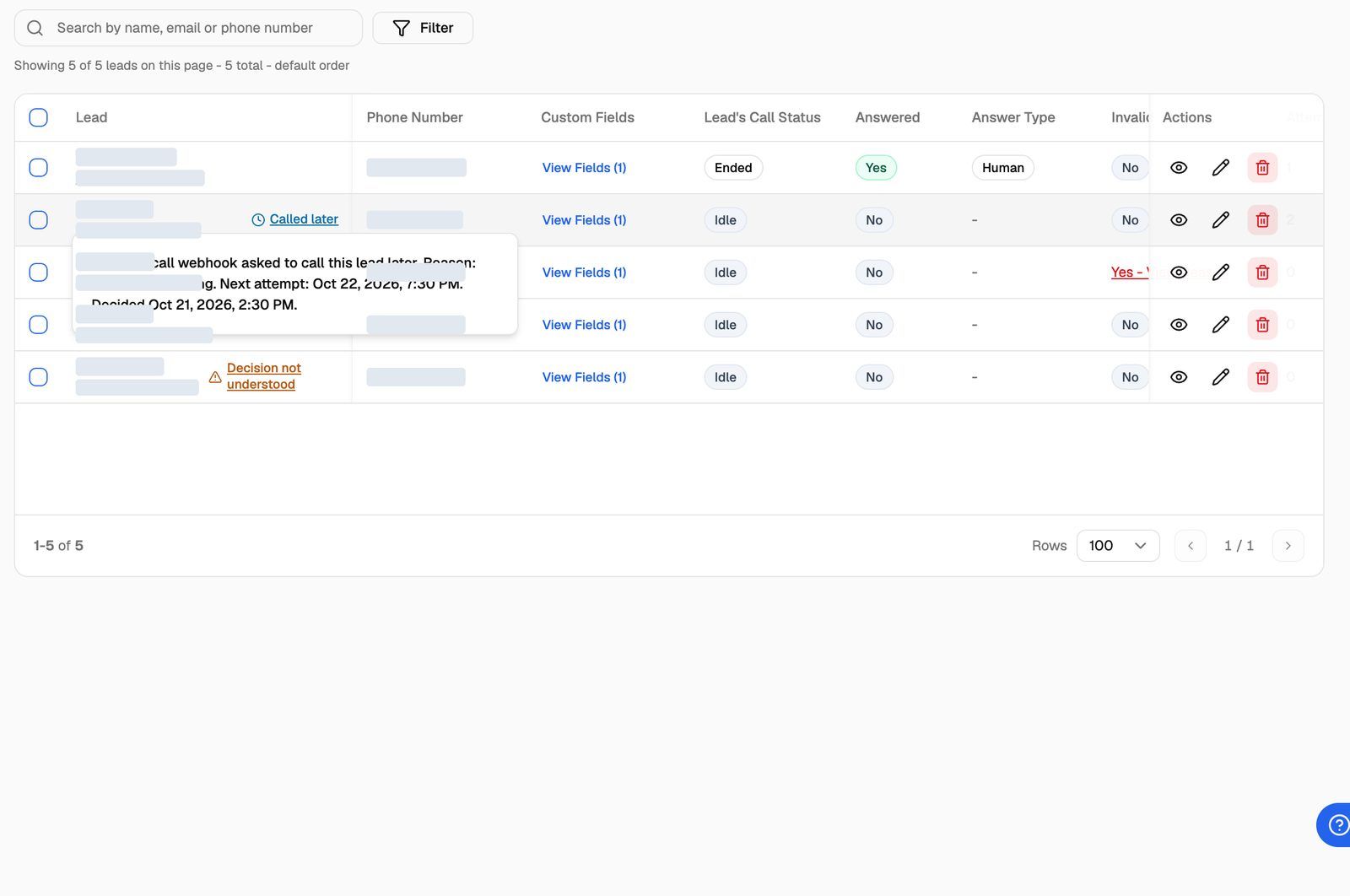
A reason that isn't text is dropped, but the decision still counts. A decision we can't read is treated as no answer (next section). On inbound calls, and on outbound campaigns set to Call anyway, the lead then shows Decision not understood with what was wrong. Under Call later, it shows Called later with the cause.
If your webhook doesn't answer
These all count as no answer: a timeout, an unreachable URL, a status other than 2xx, a body that isn't a JSON object, or a _decision we can't read.
Inbound calls: the agent answers as usual, without your context.
Outbound calls: the campaign's If the webhook doesn't answer setting decides. You'll find it under Pre-call context webhook in Settings → Webhooks and Emails, once a URL is filled in.
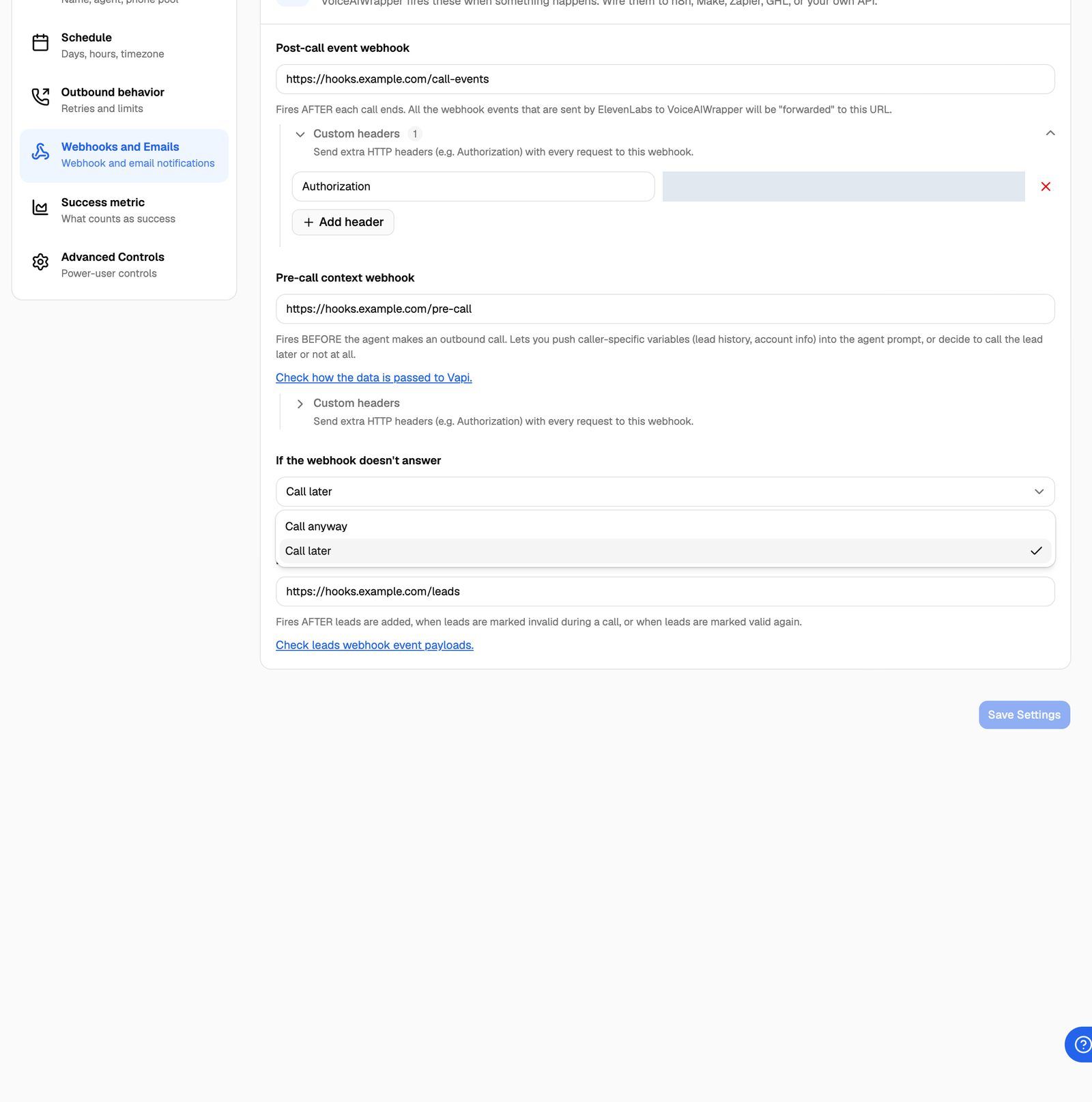
Choose Call later when no lead must be called without your check, for example a compliance lookup. Choose Call anyway when your context is nice to have but the call matters more.
With Call later, a webhook that stays down means no lead in the campaign gets called. While leads are being moved this way, the campaign's Health check shows Pre-call webhook not answering: "Leads are being moved to later because the pre-call webhook isn't answering. Check the webhook URL and that your endpoint is up." The warning covers the last 60 minutes, on active outbound campaigns set to Call later. See Campaign Health Check (Beta).
See what your webhook decided
Open the campaign's Leads tab. In the Lead column, a label next to the lead's name shows the latest decision. Hover over it for the details.
call and answer show no label. A lead stopped with do_not_call has its Do not call switch on. Hover the info icon next to the switch to see "Your pre-call webhook said not to call." and your reason. See Do-Not-Call: Sources and Reasons.
The do-not-call reason is also included in the leads event webhook (do_not_call_reason) and the leads export. On VAW Native, on plans that include API & webhook logs, every request and reply is also in API & Webhook Logs.
Frequently asked questions
Do I have to change my existing webhook?
Do I have to change my existing webhook?
No. A reply without _decision is used as call context, and the call goes ahead. Two things to check: on every engine except VAW Native, outbound requests carry _lead_metadata, _campaign_metadata and _attempt beside the engine's own fields, so allow them if your endpoint rejects unknown fields. And any 2xx status with a JSON object counts as an answer.
How do I call a "do not call" lead again?
How do I call a "do not call" lead again?
Turn its Do not call switch off in the Leads tab, or select leads and use Bulk Actions → Do Not Call → Do Not Call = False, then confirm Allow Calling. You can also send do_not_call: false through the API. For a pause that should lift on its own, have your webhook send call_later instead.
Does reject turn on do-not-call for the caller?
Does reject turn on do-not-call for the caller?
No. The caller's lead keeps its Do not call setting. Only the reason and the Rejected label are recorded.
Can I limit how many times a lead is asked?
Can I limit how many times a lead is asked?
The campaign's own attempt limits still apply to real calls. call_later and do_not_call don't use attempts, so a webhook that keeps sending call_later keeps postponing the lead. Use _attempt (or call.attempt on VAW Native) in the request to apply your own limit, and send do_not_call when you want to stop.
Related articles
Was this helpful?
Still need help? Share an idea