Route Inbound Calls with the Phone Number Webhook
Ask your own server about each caller before the agent answers: add caller details, send the call to another agent, or reject it.
Written By voiceaiwrapper
Last updated 26 days ago
With the phone number webhook, your own server gets a say in every inbound call before the agent picks up. Look the caller up in your CRM and pass their name and account details to the agent, send VIP callers to a different agent, or turn away numbers you've blocked. The caller hears ringing while your server answers.
You can set it up in about 15 minutes once your endpoint is ready.
Applies to: VAW Native Pods. A number that belongs to an inbound campaign follows the campaign instead, and this webhook isn't asked. Use the campaign's Pre-call context webhook there. See Pre-Call Context Webhook.
Before you start
- A VAW Native number with an agent assigned, showing Answering. If the number has no agent, or isn't set up yet, the caller gets your Pod's fallback and the webhook isn't asked. See Choose Who Answers a Number.
- An endpoint that answers fast. It must start with
https://, be reachable from the internet, and reply within 5 seconds. - Optional: your signing secret, to check each request came from VoiceAIWrapper. See Verify Webhook Signatures.
How it works
- A call comes in to your number.
- VoiceAIWrapper checks your credits, your free inbound lines and, if the agent belongs to a client, that the client's billing isn't paused. Calls turned away by any of these checks get a busy tone and never reach your server.
- VoiceAIWrapper sends one signed
POST(call.inbound) to your webhook while the caller hears ringing. - Your reply decides what happens: the assigned agent answers, another agent answers, or the call is rejected.
The request is sent once. It's never retried, because the caller is waiting.
Step 1: Add the webhook to the number
- In your VAW Native Pod, open Phone Numbers.
- Click the number's row, then open the Inbound webhook tab.
- Paste your endpoint into Webhook URL and click Save. You'll see "Number updated".
To turn the webhook off, click Remove next to the saved URL.
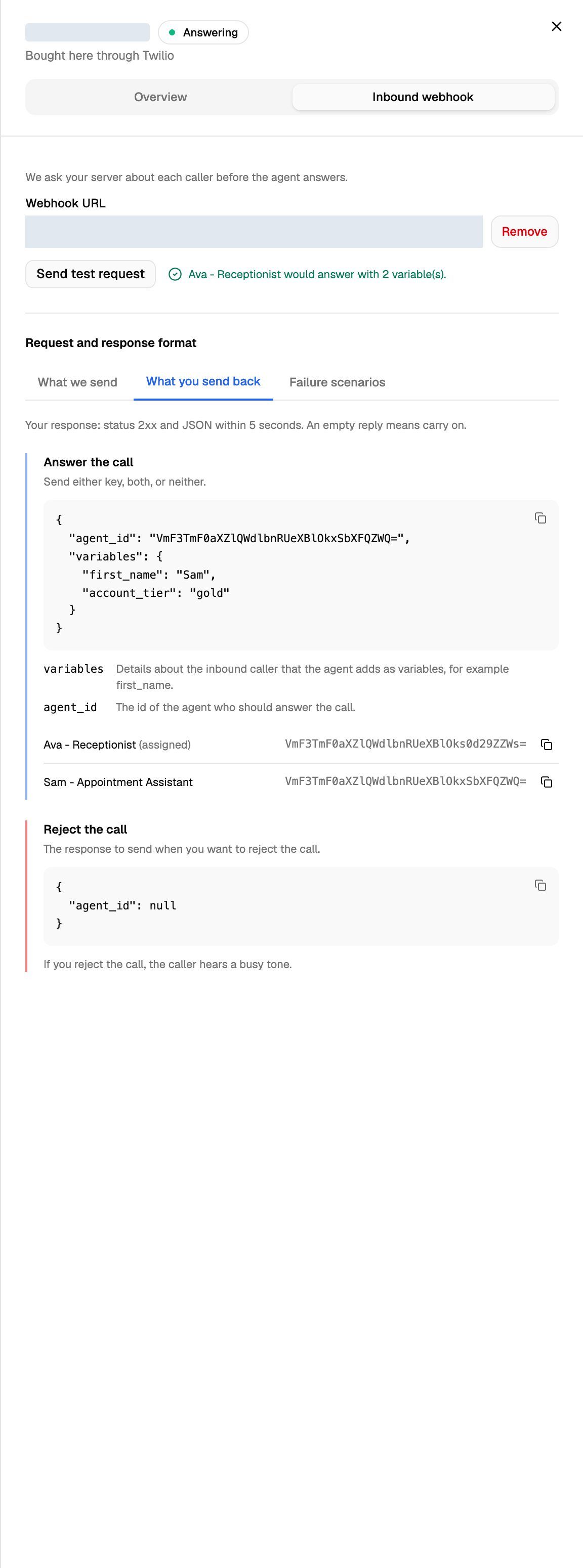
The Request and response format section below the field has three tabs with the exact format: What we send, What you send back and Failure scenarios.
Step 2: Read the request
Your server receives a JSON body like this:
{
  "id": "evt_5b0c1f…",
  "type": "call.inbound",
  "created_at": "2026-10-01T10:00:00Z",
  "version": "2026-10-01",
  "call": {
    "direction": "inbound",
    "call_type": "phone",
    "from_number": "+15555550100",
    "to_number": "+15555550199",
    "customer_number": "+15555550100",
    "phone_number_id": "…",
    "pod_id": "…",
    "telephony": { "provider": "twilio", "provider_call_id": "CA…" },
    "agent": { "id": "…", "name": "Assigned agent" }
  }
}
customer_number is the caller. agent is the agent assigned to the number. The same provider_call_id appears in this call's later events, so you can match them up. The request carries the signature headers but no custom headers.
Step 3: Send back a reply
Reply with a 2xx status and a JSON object. Every key is optional:
You can send variables and agent_id together:
{
  "agent_id": "<agent id>",
  "variables": {
    "first_name": "Sam",
    "account_tier": "gold"
  }
}
Getting agent IDs: the What you send back tab lists every agent in the Pod with its ID and a copy button. You can also use Copy agent ID on the agent's page. See Manage Agents: Avatar, Agent ID, Delete.
Rules for variables:
- Values should be text. Numbers and true/false are turned into text. Other values (lists, objects) are dropped.
- Names starting with
system.are reserved and dropped. - A call's variables are limited to 4 KB in total. Variables past that limit are dropped.
To use the values in your agent, see Use Call Data and Variables in Your Prompt.
If your server doesn't answer
A broken or slow server never blocks your calls. In each of these cases the assigned agent answers as normal:
Only an explicit "agent_id": null in a 2xx reply rejects a call.
Step 4: Test the webhook
Click Send test request on the Inbound webhook tab. VoiceAIWrapper sends a sample call.inbound to the URL in the field, from the made-up caller +15555550100 and marked "test": true. It then shows what your reply would do to a real call:
- "Agent name would answer with 2 variable(s)."
- "The reply would reject the call — the caller would hear busy."
- A reason followed by ": default agent would answer", for example "The response was not JSON: default agent would answer".
Nothing is dialled and nothing about the number changes.
Check what happened on a real call
Open the call in Call Logs and go to its Webhooks tab. The Inbound webhook section shows the Outcome:
- "Answered in 230 ms - chose the agent - 2 variables": your reply was used.
- "No usable answer - the assigned agent answered": the webhook timed out, failed or sent something unusable. Details says why.
- "Rejected the call (agent_id was null) - the caller heard busy".
Rejected calls appear in Call Logs with the end reason Rejected by inbound webhook. Every request and reply is also in API & Webhook Logs. See API & Webhook Logs.
Troubleshooting
The webhook is never called.
The webhook is never called.
Check that:
- The URL is saved (you see Remove next to it, not Save).
- The number has an agent and shows Answering.
- The number doesn't belong to an inbound campaign. If it does, the number's settings say "This number belongs to campaign. … The number's own agent and inbound webhook are not used."
- You have enough AI credits and free inbound lines, and the agent's client (if any) doesn't have paused billing. Calls refused for any of these never reach your server.
My variables don't show up in the call.
My variables don't show up in the call.
Open the call's Webhooks tab. If the outcome is "No usable answer", your server was too slow or didn't return a 2xx JSON object. Reply within 5 seconds. If the reply was used but some values are missing, check Details for dropped variables: lists, objects and system. names are dropped.
The call went to the assigned agent instead of the one I chose.
The call went to the assigned agent instead of the one I chose.
The agent_id didn't match an agent in the same Pod. Copy the ID from the What you send back tab and try Send test request again.
Related articles
Was this helpful?
Still need help? Share an idea