One-Time Charges and Payment Requests
Charge a Stripe-billed client a single fee, such as a setup fee, by sending a payment request they pay by card in their portal.
Written By voiceaiwrapper
Last updated 26 days ago
Sometimes you need to charge a client once rather than every month: a setup fee, an extra build, a custom report. With Stripe billing you do this in two parts. First you create a one-time charge, a reusable template with a title and amount. Then you send it to a client as a payment request, and the client pays it by card in their portal.
A one-time charge doesn't bill anyone by itself. Only a payment request does.
Before you start
- Stripe connected, with tax settings set up in Stripe. Until tax settings are configured, you can't create one-time charges. See Connect Your Stripe Account and Tax Settings for Client Billing.
- A client on Stripe billing. Payment requests on this page are for Stripe-billed clients. For clients on External billing, see External Billing: Plans, Usage Packs and Payment Requests.
Step 1: Create a one-time charge
- In the sidebar, open Billing Configuration → Stripe.
- Open the One Time Charges tab and click Add One-Time Charge.
- Fill in the charge. The Preview at the bottom shows what the client will see.
- Click Create charge.
You can reuse the same charge for as many clients as you like. The Requests sent column on the One Time Charges tab counts how many requests you've sent from it. Open a charge to see its Payment history across all clients.
Edit One-Time Charge changes the charge for future payment requests only. Requests you've already sent keep their original title and amount.
Step 2: Request the payment from a client
- Open Client Accounts and click the client.
- Open the Billing tab, then One Time Payments.
- Click Request Payment.
- In Select One Time Charge, pick the charge. The Template Preview shows the Client Title, Description and Amount.
- Click Request Payment.
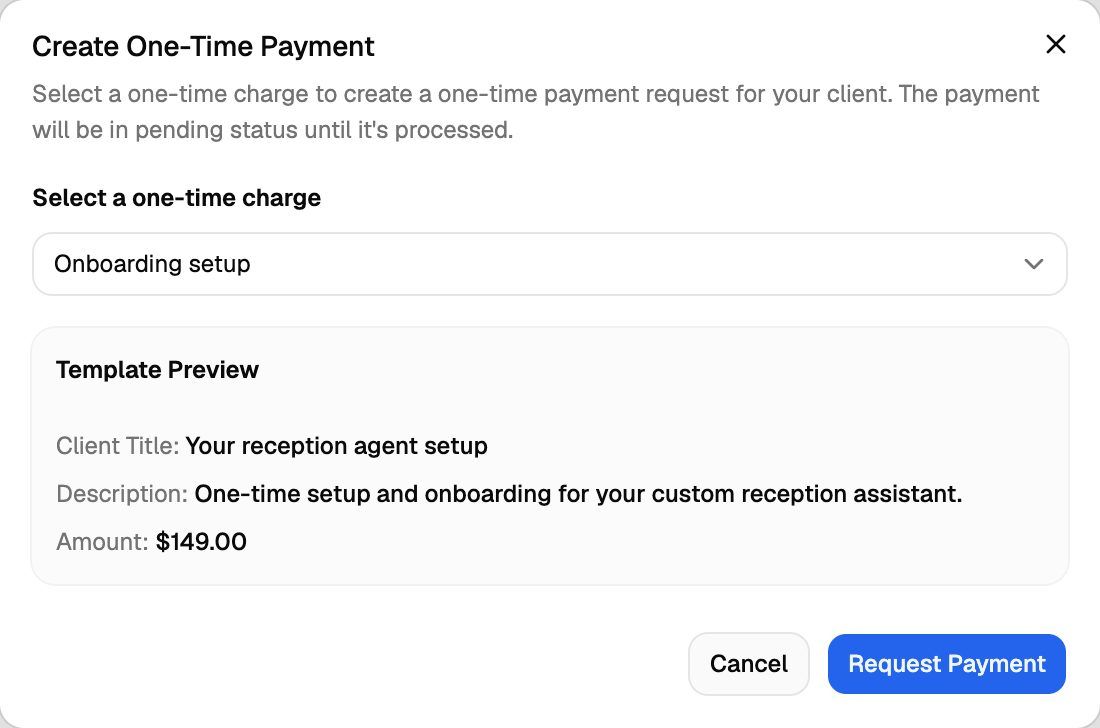
The request appears on the tab as a card with the status Pending.
Sending the request doesn't charge the client. They pay it themselves in the portal. No email goes out when you create the request, so let the client know it's waiting for them.
What the client sees
The next time the client opens their portal, a You have a payment request card appears with the title, description and amount. The client can:
- Click Pay Now to pay by card through Stripe checkout.
- Click Remind Me Later to hide the card. It comes back the next time they load the portal.
While a request is unpaid, the portal header also shows a payment requests button with the count, for example "1 Payment Request", so the client can find it again. The portal stays usable while a request is pending.
Track the payment
Each request on the client's One Time Payments tab shows a status:
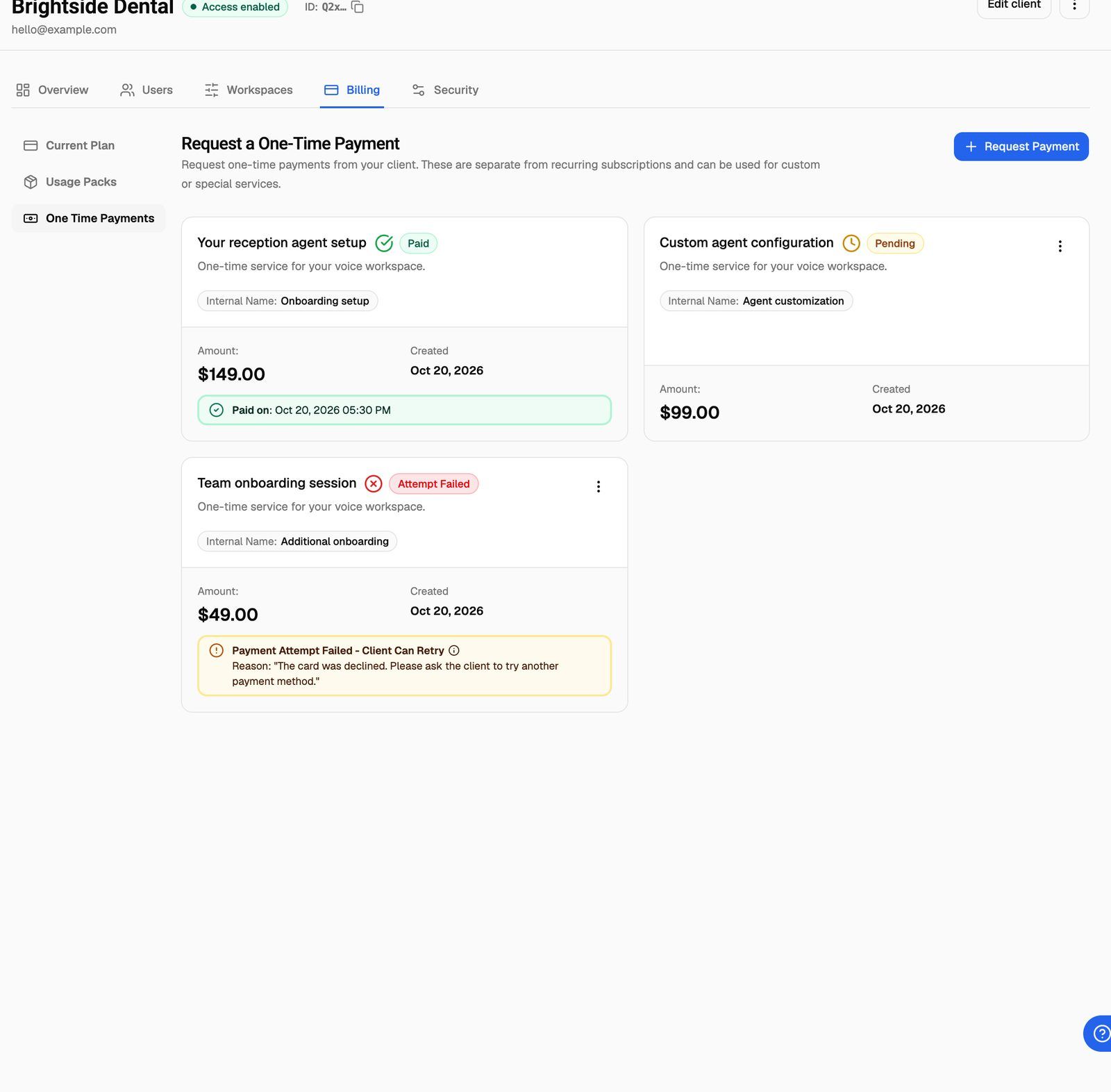
The confirmation and failure emails go out through your branded client emails. They're only sent if you've connected SendGrid and the matching templates are active. See Send Branded Emails to Clients with SendGrid and Customize Email Templates and Check Delivery Logs.
Delete a request or a charge
To delete a request, click the ⋮ menu on its card and choose Delete. You can only delete requests that are Pending or Attempt Failed.
To delete a one-time charge, use Delete One-Time Charge on the One Time Charges tab. This doesn't delete payment requests you've already sent from it.
Deleting a payment request or a one-time charge can't be undone. A deleted request disappears from the client's portal, so check you've picked the right one.
Frequently asked questions
Can I send the same charge to several clients?
Can I send the same charge to several clients?
Yes. Open each client's Billing → One Time Payments tab and request it from the same one-time charge. Each request is tracked separately.
Can I change the amount of a request I already sent?
Can I change the amount of a request I already sent?
No. Delete the request (while it's Pending or Attempt Failed), edit the one-time charge or create a new one, then send a new request.
Does a one-time payment add minutes?
Does a one-time payment add minutes?
No. A one-time payment is a fee only. To sell extra minutes, use usage packs. See Usage Packs and Auto-Recharge for Clients.
Related articles
Was this helpful?
Still need help? Share an idea