Pre-Call Context Webhook
Ask your own server about each lead or caller just before a campaign call, and pass what it returns to the agent as variables.
Written By voiceaiwrapper
Last updated 26 days ago
The pre-call context webhook asks your server about a lead right before the agent calls, or about a caller before the agent answers. Your server replies with details from your CRM or database, such as the customer's plan or last order, and the agent can use them in its prompt. A personalised opening ("I see you're on the Gold plan") comes from here.
Your reply can also decide whether the call happens at all. That's covered in Pre-Call Decisions: Call Later, Do Not Call and Reject.
Where it's available
Before you start
- A campaign in Draft or Paused. Settings are locked while a campaign is Active or Scheduled.
- An endpoint that accepts a POST with a JSON body and answers within the time above. On VAW Native it must start with
https://. - Variables in your agent's prompt for the details you'll send, such as
{{plan}}. See Use Call Data and Variables in Your Prompt.
Set it up
- Open the campaign and go to the Settings tab → Webhooks and Emails.
- Paste your URL into Pre-call context webhook.
- Optional: open Custom headers under the field and add a header your endpoint checks, such as
Authorization. See Add Custom Headers to Webhooks. - Outbound campaigns only: choose what happens when your webhook fails in If the webhook doesn't answer. This setting appears once a URL is filled in. See Pre-Call Decisions: Call Later, Do Not Call and Reject.
- Click Save Settings.
The link under the field opens a dialog with sample requests and replies for your campaign's engine. On VAW Native it reads See what this webhook receives and what it can send back. On other engines it reads Check how the data is passed to followed by the engine's name.
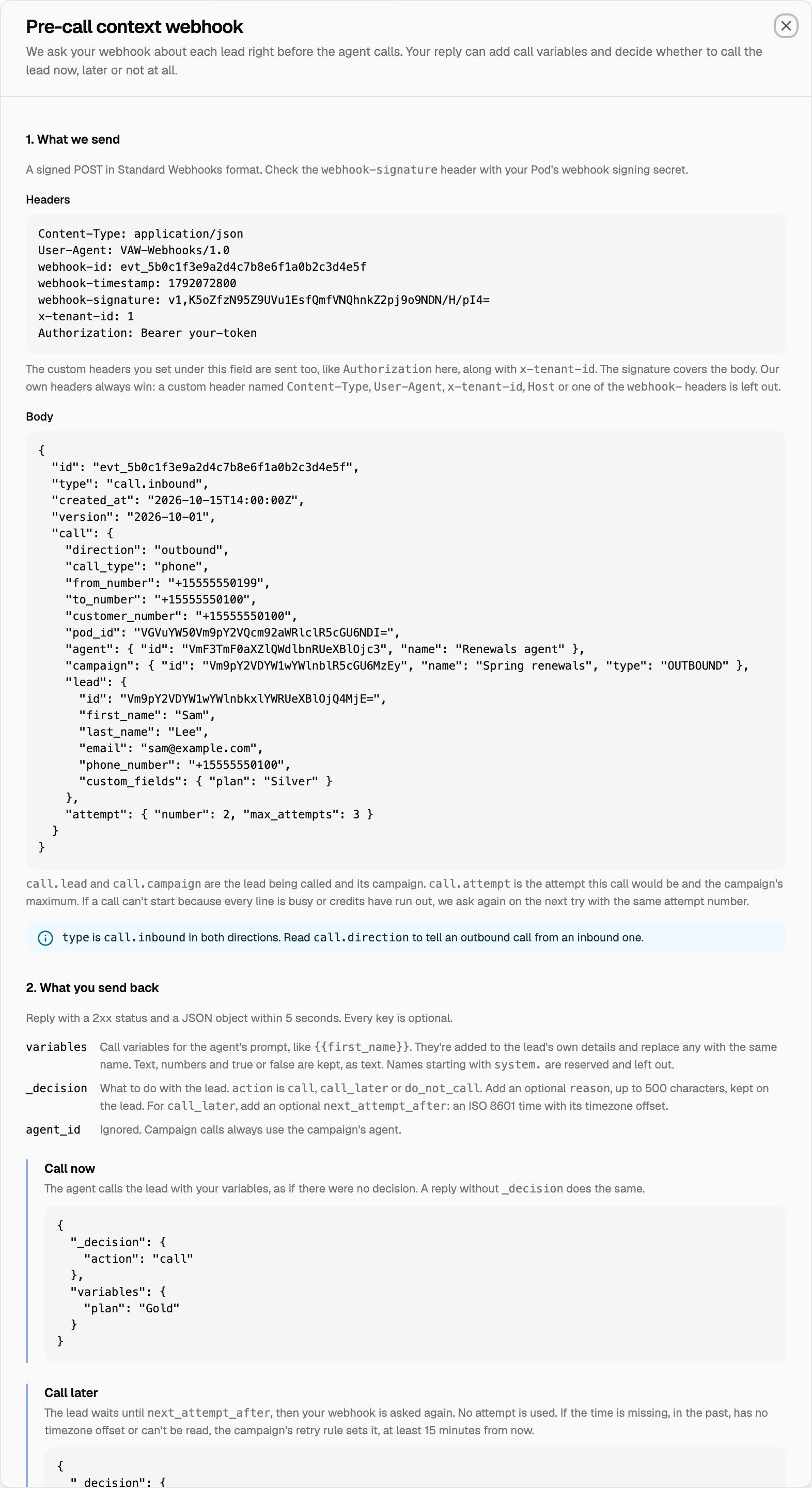
What your webhook receives
VAW Native
A signed POST in Standard Webhooks format. Check the webhook-signature header with your Pod's Webhook signing secret (see Verify Webhook Signatures). The request also carries your custom headers and an x-tenant-id header. Our own headers always win: a custom header named Content-Type, User-Agent, x-tenant-id, Host or one of the webhook- headers is left out.
The body looks like this for an outbound call:
{
  "id": "evt_5b0c1f3e9a2d4c7b8e6f1a0b2c3d4e5f",
  "type": "call.inbound",
  "created_at": "2026-10-15T14:00:00Z",
  "version": "2026-10-01",
  "call": {
    "direction": "outbound",
    "call_type": "phone",
    "from_number": "+15555550199",
    "to_number": "+15555550100",
    "customer_number": "+15555550100",
    "pod_id": "VGVuYW50Vm9pY2VQcm92aWRlclR5cGU6NDI=",
    "agent": { "id": "VmF3TmF0aXZlQWdlbnRUeXBlOjc3", "name": "Renewals agent" },
    "campaign": { "id": "Vm9pY2VDYW1wYWlnblR5cGU6MzEy", "name": "Spring renewals", "type": "OUTBOUND" },
    "lead": {
      "id": "Vm9pY2VDYW1wYWlnbkxlYWRUeXBlOjQ4MjE=",
      "first_name": "Sam",
      "last_name": "Lee",
      "email": "sam@example.com",
      "phone_number": "+15555550100",
      "custom_fields": { "plan": "Silver" }
    },
    "attempt": { "number": 2, "max_attempts": 3 }
  }
}
typeiscall.inboundin both directions. Readcall.directionto tell an outbound call from an inbound one.call.attempt(outbound only) is the attempt this call would be and the campaign's maximum. If a call can't start because every line is busy or credits have run out, we ask again on the next try with the same attempt number.- On inbound calls,
call.leadis the caller's lead, found or created before we ask.
Vapi, Retell AI, ElevenLabs, Bolna and Ultravox: outbound
A POST with the call request VoiceAIWrapper is about to send to the engine, plus three objects of our own:
_lead_metadata: the lead being called (name, email, phone number, custom fields, attempts made)._campaign_metadata: the campaign, your organization and the Pod. These are the same shapes the post-call event webhook uses; see Post-Call Event Webhook._attempt:number(the attempt this call would be) andmax_attempts(the campaign's maximum).
The headers are Content-Type, an x-tenant-id header that identifies your organization, and your custom headers.
Vapi and Retell AI: inbound
A POST with the engine's own inbound-call request, as the engine sent it: Vapi's assistant-request message or Retell's call_inbound event. Both include the caller's number. The caller's lead is found or created in the campaign before we ask. The headers are the same as for outbound.
What to send back
Reply with a 2xx status and a JSON object. Every key is optional.
For legacy Bolna and Ultravox Pods, use the reply format shown in the campaign's instructions dialog.
How the reply is used:
- VAW Native: your
variablesare added to the lead's own details and replace any with the same name. Text, numbers and true or false are kept, as text. Names starting withsystem.are reserved and left out. Anagent_idis ignored: campaign calls always use the campaign's agent. - Vapi and Retell AI, outbound: your reply replaces the lead details we'd otherwise send (
first_name,last_name,phone_number,emailand custom fields). The fields that identify the call (the agent, the phone numbers and the call's metadata) are always kept. So send back every variable your prompt uses, including the ones that come from the lead. - Vapi and Retell AI, inbound: your keys are added to the answer we send the engine, beside the agent we choose.
- Every engine: keys that start with an underscore belong to VoiceAIWrapper. We remove them, including
_decision, before anything reaches the engine.
Keep your endpoint fast. On VAW Native and on every inbound call you have 5 seconds, and on inbound calls the caller hears ringing while we wait.
If your webhook doesn't answer
A timeout, an unreachable URL, a non-2xx status, a body that isn't a JSON object, or a _decision we can't read all count as no answer.
- Outbound: the campaign's If the webhook doesn't answer setting decides. Call anyway (the default) calls the lead without your context. Call later moves the lead to a later attempt.
- Inbound: the agent answers as usual, without your context.
Details, and how to see what happened on each lead, are in Pre-Call Decisions: Call Later, Do Not Call and Reject.
On VAW Native, a number that belongs to an inbound campaign follows the campaign while the campaign is scheduled, active or paused: the campaign's pre-call context webhook is asked, not the number's own Inbound webhook. For numbers outside campaigns, see Route Inbound Calls with the Phone Number Webhook.
Troubleshooting
The agent doesn't use the details I sent.
The agent doesn't use the details I sent.
Check that:
- The keys match the table above for your engine, and the variable names match the ones in your prompt exactly.
- On Vapi and Retell AI outbound calls, your reply includes every variable the prompt needs, including the lead's own details. Your reply replaces them.
- Your endpoint answered in time with a 2xx status and a JSON object. A late or broken reply is ignored.
On VAW Native, on plans that include API & webhook logs, every request and reply is in API & Webhook Logs, with a note when something was left out. See API & Webhook Logs.
I get "Looks like you are trying to add our webhook URL."
I get "Looks like you are trying to add our webhook URL."
You pasted a VoiceAIWrapper address, which would make the webhook call itself. Use your own endpoint's URL.
My VAW Native webhook is never reached.
My VAW Native webhook is never reached.
The URL must start with https:// and point to a public address. Private addresses and localhost are blocked, and redirects aren't followed.
ElevenLabs leads are marked invalid with "Missing placeholders".
ElevenLabs leads are marked invalid with "Missing placeholders".
On ElevenLabs, every dynamic variable your agent uses must exist on the lead (its name, phone number, email or custom fields) before the webhook is asked. Add the missing values as custom fields on the lead, or remove the placeholder from the agent.
Related articles
Was this helpful?
Still need help? Share an idea