Define a Campaign Success Metric
Tell a campaign which call outcomes count as a success, so its Overview shows Call Success % and Lead Success %.
Written By voiceaiwrapper
Last updated 26 days ago
A success metric tells a campaign what a good call looks like, such as a booked appointment or an interested lead. Once it's on, the campaign's Overview tab shows what share of answered calls, and of answered leads, ended in success. You decide what counts by naming the outcome values your engine reports.
Applies to: campaigns on VAW Native, Vapi, Retell AI, ElevenLabs and Bolna. Ultravox campaigns don't have a success metric. For Inbound Widget campaigns, the wizard skips this step.
Before you start
- A campaign in Draft, Paused or Ended, or one you're creating in the wizard. Settings are locked while a campaign is Active or Scheduled. See Campaign Statuses and the Campaign Switch.
- An agent that reports call success. On VAW Native this is post-call analysis. On other engines it's a setting in your provider account (see the table below).
Turn on the success metric
You can do this in the Success metric step of the Campaign Creation Wizard, or later:
- Open your Pod (an engine or provider connection), select Campaigns, and click the campaign.
- Open the Settings tab and select Success metric ("What counts as success").
- Turn on Enable Call Success Metric.
- On engines other than VAW Native, fill in the extra field if there is one, then add your Success Values: type a value and press Enter. Repeat for each value.
- Click Save Settings.
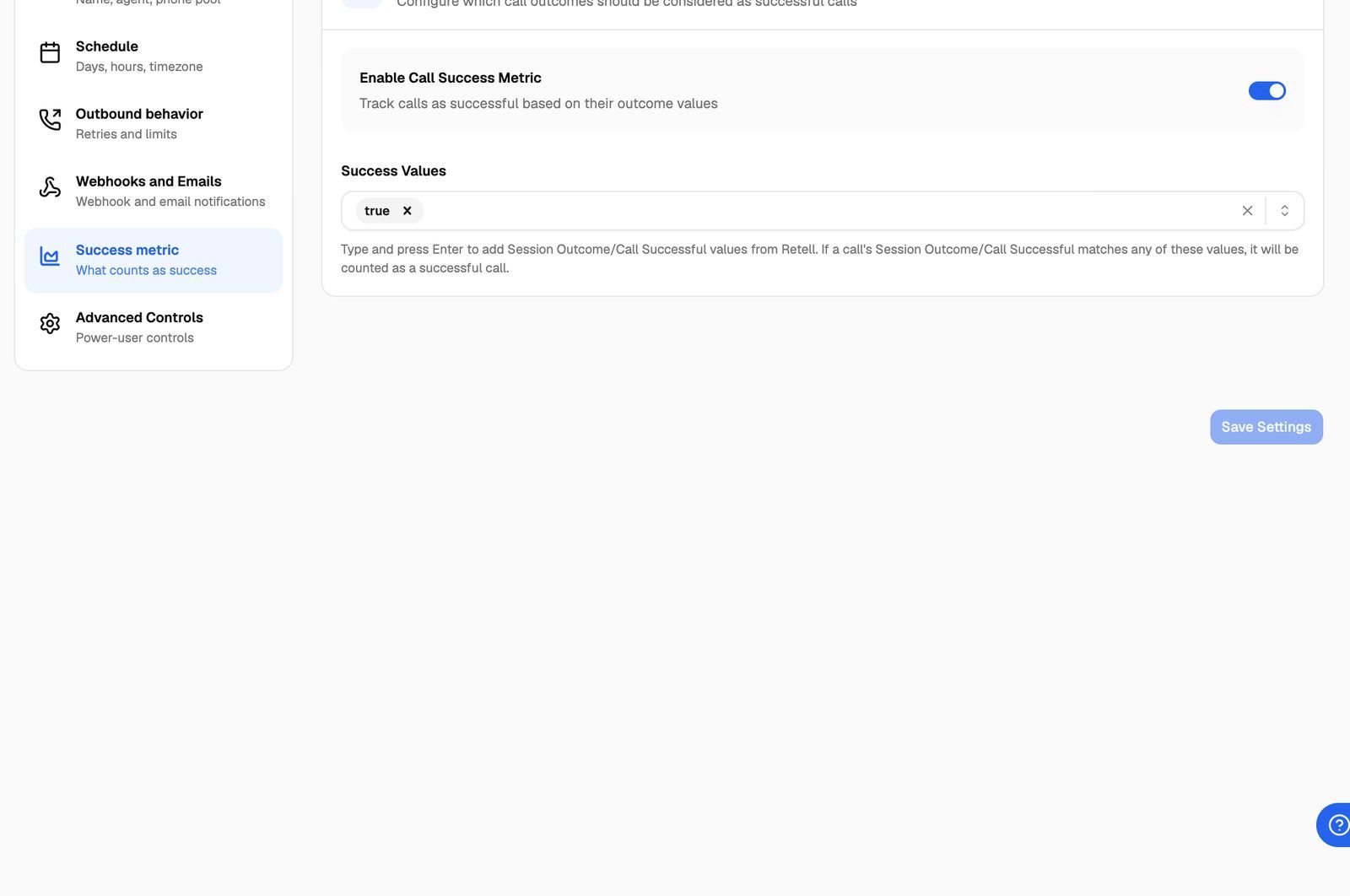
A call counts as successful when the value your engine reports matches any one of your success values. Matching ignores upper and lower case.
What to enter for each engine
The value has to match exactly what the provider sends, apart from case. Some examples:
- Retell AI reports call success as true or false, so
trueis usually the value to add. - ElevenLabs reports values such as
success,failureandunknown. Addsuccess. - Vapi reports whatever your assistant's success evaluation rubric produces, for example
trueor a score.
If you aren't sure, open the campaign's Calls tab and look at the value your provider sent for recent calls, then add that. The column is Success Evaluation on Vapi, Call Success on Retell AI and ElevenLabs, and Success Metric on Bolna.
VAW Native: success comes from post-call analysis
On VAW Native you only turn the metric on. The agent's post-call analysis gives every answered call a verdict of success, failure or unknown, and calls with a success verdict count. The agent needs Analyze calls and Call success turned on. You decide what success means for that agent there, for example with a checklist of what must happen on the call. See Define What Counts as a Successful Call.
Where you see the results
Open the campaign's Overview tab. The Next call info & success outcome row shows two cards:
Each card lists your values under Success outcome includes: and shows the raw numbers underneath, for example "12 of 40 answered calls". Only answered calls count. Calls that never connected aren't counted at all.
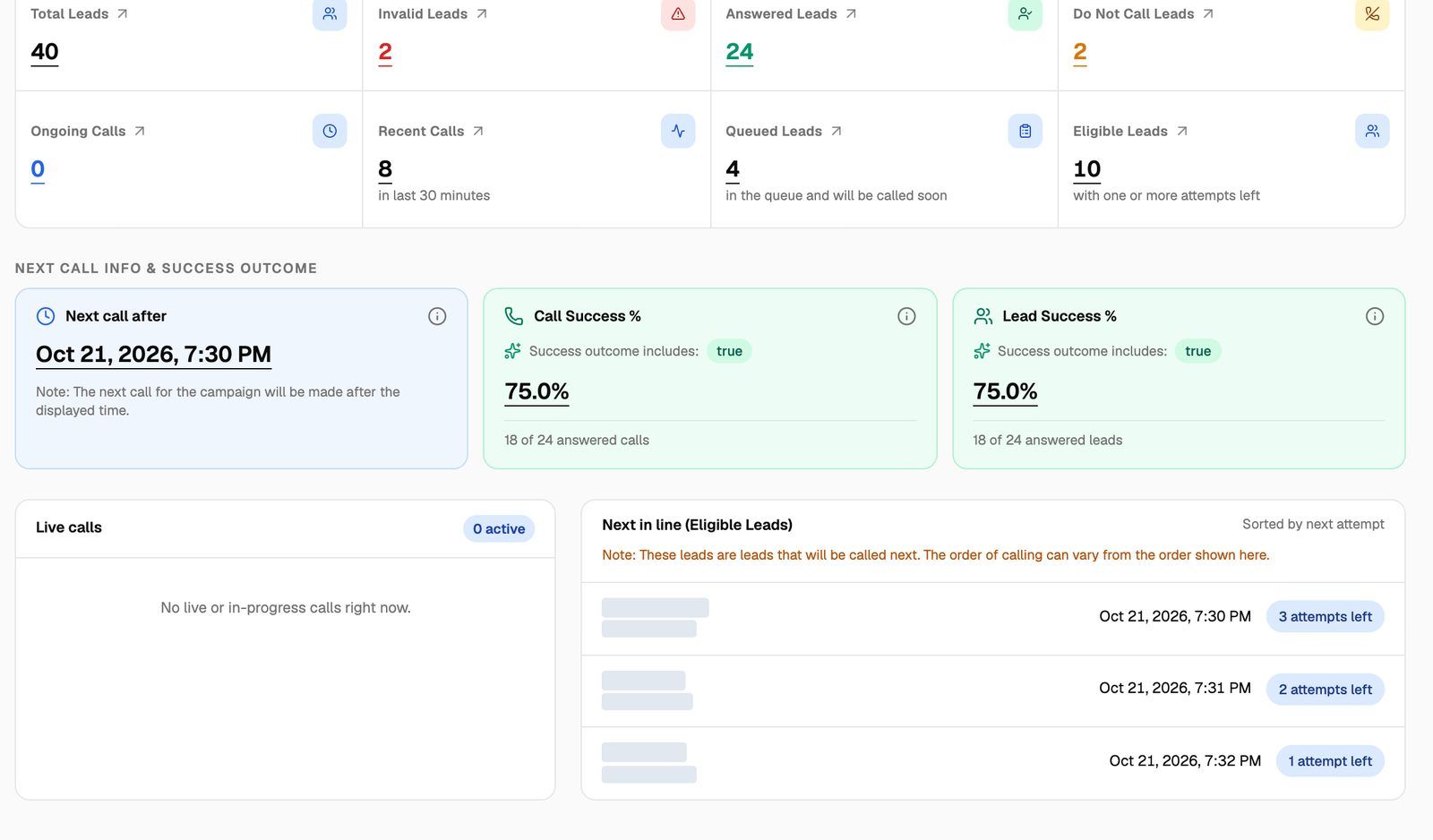
The percentages are worked out from all of the campaign's calls each time the Overview loads. If you change your success values, past calls are counted again under the new values.
Troubleshooting
I see "At least one success value is required".
I see "At least one success value is required".
When Enable Call Success Metric is on, you need at least one value. Type it in Success Values and press Enter so it turns into a chip before you save. On VAW Native the value is added for you.
The Overview says "Enable success metric in settings to see insights."
The Overview says "Enable success metric in settings to see insights."
The metric is off for this campaign. Turn on Enable Call Success Metric on the Settings tab and save. You'll need to pause an Active campaign first.
Call Success % stays at 0%, but I know some calls went well.
Call Success % stays at 0%, but I know some calls went well.
Your values don't match what the provider sends. Common causes:
- On Retell AI, the value is
true, not "yes" or "successful". - On Vapi, the success evaluation rubric isn't set up on the assistant, or the structured output name has a typo.
- On ElevenLabs, the agent has no evaluation criteria in its Analysis tab, so there's no success value to match.
- On VAW Native, Analyze calls or Call success is off for the agent.
Find a call you know went well on the Calls tab, compare its Success Evaluation or Call Success value with your list, and adjust.
Related articles
Was this helpful?
Still need help? Share an idea