Buy a New Phone Number
Search Twilio for a local, toll-free or mobile number and buy it from VoiceAIWrapper. Twilio bills it to your own account.
Written By voiceaiwrapper
Last updated 26 days ago
You can buy a new phone number for your VAW Native agents without leaving VoiceAIWrapper. You search Twilio's available numbers, pick one, choose which agent answers it, and it's ready to take calls.
The number is bought in your own Twilio account. Twilio bills it to you every month at its published rate. VoiceAIWrapper adds nothing to that charge and never sees your Twilio bill.
Applies to: VAW Native Pods. For Vapi, Retell AI and ElevenLabs, see Phone Numbers on Vapi, Retell, ElevenLabs and Bolna.
Before you start
You'll need:
- A connected and verified Twilio account. See Connect Your Twilio Account to VAW Native.
- Funds or a payment method in Twilio. The purchase is charged to your Twilio account.
- An agent to answer the number (optional). You can add the number with no agent and connect one later.
Buying a number costs real money. Twilio starts billing the number monthly from the moment you buy it, until you release it. Check Twilio's pricing for the country and number type before you buy.
What you can buy
The search only shows numbers that can take voice calls, and each search returns up to 20 numbers.
Need a number in another country? Buy it in your Twilio Console, then bring it in. See Use a Phone Number You Already Own.
Step 1: Search for a number
- In your VAW Native Pod, open Phone Numbers and click Add a number.
- Open the Buy a new number tab.
- If more than one of your Twilio connections has passed its check, choose one under Connection. That's the account Twilio charges.
- Choose a Country and a Type.
- For the US or Canada, you can type an Area code, such as
503. Leave it empty to search the whole country. - Click Search.
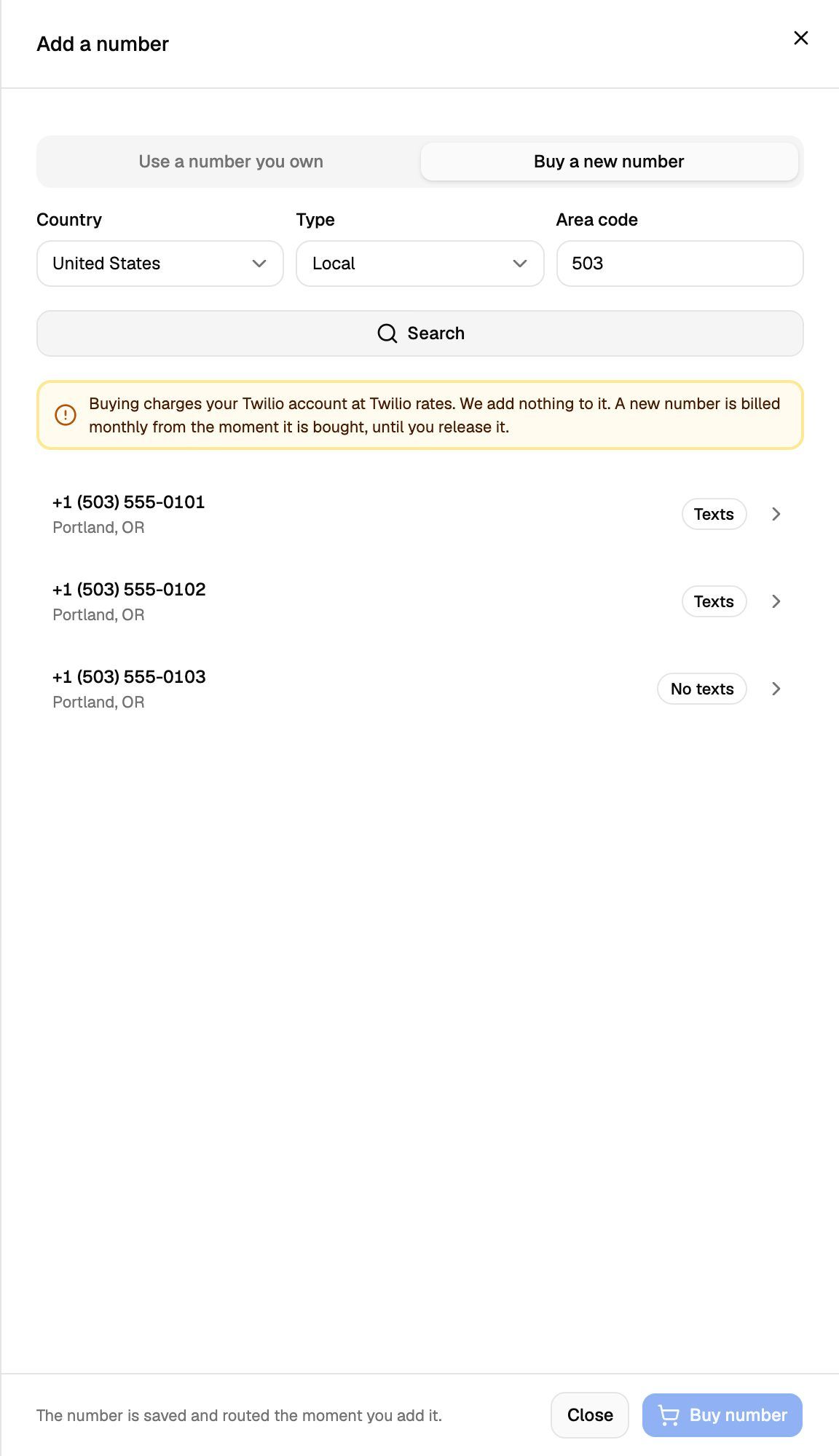
Each result shows the number, its area (city and region, when Twilio provides them) and whether it can send text messages:
- Texts: the number can send SMS.
- No texts: the number can't send SMS. It still works for calls.
If you want your agent to text callers, pick a number marked Texts. See SMS Capability and Caller ID.
If you change the country, type or area code, click Search again before you pick. Old results are cleared because those numbers may already be sold.
Step 2: Confirm and buy
- Click the number you want. A Before you buy box names the Twilio connection that will be charged.
- Under Answers as, choose the agent that should answer the number, or leave No agent yet.
- Under Phone number's nickname, type a name you'll recognise, such as
Main lineorAfter hours(optional). - Click Buy number.
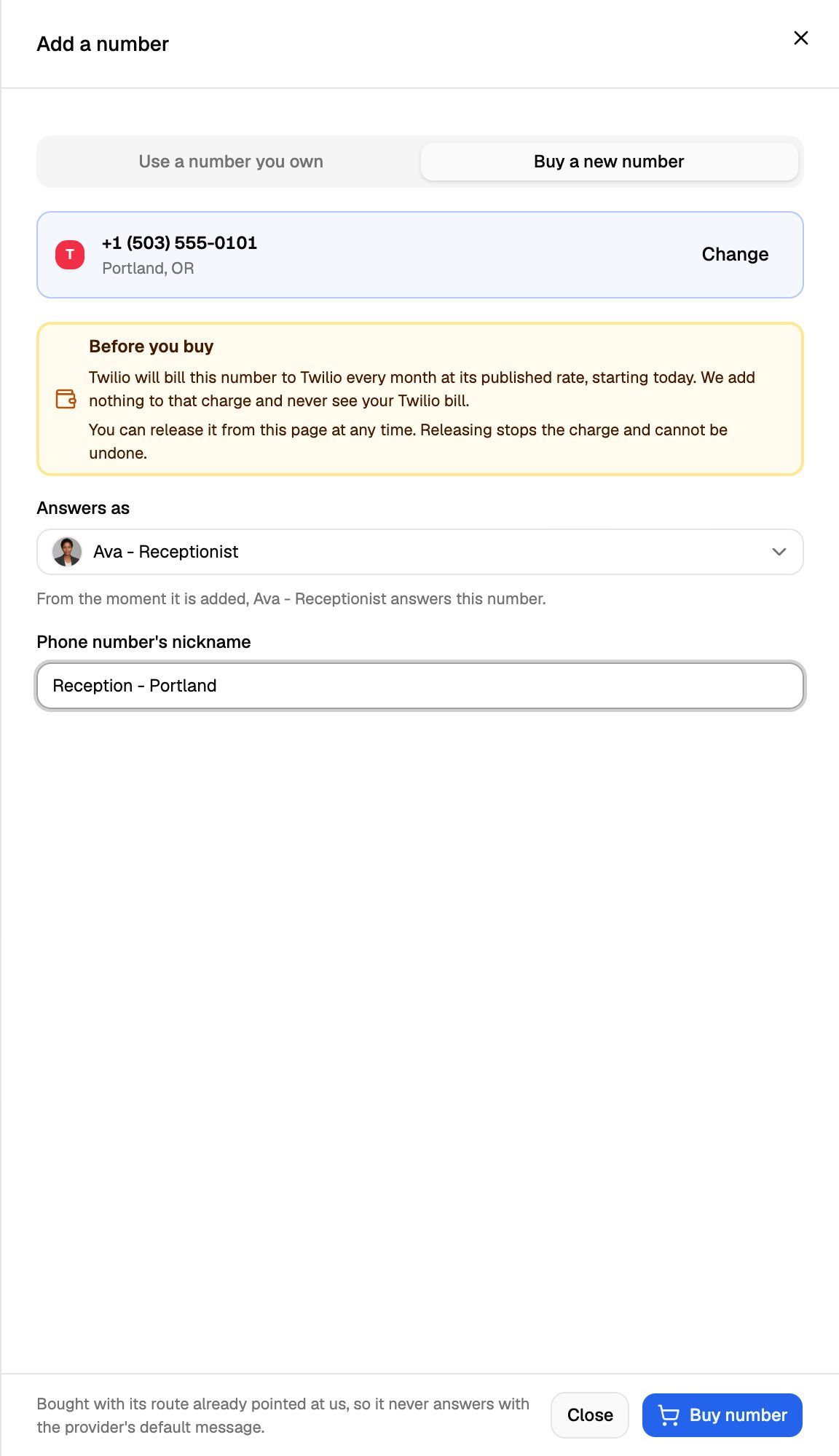
Picked the wrong one? Click Change to go back to the results.
When the purchase goes through, you'll see "number purchased", and the number's settings open. The number is bought with its call routing already pointing at VoiceAIWrapper, so it never answers with Twilio's default message.
Next:
- Check that the number shows Answering. See Choose Who Answers a Number.
- Call the number from your phone to hear your agent pick up.
If you left No agent yet, callers hear what your Pod plays for numbers without an agent: a message or a busy tone. See Choose Who Answers a Number.
Stop paying for a number
You can release a number you bought here from its settings. Releasing hands it back to Twilio and stops the monthly charge. It can't be undone. See Disconnect or Release a Number.
Troubleshooting
"No numbers are available matching that search."
"No numbers are available matching that search."
Twilio has no voice-capable numbers matching that country, type and area code right now. Try another area code, leave the area code empty, or choose a different type.
I can't find Mobile for the US or Canada.
I can't find Mobile for the US or Canada.
Twilio doesn't list mobile numbers separately in the US and Canada, so the option isn't offered there. Choose Local instead.
"That phone number is not available for purchase any more."
"That phone number is not available for purchase any more."
Someone else bought the number between your search and your purchase. Click Change, search again and pick another number.
Another error from Twilio when I click Buy number.
Another error from Twilio when I click Buy number.
Twilio refused the purchase, and the message is Twilio's own reason. It often points to something in your Twilio account, such as its balance or details Twilio needs from you before it sells numbers in that country. Fix it in your Twilio Console, then search and buy again. The number isn't bought when Twilio refuses.
"… was purchased, but …" and the number shows "Needs attention".
"… was purchased, but …" and the number shows "Needs attention".
The number was bought and is in your Twilio account, but its route to the agent couldn't be set up. Don't release it: Twilio has already charged for it. Open the number and click Retry setup. See Choose Who Answers a Number.
"… was purchased in Twilio but could not be saved here."
"… was purchased in Twilio but could not be saved here."
Twilio sold you the number, but VoiceAIWrapper couldn't record it. The number is in your Twilio account. Bring it in with Use a number you own, or release it in your Twilio Console if you don't want it. See Use a Phone Number You Already Own.
"That Twilio connection is not verified. Reconnect it and try again."
"That Twilio connection is not verified. Reconnect it and try again."
The connection failed its last check. Open Connected telephony accounts, then use Re-check or Update credentials. See Connect Your Twilio Account to VAW Native.
Related articles
Was this helpful?
Still need help? Share an idea