Edit Prompts and Greetings for Provider Agents
Change a Vapi, Retell AI or ElevenLabs agent's greeting and system prompt from VoiceAIWrapper, test it, and know what to change in the provider instead.
Written By voiceaiwrapper
Last updated 26 days ago
You can change what a provider agent says without leaving VoiceAIWrapper. The Edit prompt sheet lets you update the greeting and the system prompt of any Vapi, Retell AI or ElevenLabs agent, then run a test call to hear the result. Your changes are saved straight to the agent in your provider account, so the provider dashboard and every campaign that uses the agent pick them up.
Use it for quick fixes, like a new offer, changed opening hours or a better opening line. Deeper changes still happen in the provider's own dashboard.
Applies to: BYOK Pods on Vapi, Retell AI and ElevenLabs. For agents on VAW Native, see Write the Prompt and Greeting.
Before you start
- Select the Pod in the Pod selector.
- The agent must already exist in your provider account. See How Provider Agents Appear in VoiceAIWrapper.
Open the Edit prompt sheet
- In the sidebar, open Assistants (Vapi) or Agents (Retell AI, ElevenLabs).
- Find the agent and click Edit prompt in its row. Clicking anywhere else on the row opens the same sheet.
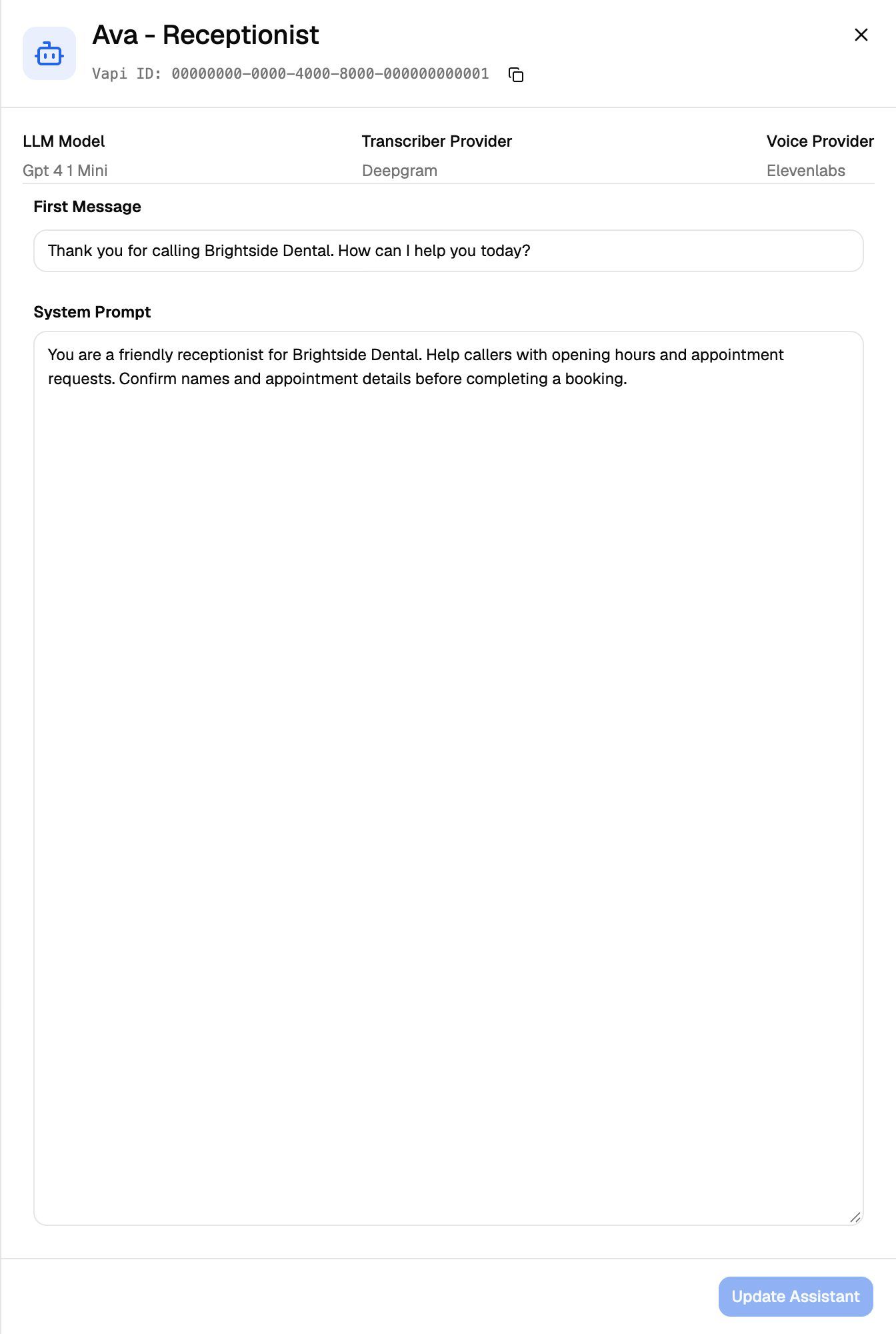
The sheet shows the agent's name and ID at the top, with a button to copy the ID.
What you can edit on each provider
The save button stays greyed out until you change something.
Vapi
The sheet also shows the assistant's LLM Model, Transcriber Provider and Voice Provider. These are for reference only. Change them in Vapi.
Retell AI: choose who speaks first
Welcome Message Type decides how the call opens:
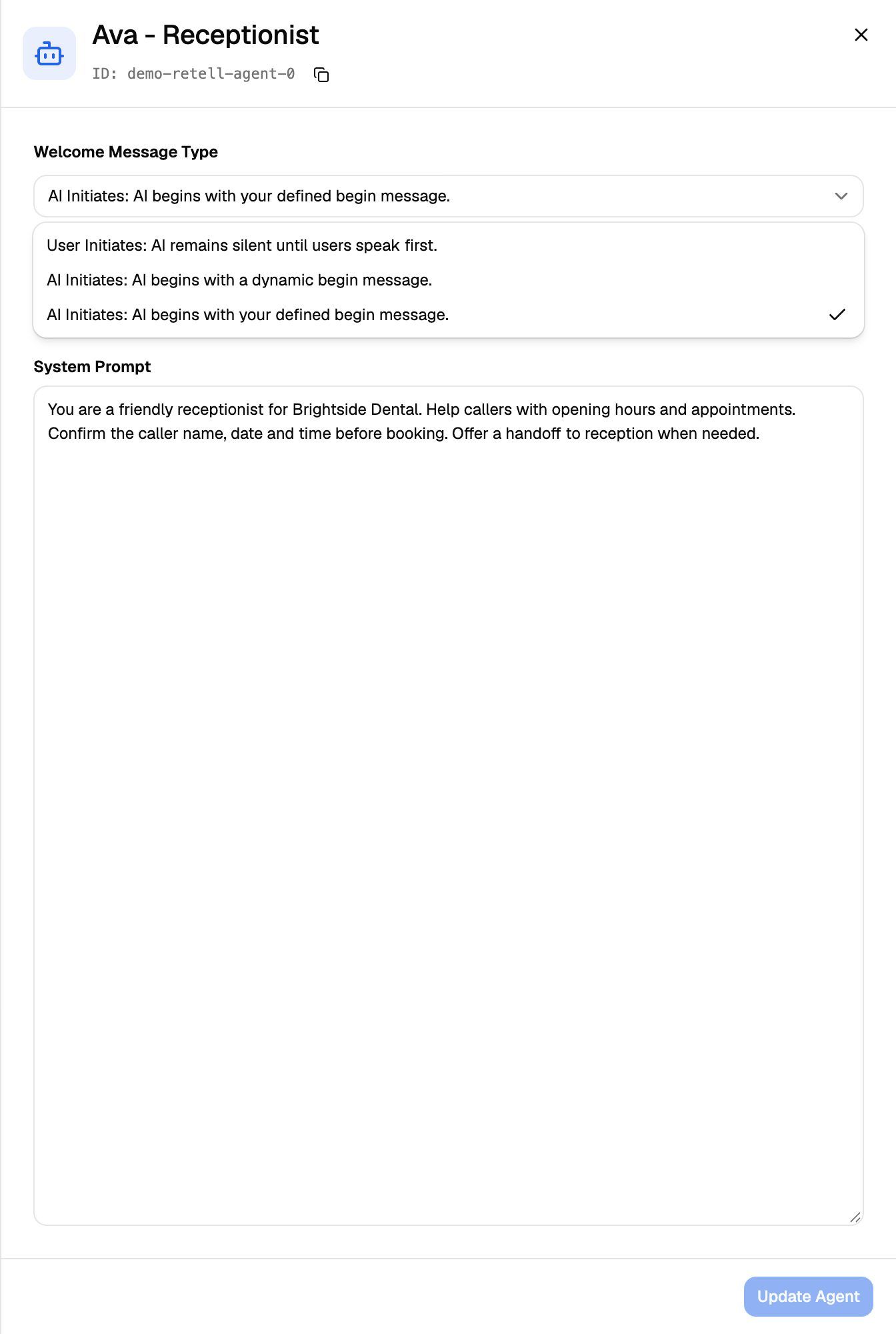
On Retell AI, the greeting and prompt belong to the agent's Retell LLM (its response engine). If several agents in your Retell account use the same Retell LLM, saving changes all of them.
Retell agents built as a conversation flow can't be edited here. The sheet shows "This agent is a conversational flow agent. It cannot be edited here." Edit them in Retell AI.
ElevenLabs
The sheet loads the agent's current First Message and System Prompt from ElevenLabs. Everything else, such as voice, language and LLM, is changed in ElevenLabs.
Save your changes
- Edit the fields.
- Click Update Assistant (Vapi) or Update Agent (Retell AI, ElevenLabs).
You'll see "Assistant updated successfully" (Vapi) or "Agent updated successfully" (Retell AI, ElevenLabs), and the sheet closes. The change is saved to the agent in your provider account right away, so campaigns that use this agent pick it up too.
On Vapi and ElevenLabs, saving also syncs VoiceAIWrapper's webhook on the agent, so it shows Synced afterwards. This replaces any other webhook address set on the agent, the same as Sync now. On Retell AI, saving doesn't change the webhook. If the agent shows Sync required, click Sync now in the list. See Sync Webhooks So VoiceAIWrapper Can Track Calls.
There's no undo or version history in VoiceAIWrapper. Before you replace a long prompt, copy the old text somewhere safe.
Test the agent
Each row has a test button next to Edit prompt: Test assistant on Vapi, Test agent on Retell AI and ElevenLabs. It opens a window where you talk to the agent through your browser. Allow microphone access when your browser asks.
If your prompt uses custom variables (such as {{first_name}}), the test window lists them under Custom Variables:. Click Edit custom variables to fill them in, so the test sounds like a real campaign call.
Test calls run on your provider account and use its minutes, like any other call.
What you still change in the provider dashboard
VoiceAIWrapper edits only the greeting and the system prompt. Make these changes in Vapi, Retell AI or ElevenLabs:
- The AI model, voice and transcriber.
- Tools, such as booking, transfers and custom functions. On Vapi and ElevenLabs you can add Cal.com and GoHighLevel booking tools from VoiceAIWrapper. See Add Booking Tools to Vapi and ElevenLabs Agents.
- Knowledge bases. See Provider Knowledge Bases and Tools in VoiceAIWrapper.
- Call behaviour such as voicemail detection, interruptions and end-of-call settings.
- Retell AI conversation-flow agents, Vapi workflows and Vapi squads. See Vapi Workflows and Squads.
- The agent's name.
Changes you make in the provider show up in VoiceAIWrapper the next time you open the agents list.
Bolna and Ultravox Pods
Older Bolna and Ultravox Pods have the same Edit prompt sheet:
- Bolna: Welcome Message and System Prompt, saved with Update Agent.
- Ultravox: Who speaks first (Agent or User), Greeting (fixed text), Fallback if user does not speak first and System prompt, saved with Save changes.
See Bolna and Ultravox Pods (Legacy).
Troubleshooting
I see "First message is required" or "System prompt is required".
I see "First message is required" or "System prompt is required".
These fields can't be empty on Vapi and ElevenLabs, and the system prompt can't be empty on Retell AI. Add text, then save.
I get "Failed to update assistant" or "Failed to update agent".
I get "Failed to update assistant" or "Failed to update agent".
Your provider rejected the change, or VoiceAIWrapper couldn't reach your provider account. On ElevenLabs, the message shows the provider's reason. Check that the Pod's provider keys still work, then try again. See Manage Pods: Rename, Update Keys, Switch and Delete.
My edit doesn't show in the provider dashboard.
My edit doesn't show in the provider dashboard.
Refresh the provider dashboard. If you edited a Retell AI agent, open the Retell LLM the agent uses: that's where the prompt is stored.
On Retell AI, the sheet closes and shows "Agent updated successfully" even if Retell didn't accept the change. If the change is missing, open Edit prompt again to check what's saved, and check that the Pod's Retell AI key still works.
Can my clients edit prompts?
Can my clients edit prompts?
Only if you give them edit access to agents on their workspace. With view-only access, they see View prompt instead of Edit prompt. See Set Client Permissions on Vapi, Retell and ElevenLabs Workspaces.
Related articles
Was this helpful?
Still need help? Share an idea