What a Call Costs on VAW Native
The lines that make up a VAW Native call or chat in AI credits, the per-minute figures behind them, a worked example, and where to check a call's real cost.
Written By voiceaiwrapper
Last updated 26 days ago
Every VAW Native call is priced from a few separate lines: a fixed platform fee, the AI models it used, and a knowledge base fee when one is attached. This article explains each line, gives the per-minute figures behind them, works through a typical call, and shows where to check what a real call cost. Use it to compare agent setups and to set your own client prices.
All costs are in AI credits. 1,000 AI credits = $1, so a figure in credits is the dollar amount times 1,000.
Applies to: VAW Native Pods. Calls on your own Vapi, Retell AI or ElevenLabs account are billed by that provider. See What a Call Costs When You Bring Your Own Provider.
The lines on a call
How the time is measured:
Answered time only, to the second. The clock runs from when the call is answered to when it ends. There's no rounding up to the next minute.
A call nobody answers costs nothing. With no answered time, the platform and knowledge base lines are zero.
Models are charged at cost. VoiceAIWrapper doesn't add a markup to the AI models, voices or transcription. The platform and knowledge base lines are the only fixed fees.
Test calls are real calls and are charged the same way.
Phone calls also have phone charges, which Twilio bills to your own Twilio account. They aren't part of the AI credits. Web calls, such as calls from a web widget or a test call in your browser, have no Twilio charge. See Connect Your Twilio Account to VAW Native.
Per-minute figures before you choose
A model charged by text or characters has no fixed price per minute. To help you compare, the webapp shows an estimate worked out from typical calls:
The AI model picker shows {cost} credits/min next to each model. See Choose an AI Model.
The Voice model list shows credits/min for each voice model, and the Voice row on Agent Settings shows the one your agent uses. See Choose a Voice for Your Agent.
The AI model for analysis and extractions list on the Analysis tab shows {cost} credits/run.
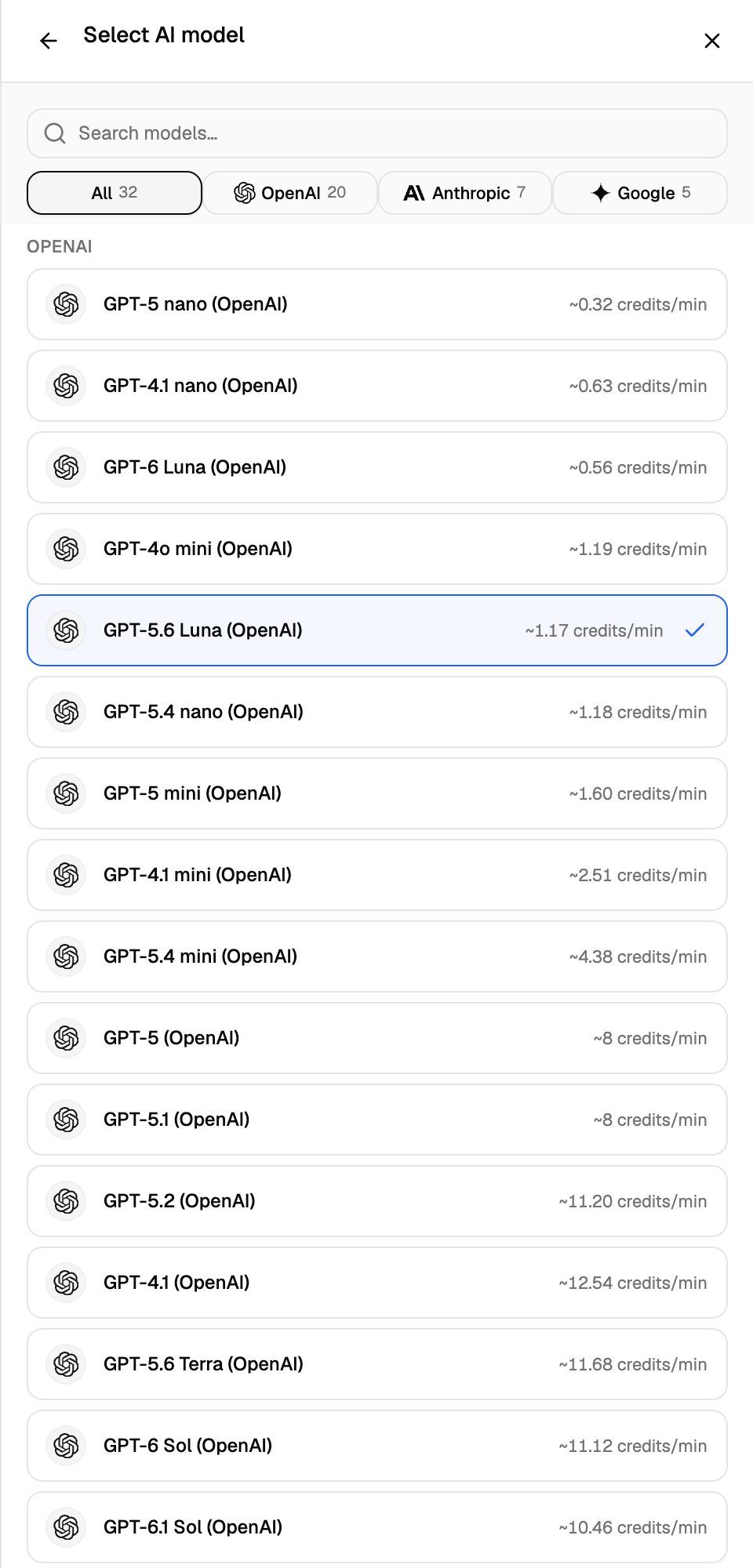
Here are the estimates the webapp shows today for common choices:
The voice is usually the largest model line, because it's charged on everything the agent says. An agent that talks a lot costs more per minute on the voice line than one that mostly listens. The AI model line grows on long calls, because the whole conversation so far is sent to the model on every turn.
For a Voice Library voice, the voice model figure ends in +, and the list adds a note that the figure may be higher for that voice.
Agents that still use an older OpenAI voice keep running on it, at that voice's own rate. Those voices are no longer offered in the picker.
Chats
A chat has no minutes, so it's charged per reply instead:
Chats have no voice or transcription lines. A reply that fails isn't charged the platform fee. When a chat is analysed or has extractions, those runs are added to its cost too.
Post-call analysis and extractions
Post-call analysis (summary, sentiment and call success) runs once when the call ends, so its cost doesn't grow with the length of the call. Each Call Data Extraction is its own run on the same model. Analysis is skipped on calls that never connected or had too little conversation, and those calls aren't charged for it.
A call's total is first recorded when it ends, then updated once analysis and extractions finish. See Post-Call Analysis: Summary, Sentiment and Call Success.
Worked example: a 3-minute call
An inbound call answered by an agent on the default settings (GPT-5.6 Luna (OpenAI) and the Flash v2.5 voice model), with a knowledge base attached, post-call analysis on GPT-5 mini and one extraction. The call lasts exactly 3 minutes.
That's about 116 credits per minute. A few variations:
Without the knowledge base: 15 credits less, about 334 credits.
With the Multilingual v2 voice model: the voice line doubles to about 268.80, so the call costs about 483 credits.
If nobody answers: 0 credits.
The model lines are estimates. The real call is priced from what it actually used.
Check what a call actually cost
Open Call Logs on your VAW Native Pod (an engine or provider connection). The Credits column shows each call's total.
Click a call and select the What ran tab.
Scroll to the Cost section.
Each line shows its model and credits, and Total is the sum of the lines. If you see Post-call analysis is still running, so this total can still grow., check again in a few minutes. Chats work the same way from Chat Logs. For every line type and message, see Credit History and Per-Call Costs.
Frequently asked questions
Does turning off call recording make calls cheaper?
Does turning off call recording make calls cheaper?
No. Recording is covered by the platform line, which is the same with recording on or off.
What happens when an outbound call reaches voicemail?
What happens when an outbound call reaches voicemail?
VAW Native doesn't detect voicemail yet, so a call answered by voicemail is charged like any answered call. New agents end the call after 30 seconds of silence, which keeps these calls short. See Call Settings: Recording, Silence Timeout and Maximum Call Length.
Can the rates change?
Can the rates change?
Yes, when a model's price changes. Each call is priced at the rates in force on the day it starts, and those rates are stored with the call, so a later change never re-prices a call you've already made. Two price changes are already scheduled: Gemini 4 Argon (Google) doubles from 1 December 2026 (from about 10.46 to about 20.92 credits/min), and Gemini 3.6 Flash (Google) and Gemini 3.8 Flash (Google) double from 1 January 2027 (from about 4.17 to about 8.34 credits/min). The pickers always show the figures in force today.
Do my clients see these costs?
Do my clients see these costs?
No. In the client portal, the Cost section and the Credits column are hidden. You set what clients pay. See Choose a Pricing Model.
Related articles
Was this helpful?
Still need help? Share an idea