Add-Ons: BYOK Connections, Client Accounts and Team Members
Buy or remove BYOK provider connections, client accounts and team members from Billing, and how charges, removals and unpaid add-ons work.
Written By voiceaiwrapper
Last updated 26 days ago
Add-ons provide extra provider connections, client accounts or team-member capacity without changing plan. Review available add-ons in Settings → Billing, including their price, start date and renewal terms. This article covers included allowances, add-on prices and what to check when adding or removing them.
Before you start
You need to be the organization's owner or an admin to open Settings and change billing.
A card on file. Purchases are charged to it. See Choose a Plan and Add a Payment Method.
The add-ons
Pay-as-you-go includes 1 client account and 1 team member including the owner. Growth includes 3 client accounts, 1 team member including the owner and 1 BYOK connection. Additional Growth client accounts and team members are $15/month or $150/year each; PAYG equivalents are $20/month or $200/year. Additional BYOK connections on either plan are $29/connection/month or $290/connection/year. The add-on quantity is additional to the included allowance.
What counts toward each add-on
BYOK provider connections: every Pod in your organization except VAW Native. Two Vapi Pods need two connections.
Client accounts: every client account, enabled or disabled. A disabled client still uses a client account until you delete it.
Team members: everyone in your organization, including you and anyone you've invited who hasn't accepted yet.
Add an add-on
In the sidebar, click Settings, then scroll to Billing.
Under Add-ons, find the add-on and click +. Click it again to add more.
A panel opens under the row with Adding and the number, and a note that says exactly what will be charged.
Read the note, then click the button to confirm. It says Buy now · pay and the amount when there's a charge today, or Confirm when there isn't.
You'll see Subscription updated. You can use the new connection, client account or team member right away.
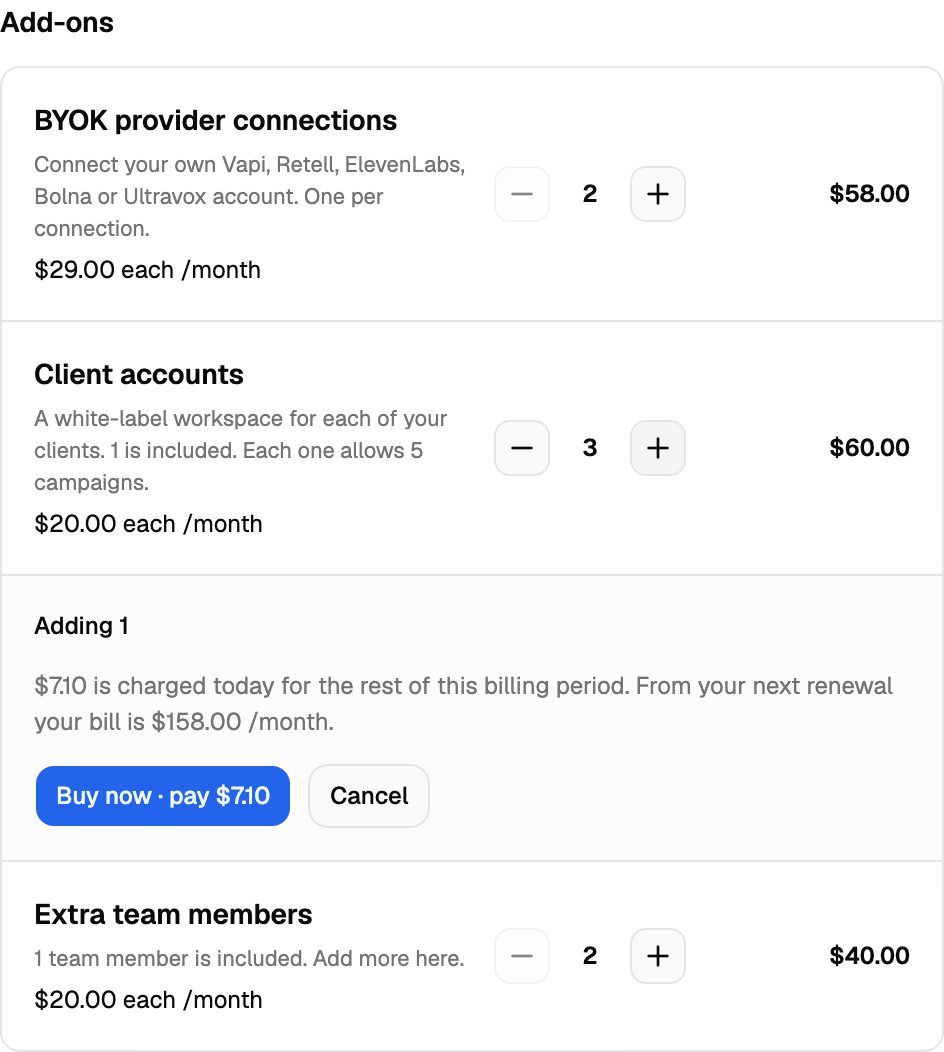
What you're charged when you add
The note in the panel tells you which case applies:
Check the charge due now and future renewal amount before confirming an add-on. A Growth or Scale plan trial does not establish that additional paid add-ons are free.
Add-ons are billed on the same cycle as your subscription, monthly or yearly.
Remove an add-on
Open Settings → Billing → Add-ons.
Click − next to the add-on.
Review the number being removed, the effective removal date, future price and any warnings shown in Billing before confirming.
Click Confirm removal.
What happens next:
For a paid add-on, check the effective removal date and future bill shown for your account. Payments are non-refundable except where a refund is required by applicable law; VoiceAIWrapper does not offer a money-back guarantee.
During the separate Pay-as-you-go BYOK add-on trial, removal takes effect immediately ("Removed now."). For add-ons on Growth or Scale, review the effective date shown in Billing.
If Billing shows a pending add-on removal, review its date and any available undo control. Contact support if you need to change it and no suitable control is shown.
You can't remove what you're using
You can't go below what's in use:
To remove a BYOK provider connection, delete a BYOK Pod first. See Manage Pods: Rename, Update Keys, Switch and Delete.
To remove a client account, delete a client first. See Enable, Disable or Delete a Client.
To remove a team member seat, remove someone from your team or cancel a pending invitation.
On Pay-as-you-go and Growth, removing client-account capacity also lowers the campaign allowance: 5 campaigns per client account. Review the usage limit before confirming a removal.
Buying an add-on from an upgrade prompt
When you hit a limit, such as connecting a Vapi account on Pay-as-you-go without a spare BYOK connection, the webapp opens an upgrade prompt. It says something like "Add a provider connection (BYOK) to keep going, or upgrade to Scale."
Click Add followed by the add-on name (for example Add provider connection (BYOK)). The Billing page opens with one unit of that add-on ready to confirm. See Plan Limits and Upgrade Prompts.
If an add-on payment fails
If Stripe can't collect payment and its final retry fails, the unpaid add-ons are removed from your Pay-as-you-go subscription and the unpaid invoice is canceled. Your plan stays active. After that:
BYOK connections: your newest BYOK Pods are disabled. Their active campaigns are paused, and scheduled campaigns go back to draft.
Client accounts and team members go back to what your plan includes. Client accounts and campaigns over the new limit are turned off, newest first.
To get them back, buy the add-ons again. Disabled Pods are turned back on automatically, but their campaigns stay paused until you resume them. See Failed Payments.
On a legacy plan: seats
An older plan may use different allowance names or billing terms. Check its exact seat limits, price and effective dates in Billing or contact support before making a change. Do not apply legacy seat-proration or trial restrictions to the current Growth or Scale plans.
Troubleshooting
"You have N campaigns turned on. Turn some off before going down to N client accounts."
"You have N campaigns turned on. Turn some off before going down to N client accounts."
Pay-as-you-go and Growth allow 5 campaigns per client account. Review your campaign usage and the limit shown before removing client-account capacity. See Platform Limits Reference.
"You have N BYOK connections in use. Remove some before lowering this to N."
"You have N BYOK connections in use. Remove some before lowering this to N."
Each BYOK Pod uses one connection. Delete a Pod you no longer need, then remove the connection. The same kind of message appears for client accounts and team members.
The + and − buttons are greyed out.
The + and − buttons are greyed out.
A plan change is waiting, such as a move to Pay-as-you-go or to monthly billing at the end of the period. Other changes are held until it happens. Use Undo on the pending change if you want to make changes now.
"We couldn't work out the price. Please try again."
"We couldn't work out the price. Please try again."
The price preview didn't load. Click Cancel, wait a moment, and try again.
I don't see BYOK provider connections in the list.
I don't see BYOK provider connections in the list.
Scale includes Vapi, Retell AI and ElevenLabs BYOK connections. Growth includes 1 connection in total, with extra connections available as add-ons. Check your current plan and included allowance in Billing, or contact support if the controls do not match.
Related articles
Was this helpful?
Still need help? Share an idea