See Exactly What Every Call Cost
On VAW Native you see an estimated cost before you choose a model or voice, and a line-by-line cost for every finished call and chat, in AI credits.
Written By voiceaiwrapper
Last updated 26 days ago
On VAW Native you see an estimated cost before you pick a model or voice, and an itemised cost for every call and chat once it ends. That lets you compare setups and price your services with a known margin.
All costs are shown in AI credits: 1,000 credits = $1.
Applies to: VAW Native Pods (an engine or provider connection). Calls on your own Vapi, Retell AI or ElevenLabs account are billed by that provider. See What a Call Costs When You Bring Your Own Provider.
Before you choose: a price next to each option
On an agent's page:
- On the Agent Settings tab, the AI model picker shows {cost} credits/min next to each model.
- The Voice picker shows from {cost} credits/min on each voice, and the Voice row shows the cost of the voice model the agent will use.
- On the Analysis tab, the analysis model shows {cost} credits/run, because analysis runs once per call, not per minute.
These are estimates from typical usage; real calls vary. Two lines are fixed and don't depend on your choices: the platform line at 60 credits per answered minute ($0.06), and the knowledge base line at 5 credits per answered minute ($0.005) when one is attached. AI models are charged at what they cost us, with no markup.
After the call: an itemised cost
Each VAW Native call shows its total in the Credits column of Call Logs. Open a call and select the What ran tab to see the Cost section, line by line: Conversation, Voice, Transcription, Analysis, Extractions, Platform and Knowledge base, each with the model and provider where one applies, and a Total.
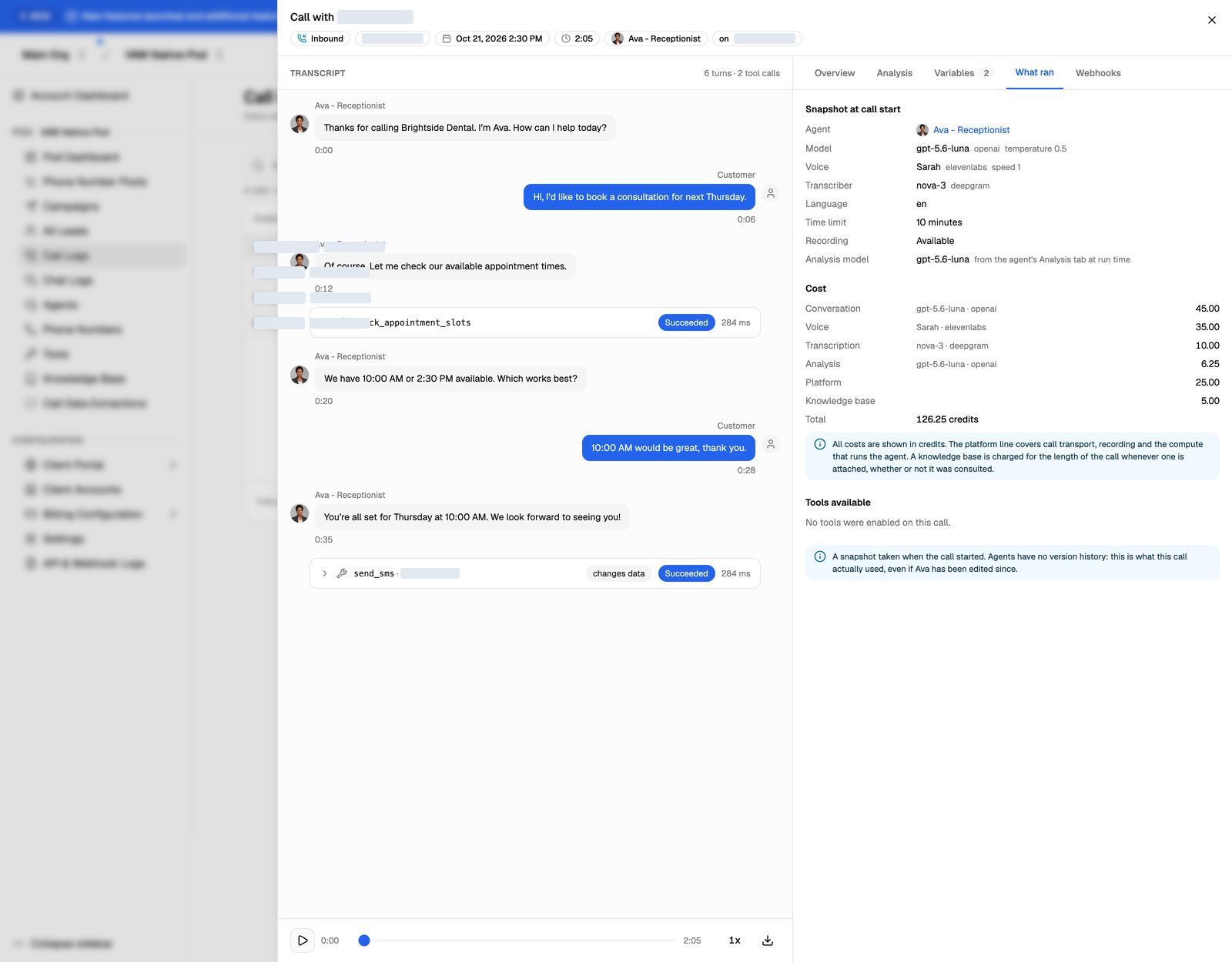
A few things make these figures dependable:
- Billing is per second of answered time. A call nobody answers costs 0 credits.
- Each call keeps the rates it started with. If a rate changes later, past calls don't change.
- The same tab shows what the call ran on: the model, voice, transcriber and tools in place when it started, even if you've edited the agent since.
Chats work the same way. Open a chat in Chat Logs and select What ran. There, the platform line is 5 credits per agent reply (the greeting included), and the knowledge base line is 0.5 credits per reply when one is attached.
Worked example
A call answered for 3 minutes 30 seconds, on an agent with a knowledge base attached:
The fixed lines come to 227.5 credits, about $0.23. The model lines depend on the models you chose, which is why the pickers show them before you choose.
Across your account
- Settings → Billing → Credits → View history opens the Credit history: every credit in and out, including each Call and Chat, with your balance after each one. View all opens the Credit breakdown with each batch and its expiry date.
- The Pod Dashboard has a Credits per minute chart, so you can spot days when calls cost more than usual.
See Credit History and Per-Call Costs.
Use it to price your services
Look at a week of calls for each kind of agent you sell. Divide the credits used by the answered minutes to get your cost per minute, then divide by 1,000 for dollars. For phone calls, add what Twilio charges you per minute, since Twilio bills you directly. That total is the floor for the per-minute price you charge the client.
Your clients never see these figures. In the client portal, the Credits column and call costs are removed. See Price Your Services for Clients.
Related articles
Was this helpful?
Still need help? Share an idea