Built for White-Label Reselling
Why VAW Native suits reselling: detailed client permissions and limits, clients who edit agents within your rules, private costs, and calls that pause when a client stops paying.
Written By voiceaiwrapper
Last updated 26 days ago
When you resell voice agents under your own brand, you need to control what each client can touch, keep your costs private, and stop serving clients who stop paying. VAW Native workspaces are built for all three.
Applies to: VAW Native workspaces. To compare with Vapi, Retell AI and ElevenLabs workspaces, see Client Controls: What Your Clients Can Do on Each Engine.
Decide exactly what each client can do
Each portal page and each agent tab gets a level (No Access, View Only or View & Edit), and individual actions have their own switches, such as Change voice, Change AI model, Phone test calls or Buy a number. Limits such as Maximum agents and Maximum campaigns cap what the client can hold, including the assets you assign.
In a new workspace, most areas start at View Only and every switch that creates, deletes or spends is off. You open things up one switch at a time.
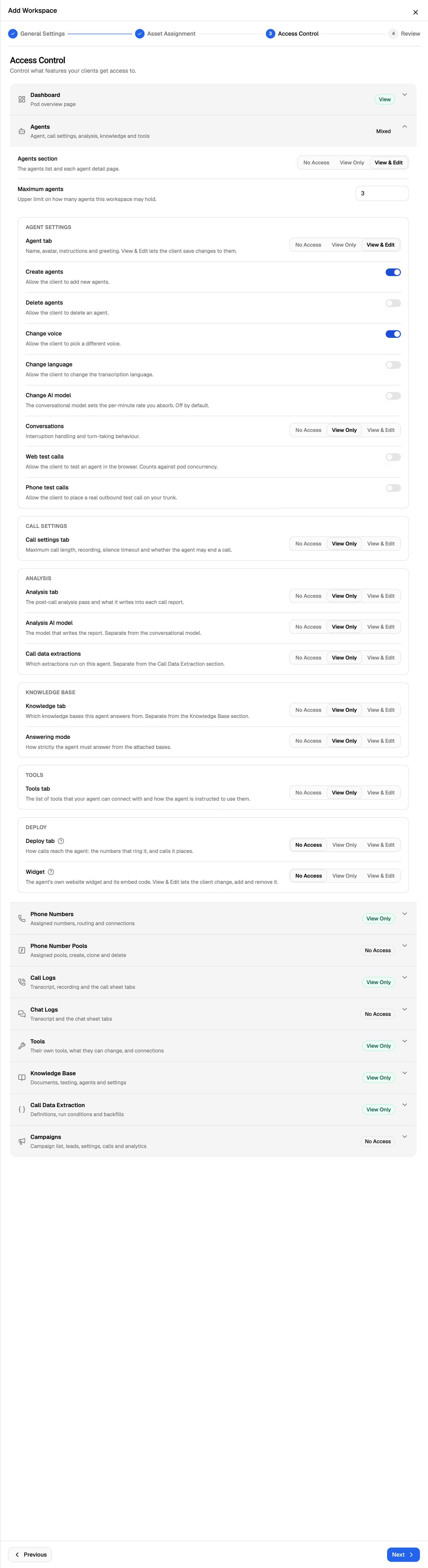
See Set Client Permissions on VAW Native Workspaces.
Let clients build and edit, within your limits
With the right switches on, clients can work on their own agents in the portal: create agents (they start blank), change the prompt, greeting, voice, language or AI model, attach knowledge bases and tools, connect numbers, and run campaigns. Each is a separate permission, and limits stop the client going past what you've sold.
Clients can also connect their own Twilio account and buy numbers on it. They can't buy or import numbers on your Twilio connections, can't remove numbers that run on them, and can't delete tools you own.
Your costs stay private
Clients never see what their calls cost you. In the portal:
- There's no Credits column in Call Logs, and no cost on a call or chat. The server removes these figures before they reach a client user, so they aren't just hidden on screen.
- The model and voice pickers show no cost estimates.
- Campaign analytics have no cost section.
Wording that doesn't name VoiceAIWrapper
Where the webapp says "VAW" (for example "values provided by VAW" in prompt help, or "Filled in by VAW" on a call's Variables tab), the portal says "the system" instead. The AI agent builder is called Agent Builder, and call error messages and end reasons are shown without provider names.
Some pages do name the underlying vendors. Twilio appears on the phone number, call transfer and text message screens. If you turn on Change AI model, the model picker groups models under OpenAI, Anthropic and Google. The What ran tab lists the models and providers behind each call, which is why it's off by default.
Usage is billed to the right client, and paused when they don't pay
Each VAW Native agent belongs to one client. If you try to add it to a second client, you'll see "{agent} already belongs to {client}. Remove it there first, then add it here." Campaign calls bill to the campaign's client. Every other answered call and chat on the agent bills to the agent's client: inbound calls on a number, widget conversations and test calls, including the ones you place yourself. Unanswered calls are never billed.
When a client's billing lapses (their minutes run out, a Stripe payment fails, or an external payment goes overdue), VoiceAIWrapper pauses the client:
- Their campaigns pause.
- Their VAW Native agents refuse new calls and chats. Inbound callers hear a busy tone, and a chat in progress stops at its next message.
- You see a notice on the client's page: "{client}'s billing is paused…".
Everything resumes once the client pays or tops up. On Vapi, Retell AI and ElevenLabs, agents keep running outside campaigns while a client is paused.
See What Clients See When Payment Is Due.
Related articles
Was this helpful?
Still need help? Share an idea