What Clients See When Payment Is Due
The full-page screens clients see in the portal when a payment, trial or subscription needs action, and how campaigns and calls pause and resume with billing.
Written By voiceaiwrapper
Last updated 26 days ago
When a client needs to pay, start a trial or fix their subscription, the client portal shows them a full-page screen instead of their dashboard. They can't use the portal until they act on it. Separately, when a client runs out of minutes or a payment fails, their campaigns and calls pause automatically, and they start again once the client pays.
This article shows each screen your clients can see, what triggers it, and what pauses and resumes behind the scenes, so you can answer client questions quickly.
To see exactly what a client sees, open their portal with Login as Primary User (or Login as User on a workspace user). See Log In as a Client to Preview Their Portal.
Screens for clients billed through Stripe
These screens appear when you assign a Stripe billing plan to a client and the client still has a step to complete. Each one replaces the whole portal until the step is done.
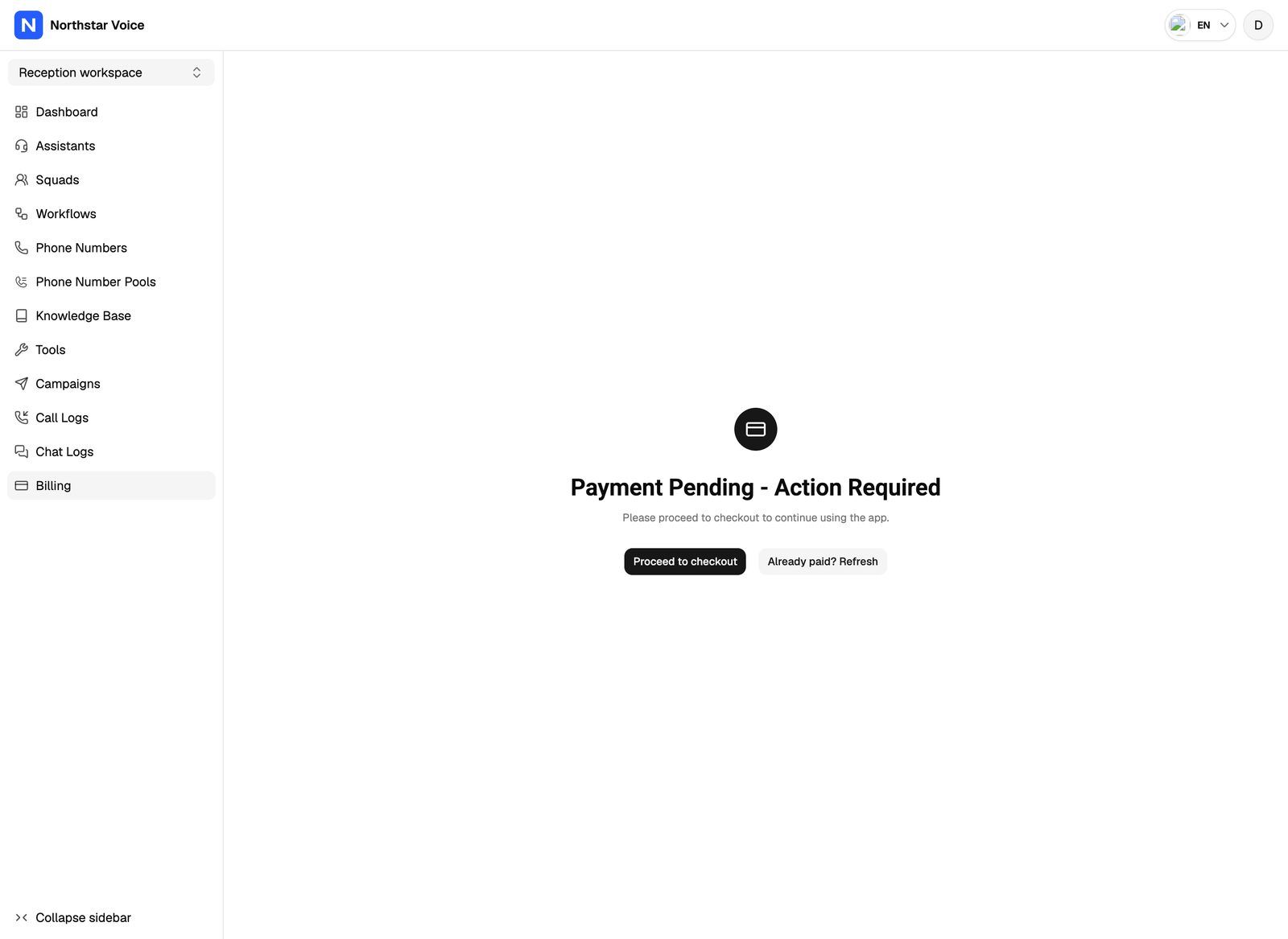
Every screen also has a refresh button, such as Already paid? Refresh or Already Started the trial? Refresh. Clients use it after finishing checkout in another tab so the portal picks up the change.
For how trials work and how to set them up, see Offer Free Trials to Clients.
One-time payment requests
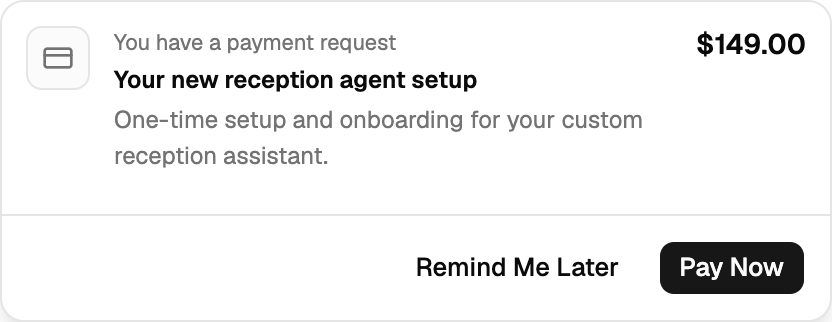
When you send a client a one-time charge, it doesn't block the portal. Instead, a card appears at the top of every page with You have a payment request, the charge name, description and amount.
- Pay Now opens Stripe checkout for that charge.
- Remind Me Later hides the card until the client next opens the portal.
If the client's last attempt failed, the card also shows Your last payment attempt failed. Reason: followed by the reason from Stripe. Several open requests stack on top of each other; hovering over the stack spreads them out.
See One-Time Charges and Payment Requests to send one.
Screens for clients on External billing
Clients you bill outside the webapp see these screens instead. They can't pay inside the portal, so most screens tell them to contact you.
If you disable a client account, the client can't log in at all. The login page tells them their account has been disabled and to contact their provider.
How due dates, grace periods and these statuses work is covered in Overdue Payments and Grace Periods (External Billing).
When campaigns and calls pause automatically
Separate from the screens above, the webapp pauses a client for billing when they can no longer pay for usage. This happens when:
- A Stripe-billed client on a plan with included minutes uses up their plan minutes and usage-pack minutes.
- A trial with a minute limit uses up its trial minutes.
- A Stripe payment fails (for example, the card is declined).
- An External billing payment goes overdue, or its grace period ends.
- An External billing client uses up their included and usage-pack minutes on a plan with no per-minute rate.
While a client is paused for billing:
- Their campaigns stop. Running campaigns change to paused, and scheduled campaigns go back to draft so they don't start. A paused campaign shows a Paused due to billing badge on its page, and the client can't resume it from their portal.
- Their VAW Native agents stop taking new calls and chats outside campaigns. Phone callers to the agent's number get a busy signal, web widget calls can't start, chats can't start or get replies, and a test call in the portal shows "Agent name can't take new calls until your billing is up to date." Calls already in progress finish normally.
- Agents on Vapi, Retell AI and ElevenLabs keep running outside campaigns. Only their campaigns pause.
A failed Stripe payment doesn't put a full-page screen in front of the client. Their campaigns and VAW Native agents pause as above, and they can update their card from Billing → Manage Billing & View History in the portal.
When at least one campaign was paused, the client also gets the Campaign Paused Due to Billing Failed email, as long as your client emails are set up and that template is active. See Customize Email Templates and Check Delivery Logs.
What you see in the webapp
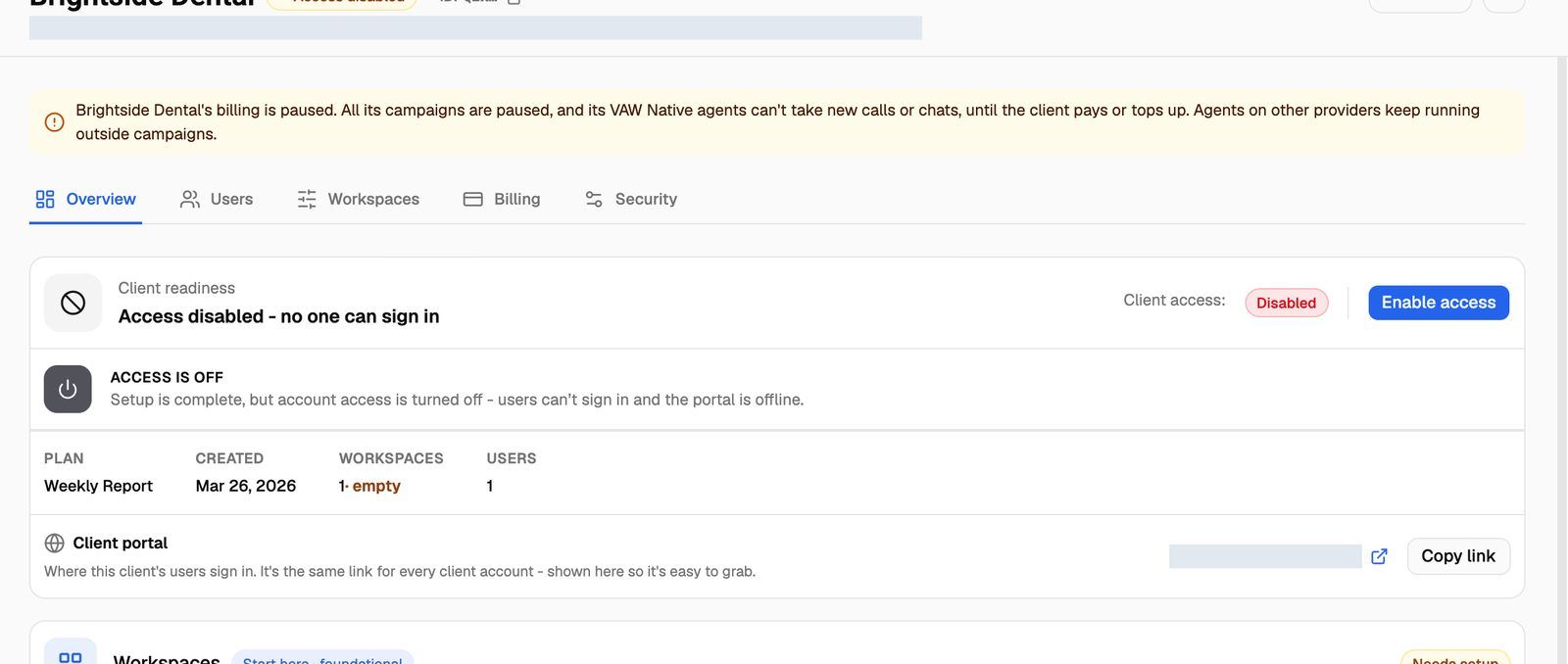
- On Client Accounts, the client's Status shows a Billing paused badge.
- On the client's page, a notice explains that the client's billing is paused, their campaigns are paused, and their VAW Native agents can't take new calls or chats until they pay or top up.
When everything resumes
The client resumes automatically, with no action from you, when:
- Stripe: an invoice is paid, or the client completes a checkout (for example, buys a usage pack).
- External billing: you mark a payment request as Paid, the subscription is active again, and the client has minutes left (or their plan has a per-minute rate).
When the client resumes, campaigns that were paused for billing go back to running, and draft campaigns that were scheduled go back to scheduled. If a campaign's start time passed during the pause, it starts right away. VAW Native agents take calls and chats again.
You can resume a campaign that's Paused due to billing yourself from the campaign page in the webapp. This overrides the pause for that campaign only. The client stays paused for billing until they pay.
Frequently asked questions
My client paid but still sees the payment screen.
My client paid but still sees the payment screen.
Ask them to click the refresh button on the screen (Already paid? Refresh or Refresh after paying). For Stripe, the screen clears once Stripe confirms the payment. For External billing, it clears only after you mark the payment request as Paid. See External Billing: Plans, Usage Packs and Payment Requests.
Why are the client's campaigns still paused after they paid?
Why are the client's campaigns still paused after they paid?
For External billing, campaigns resume only when the subscription is active and the client has minutes available. If the client used up all their minutes and the plan has no per-minute rate, apply a usage pack and mark its payment request as Paid. If the subscription shows Blocked, it needs to be cancelled and started again first.
Do one-time payment requests pause anything?
Do one-time payment requests pause anything?
No. An unpaid one-time charge shows a payment card in the portal, but it doesn't block the portal or pause campaigns.
Can I change the wording on these screens?
Can I change the wording on these screens?
No. The screens use fixed wording, translated into the portal languages you offer. They never mention VoiceAIWrapper. Where they ask the client to get in touch, they say "your provider".
Related articles
Was this helpful?
Still need help? Share an idea