What a Call Costs When You Bring Your Own Provider
On Vapi, Retell AI and ElevenLabs Pods your provider bills calls directly. What you still pay VoiceAIWrapper, where provider costs show, and what clients never see.
Written By voiceaiwrapper
Last updated 26 days ago
When you connect your own Vapi, Retell AI or ElevenLabs account, calls on that Pod (an engine or provider connection) run on your provider account, and your provider bills you for them directly. VoiceAIWrapper doesn't resell those minutes, doesn't mark them up and doesn't take AI credits for them. This article explains what you still pay VoiceAIWrapper, where the provider's costs show up in the webapp, and what your clients never see.
Applies to: BYOK Pods, meaning Pods that use your own Vapi, Retell AI or ElevenLabs account. For the built-in engine, see What a Call Costs on VAW Native.
Who bills what
Because each BYOK Pod is a separate connection, two Vapi Pods need two BYOK provider connections on Pay-as-you-go. You add and remove them in Settings → Billing → Add-ons, and the webapp shows the price before you confirm. See Add-Ons: BYOK Connections, Client Accounts and Team Members.
What you charge your clients is up to you. See Choose a Pricing Model.
Where provider costs show in VoiceAIWrapper
When a call ends, your provider sends VoiceAIWrapper a report that includes what the call cost. VoiceAIWrapper stores that figure, rounded to two decimal places, and adds it up in several places:
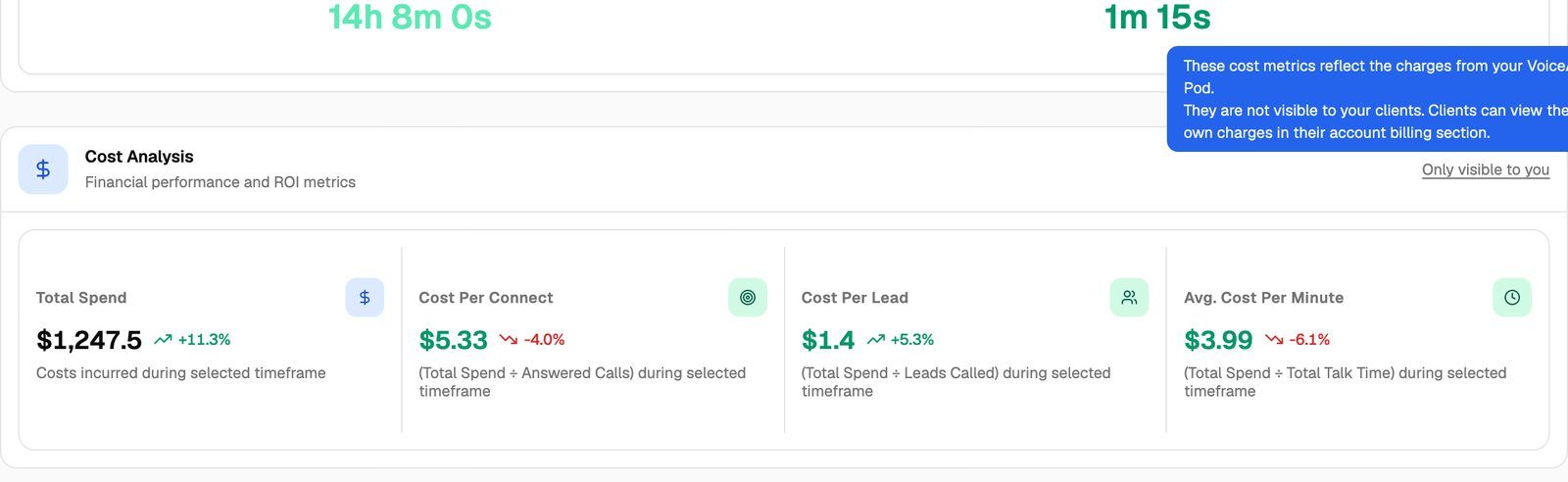
Keep in mind:
ElevenLabs costs are in ElevenLabs' own units, not AI credits. The webapp labels them Credits in Call Logs and on the Pod Dashboard, and Tokens on a campaign's Analytics tab.
Costs only arrive if VoiceAIWrapper receives your provider's call reports. If calls are missing or have no cost, check that webhooks are synced. See Sync Webhooks So VoiceAIWrapper Can Track Calls.
Your provider's own bill is the one you pay. The figures in VoiceAIWrapper help you track spend per campaign and client, but your provider's invoice is the final word.
Use Avg. Cost Per Minute or Cost Per Connect from a few days of real calls as your baseline when you set client prices. See Estimate Your Monthly Costs.
What your clients never see
Provider costs are for you only:
Campaign analytics in the client portal never include the Cost Analysis section. In your webapp it's marked Only visible to you.
Call logs in the client portal have no Provider Cost column.
Clients see what you charge them, through the billing you set up for them, not what your provider charges you. See Ways to Bill Your Clients: Stripe or External Billing.
Frequently asked questions
Does VoiceAIWrapper take a cut of my provider minutes?
Does VoiceAIWrapper take a cut of my provider minutes?
No. Your provider bills your provider account directly, and VoiceAIWrapper never bills those minutes. What you pay VoiceAIWrapper is your plan, any add-ons, and AI credits if you also use VAW Native.
Do I need AI credits if I only use BYOK Pods?
Do I need AI credits if I only use BYOK Pods?
Not for calls on those Pods. AI credits pay for calls and chats on VAW Native, which every organization has alongside any BYOK Pods.
Are test calls on a BYOK Pod free?
Are test calls on a BYOK Pod free?
VoiceAIWrapper doesn't charge for them. A test call is a real call that runs on your provider account like any other, so it's billed there.
Why does a call show no provider cost?
Why does a call show no provider cost?
The cost comes from your provider's end-of-call report. If the report hasn't arrived yet, or webhooks aren't synced, the column shows -. Check the Pod's webhook sync, then look again after the call has finished processing.
Related articles
Was this helpful?
Still need help? Share an idea