Verify Webhook Signatures
Check that each VAW Native webhook request really came from VoiceAIWrapper, using your Pod's signing secret, and roll the secret without missing events.
Written By voiceaiwrapper
Last updated 26 days ago
Anyone who learns your webhook URL can send requests to it. Signature checks let your server accept only requests that really came from VoiceAIWrapper and weren't changed on the way. Every VAW Native webhook is signed with a secret that belongs to your Pod, in the open Standard Webhooks format, so you can use a ready-made library instead of writing the check yourself.
Adding the check takes 10 to 15 minutes of work on your server.
Applies to: VAW Native Pods. Webhooks from campaigns on Vapi, Retell AI and ElevenLabs Pods aren't signed. Protect those with a token in a custom header instead. See Add Custom Headers to Webhooks.
What's signed
Each Pod (an engine or provider connection) has one signing secret. It signs every request that Pod sends:
- Agent webhook events (
call.started,call.ended,call.analyzedand the chat events). See VAW Native Agent Webhooks: Events and Delivery. - The phone number's inbound webhook (
call.inbound). See Route Inbound Calls with the Phone Number Webhook. - Campaign webhooks on a VAW Native Pod: the Post-call event webhook and the Pre-call context webhook.
- Tests from Send test event and Send test request.
Before you start
- Access to your server code, or to the person who maintains it.
- Access to Pod settings in your webapp.
Step 1: Copy your signing secret
- Click the Pod name at the top of the page to open the Pod selector.
- Click the pencil icon (Edit) on your VAW Native Pod. For a Pod you aren't using right now, open its ⋮ menu and choose Edit. The Update VoiceAI Pod drawer opens.
- Scroll to Webhook signing secret.
The secret is masked, showing only its last characters (whsec_…a1b2). If you see "Created the first time you reveal it", no secret exists yet. Revealing or copying it creates one.
- Click the eye icon to reveal the full secret. Click it again to hide it.
- Click the copy icon to copy it. You'll see "Signing secret copied".
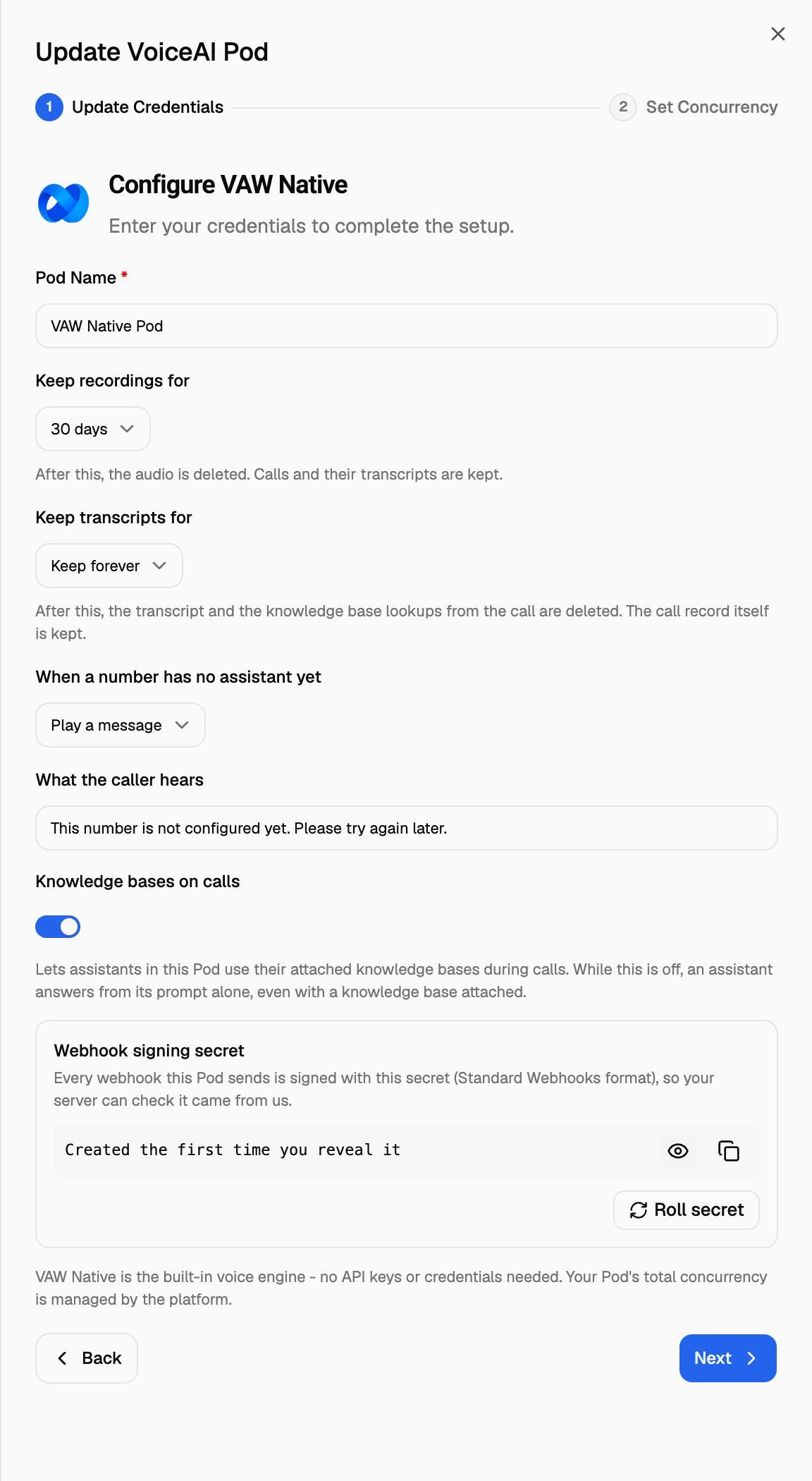
These buttons act right away. You don't need to click Next or save the drawer.
Store the secret on your server as an environment variable (for example VAW_WEBHOOK_SECRET). Never put it in code that runs in a browser.
Step 2: Check the signature on your server
Every request carries three headers:
The easiest way to check them is a Standard Webhooks library, which accepts your whsec_… secret as it is.
Node.js (Express), with the standardwebhooks package:
import express from 'express';
import { Webhook } from 'standardwebhooks';

const app = express();
const wh = new Webhook(process.env.VAW_WEBHOOK_SECRET); // "whsec_..."

app.post('/vaw-webhook', express.raw({ type: 'application/json' }), (req, res) => {
  try {
    const event = wh.verify(req.body, req.headers); // throws if the signature is wrong
    // ... handle event ...
    res.sendStatus(200);
  } catch (err) {
    res.sendStatus(401);
  }
});
Python, with the standardwebhooks package:
import os
from standardwebhooks.webhooks import Webhook

wh = Webhook(os.environ["VAW_WEBHOOK_SECRET"])  # "whsec_..."

def handle(raw_body: bytes, headers: dict):
    event = wh.verify(raw_body, headers)  # raises if the signature is wrong
    # ... handle event ...
Checking it yourself
If you'd rather not use a library:
- Take the part of your secret after
whsec_and base64-decode it. That's the key. - Build the signed content:
{webhook-id}.{webhook-timestamp}.{raw body}. - Compute an HMAC-SHA256 of that content with the key, and base64-encode the result.
- Split
webhook-signatureon spaces. The request is genuine if any entry equalsv1,plus your result. Use a constant-time comparison. - Reject the request if
webhook-timestampis more than 5 minutes from your server's clock. This stops someone replaying an old request.
Always check the raw request body, exactly as received. If your framework parses the JSON and you re-serialise it, spacing or key order can change and the signature won't match.
Step 3: Roll the secret when you need to
Roll the secret if it may have leaked, when someone with access leaves, or as routine practice.
- In Webhook signing secret, click Roll secret.
- Read the prompt: "Roll the secret? The current one keeps working for 24 hours. Click again to confirm."
- Click Confirm roll.
You'll see "New secret active. The previous one keeps working for 24 hours." For the next 24 hours, every request is signed with both secrets, and the box shows when the old one stops working. Copy the new secret and update your server during that window.
After 24 hours, the old secret stops signing. If your server still checks only the old secret, it will reject every request from then on. Update it before the time shown under the secret.
The secret is shared by every agent, phone number and campaign on the Pod, so a roll affects all of them at once.
Don't roll twice within 24 hours. A second roll replaces the overlap: the secret from before the first roll stops working at once, and only the two newest secrets sign. If a server still checks that oldest secret, it starts rejecting requests straight away.
Troubleshooting
The signature never matches.
The signature never matches.
Check that:
- You verify the raw body, before any JSON parsing.
- You use the secret from the same Pod that sends the webhook.
- If you check it yourself, you base64-decode the part after
whsec_and use that as the key, not the wholewhsec_…string. - You include the dots in
{webhook-id}.{webhook-timestamp}.{raw body}.
Use Send test event on an agent's Call Settings tab to send a signed sample whenever you need one.
Requests fail the timestamp check.
Requests fail the timestamp check.
Your server's clock is probably off. Sync it with a time server. Requests whose timestamp is more than 5 minutes from your clock should be rejected, so a drifting clock rejects genuine requests too.
Signatures stopped matching a day after I rolled the secret.
Signatures stopped matching a day after I rolled the secret.
The 24-hour overlap ended and your server still checks the old secret. Copy the current secret from Webhook signing secret and update your server. Then Resend any events that failed from each call's Webhooks tab.
Related articles
Was this helpful?
Still need help? Share an idea