Client Controls: What Your Clients Can Do on Each Engine
How client permissions differ between Vapi, Retell AI and ElevenLabs workspaces and VAW Native workspaces, and which suits clients who run things themselves.
Written By voiceaiwrapper
Last updated 26 days ago
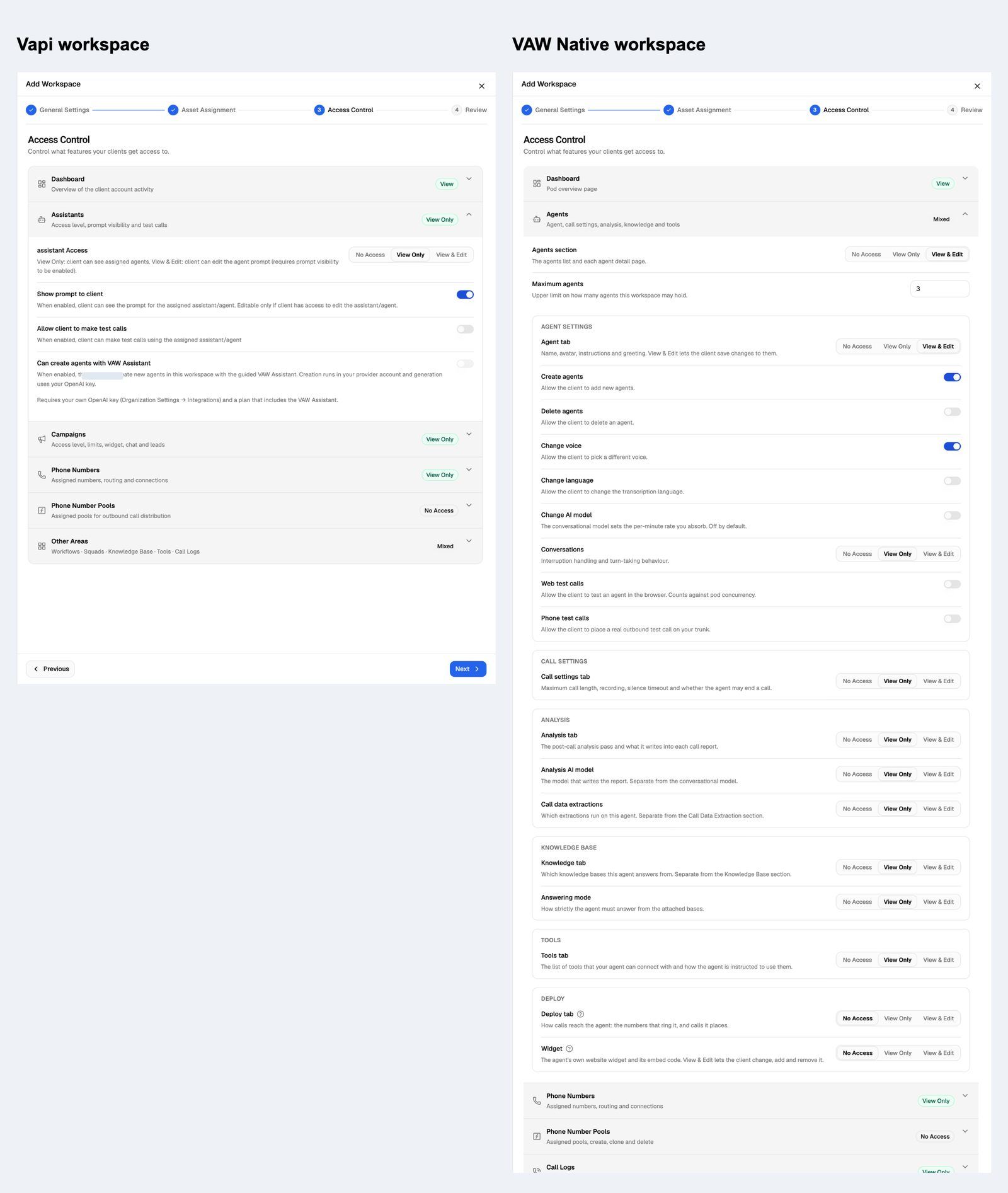
What a client can do in their portal depends on the engine behind their workspace. On Vapi, Retell AI and ElevenLabs workspaces, you give each area one access level, and the most a client can change on an agent is its greeting and prompt. On VAW Native workspaces, you set each tab and each action separately, and cap how many agents, numbers and other items the client can have. Use this page to pick the right engine for a client who wants to run things themselves.
Each workspace connects to one Pod (an engine or provider connection), and its access settings apply to every user of that client account. You set them on step 3 of Add Workspace (Access Control), or later with Update → Access on the client's Workspaces tab. See How Client Accounts and Workspaces Work.
At a glance
Vapi, Retell AI and ElevenLabs workspaces
These workspaces suit clients who mostly watch results. The agents themselves live in your provider account, so clients can change only what VoiceAIWrapper can edit there:
- Agents at View & Edit opens the same edit sheet you use: First Message and System Prompt (on Retell AI, Welcome Message Type too). It only works while Show prompt to client is on. A client's save changes the agent in your provider account, so every campaign using that agent changes too.
- Can create agents with VAW Assistant lets the client build new agents in this workspace. It needs your own OpenAI key and a plan that includes VAW Assistant. The agents are created in your provider account.
- Knowledge Base, Tools, Phone Numbers, and Vapi's Workflows and Squads are view only.
Test calls by a client run on your provider account, but they aren't billed to the client, because they aren't part of a campaign. For every setting, see Set Client Permissions on Vapi, Retell and ElevenLabs Workspaces.
VAW Native workspaces
These workspaces let a client run their own setup inside limits you set:
- Sections and tabs. Each portal page is a section, and pages with tabs (an agent's Agent, Analysis or Deploy tab, for example) give each tab its own level. A tab can't be more open than its section.
- Action switches. Switches that create, delete or buy, and the test-call switches, only appear at View & Edit. For example, Change AI model is separate from Change voice, and Buy a number is separate from Import a number.
- Limits. Maximum agents, Maximum campaigns and the other limits are hard limits. In the portal, New agent is disabled once the workspace reaches its limit, and you can't save a workspace that has more assets assigned than a limit allows.
- Hiding the prompt. There's no Show prompt to client switch. Set the Agent tab to No Access to keep the prompt private.
For every setting and its default, see Set Client Permissions on VAW Native Workspaces.
Some VAW Native switches spend money: Web test calls and Phone test calls use your AI credits, Phone test calls and Outbound on the Deploy tab place real calls, Buy a number adds a monthly charge from Twilio, Schedule, pause and resume lets a campaign dial and spend your credits, and Run a backfill bills every call it re-analyses. Turn them on only for what you've priced in.
What clients don't see
- Campaign costs. The campaign analytics in the client portal leave out cost metrics on every engine.
- The models behind a VAW Native call. The What ran tab in call and chat logs shows the models and providers used, and it starts off. Keep it off for a white-label portal.
Which should I choose for a self-serve client?
- Choose VAW Native when the client should build or change agents, manage their own numbers, knowledge or tools, or run campaigns end to end, and when you sell a set number of agents or numbers. The limits hold the client to what they bought.
- Choose a Vapi, Retell AI or ElevenLabs workspace when the client mostly reads reports and makes the odd prompt change, or when their agents already live in that provider.
A client can have one workspace per Pod, so the same client can have a VAW Native workspace and a provider workspace side by side. To move a client from a provider Pod to VAW Native, see Move a Client from Vapi, Retell AI or ElevenLabs to VAW Native.
Related articles
Was this helpful?
Still need help? Share an idea