How AI Credits Work
What AI credits are, what uses them on VAW Native, where they come from, when they expire, and how to read the Credits card on your Billing page.
Written By voiceaiwrapper
Last updated 26 days ago
AI credits pay for everything your agents do on VAW Native, VoiceAIWrapper's built-in voice engine: calls, chats, call analysis and building agents. You don't get a separate bill from a voice provider. Instead, each piece of work takes credits from one balance that your whole organization shares.
1,000 AI credits = $1.
Applies to: VAW Native Pods. Calls on your own Vapi, Retell AI or ElevenLabs account (a BYOK Pod) don't use AI credits; that provider bills you directly.
What uses credits
Some details worth knowing:
Models are charged at what they cost us. Different models and voices cost different amounts. The AI model and Voice pickers on each agent show an estimated cost in credits/min, so you can compare before you choose. See Choose an AI Model.
The platform line covers call transport, recording and the compute that runs the agent.
A knowledge base is charged for the length of the call whenever one is attached, whether or not the agent used it.
A call nobody answers is recorded at zero credits.
Test calls and test chats are real and use credits like any other.
To see exactly what a call or chat cost, see Credit History and Per-Call Costs.
Where credits come from
Pay-as-you-go has no monthly credits. You start with the sign-up credits and buy more when you need them.
When credits expire
Every batch of credits has its own expiry date. The Credits card shows it under each row.
When you use credits, the batch that expires soonest is spent first. That way rolled-over and older credits are used before newer ones.
When a sizeable batch is about to expire, the organization's owners get an email about seven days before the expiry date.
If your balance drops when no calls ran, credits probably expired. Open View history and look for Expired lines.
Read the Credits card
Open Settings in the sidebar and scroll to Billing. The Credits card sits below your plan. Only Owners and Admins can open Settings.
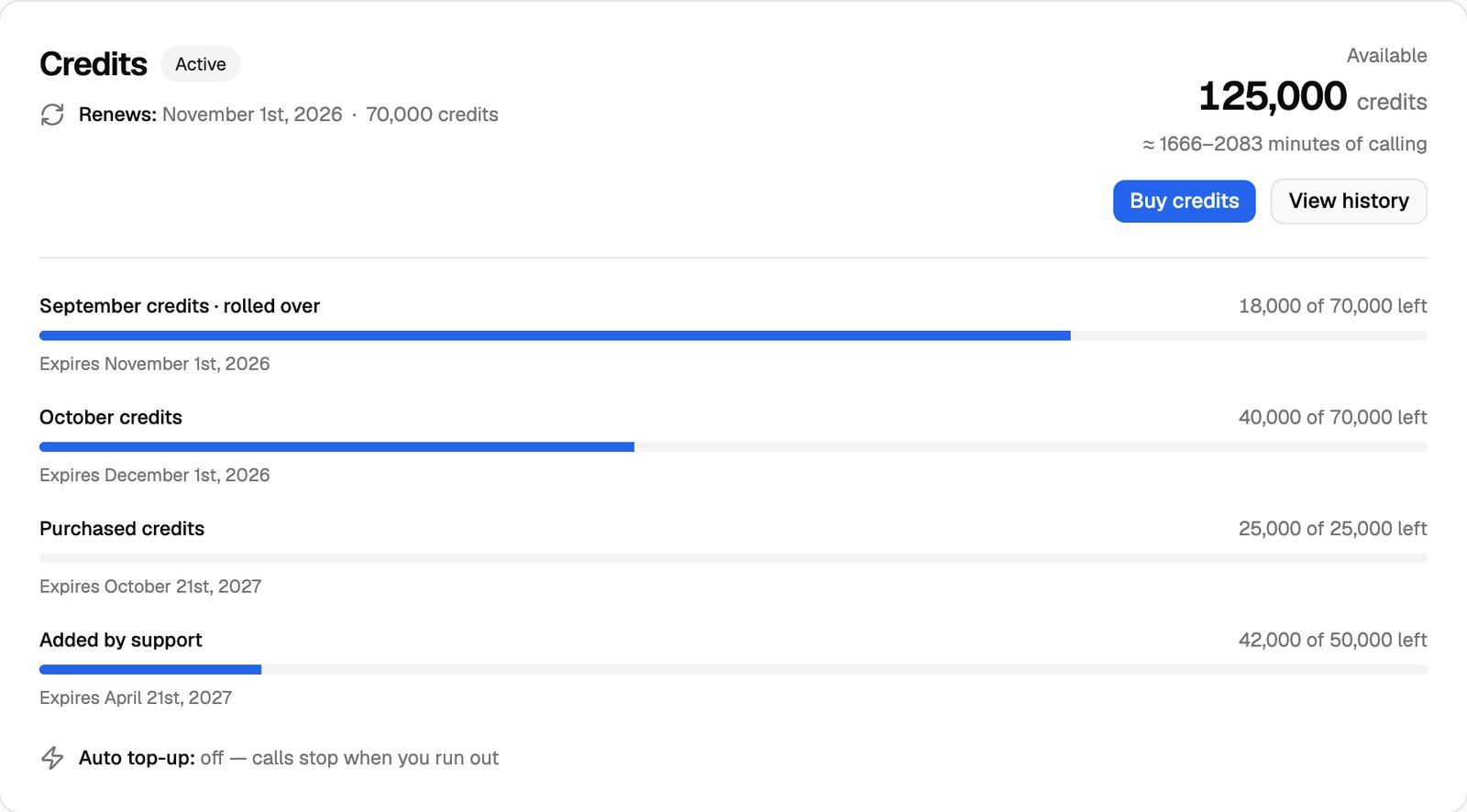
The Credits card appears once you have a subscription. If your credits haven't been set up yet, it says Credits start when your subscription does.
Frequently asked questions
Do my clients' calls use my credits?
Do my clients' calls use my credits?
Yes. Credits belong to your organization. VAW Native calls and chats in your client accounts' workspaces use the same balance. Clients don't see your credit costs: the cost section of a call's What ran tab is hidden in the client portal.
What happens to my monthly credits if I move to Pay-as-you-go?
What happens to my monthly credits if I move to Pay-as-you-go?
Pay-as-you-go doesn't include monthly credits, so new ones stop arriving after your move. Credits you already have stay on your balance until their own expiry dates. See Upgrade, Downgrade or Switch Billing Interval.
Can I see what a single call cost?
Can I see what a single call cost?
Yes. Open the call in Call Logs and select the What ran tab. The Cost section lists each line in credits. See Credit History and Per-Call Costs.
Where can I read a summary of the credit rules?
Where can I read a summary of the credit rules?
The page where you first choose your plan has a How do AI credits work? link. It explains what each plan includes, rollover and top-ups. Once you're subscribed, this article and your Credits card are the places to check.
Related articles
Was this helpful?
Still need help? Share an idea