Vapi Workflows and Squads
See your Vapi workflows and squads in VoiceAIWrapper, sync their webhooks so calls are tracked, and run them in campaigns with VAPI Calling Config.
Written By voiceaiwrapper
Last updated 26 days ago
Vapi has two ways to handle a call beyond a single assistant. A workflow is a visual call flow you build in Vapi's workflow builder. A squad is a team of assistants that hand the call to each other, for example a receptionist that passes billing questions to a billing assistant.
You build both in Vapi. VoiceAIWrapper lists them, lets you sync their webhooks so calls are tracked, and lets a campaign use a workflow or squad instead of a single assistant.
Applies to: Vapi Pods only. Retell AI, ElevenLabs and VAW Native don't have workflows or squads. For Retell AI's conversation-flow agents, edit them in Retell AI; they appear on the Agents page like other agents.
Before you start
- A connected Vapi Pod (an engine or provider connection), selected in the Pod selector. See Connect Vapi.
- At least one workflow or squad built in your Vapi account.
Where to find them
In the sidebar, under your Vapi Pod, open:
- Workflows ("View Workflows for your organization")
- Squads ("View Squads for your organization")
Like assistants, these lists are read from your Vapi account each time you open the page. New workflows and squads appear on their own, and changes you make in Vapi show up the next time you open the page. To change a workflow or squad, click Edit in Vapi in its row. It opens that workflow or squad in the Vapi dashboard in a new tab. You can't edit them inside VoiceAIWrapper.
The Workflows page
Use Search workflows... to find one by name, or the filter button to filter by name, ID, webhook URL or webhook status (Synced or Out of sync).
Sync a workflow's webhook
VoiceAIWrapper tracks a workflow's calls through a webhook: the web address Vapi sends call events to. A workflow shows Synced only when that address points to VoiceAIWrapper.
If you see Sync required:
- Hover over Sync required to see "Sync our webhook to use this workflow." and the address the workflow uses now, after Current:.
- Click Sync now.
You'll see "Workflow updated successfully", and the badge changes to Synced. If you see "Failed to update workflow", check that the Pod's Vapi keys still work. See Manage Pods: Rename, Update Keys, Switch and Delete.
The Squads page
Use Search squads... or the filter button to filter by name, squad ID, members or Webhook Status (All Valid or Issues Found).
Sync every member of a squad
A squad has no webhook of its own. Each assistant in it does. So VoiceAIWrapper checks every member that is a saved assistant in your Vapi account:
- All Valid (green): every member assistant sends its call events to VoiceAIWrapper.
- Sync required (amber): one or more members don't. Hover over it to see how many, for example "2 assistant(s) need webhook sync.", and a numbered list of their names.
To fix it, click Sync All. VoiceAIWrapper syncs only the members that need it. You'll see "Syncing 2 assistants..." and then "Successfully synced 2 assistants". If some of them fail, you'll see "Failed to sync some assistants". Click Sync All again to retry the rest.
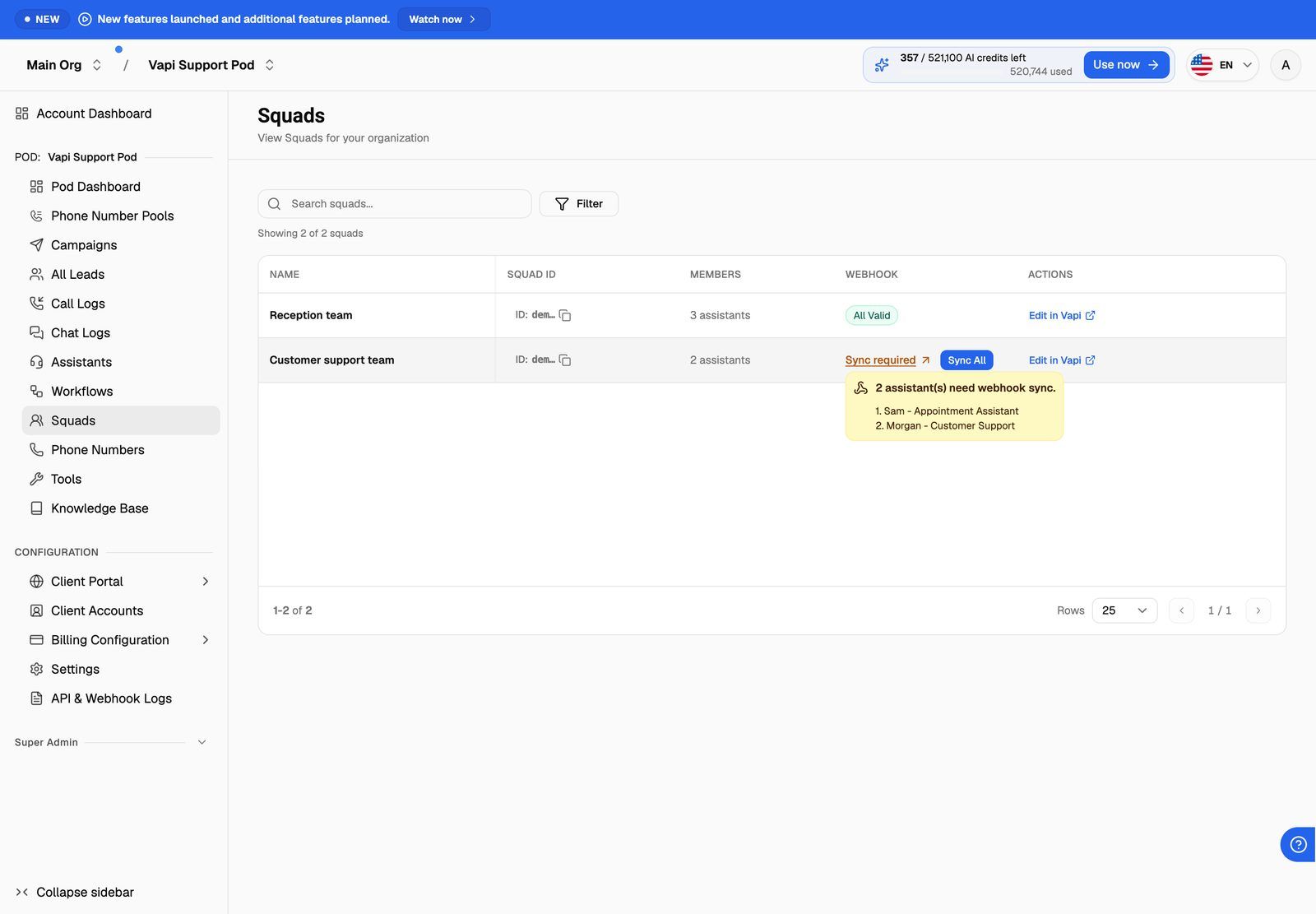
Because members are ordinary assistants, syncing a squad also marks those assistants Synced on the Assistants page. If you add a new assistant to the squad in Vapi later, the squad shows Sync required again until you sync it.
Syncing replaces the server URL on the workflow, or on each member assistant, in your Vapi account. If you were sending those call events to your own server, they'll go to VoiceAIWrapper instead. To keep getting call results in your own system, add a post-call event webhook to the campaign. See Post-Call Event Webhook.
Use a workflow or squad in a campaign
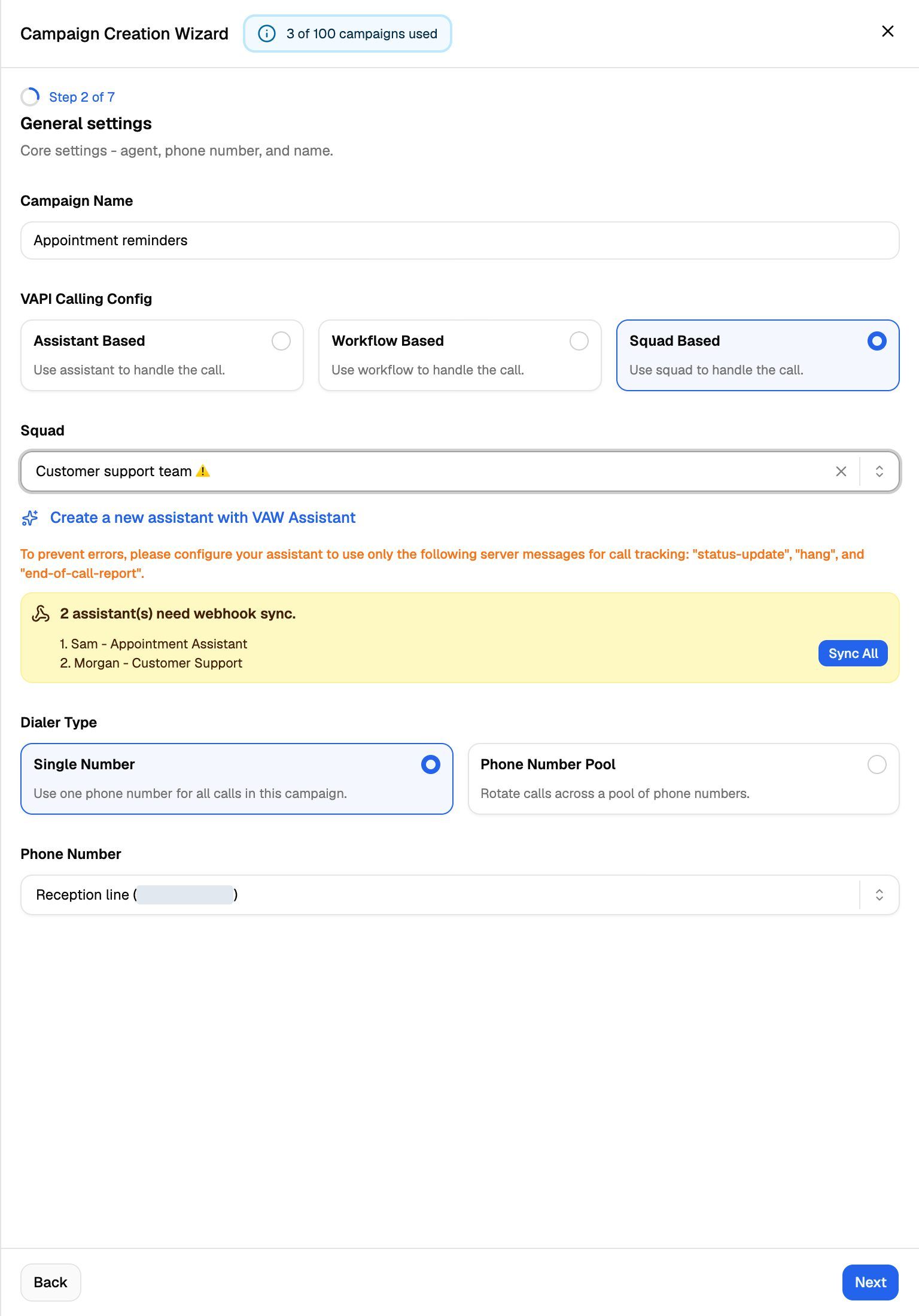
When you create an outbound phone or inbound phone campaign on a Vapi Pod, the General settings step starts with VAPI Calling Config. Choose what handles the calls:
- Under VAPI Calling Config, choose Workflow Based or Squad Based.
- Pick the workflow or squad from the dropdown that appears below.
- If a yellow panel appears under it, the webhook isn't synced yet. Click Sync now for a workflow, or Sync All for a squad.
- Pick the phone number or phone number pool and continue through the wizard.
You can't move past General settings until the webhooks are synced. You'll see "Sync webhooks on the selected agent and phone number before continuing."
On an inbound phone campaign, VoiceAIWrapper sends each incoming call to the workflow or squad you chose. You don't need to attach it to the phone number in Vapi.
To switch an existing campaign to a different workflow or squad, open the campaign, go to the Settings tab and open General Settings. The same VAPI Calling Config choice is there. For the full wizard, see Create a Campaign with the Campaign Wizard.
On Vapi campaigns, the wizard also shows: "To prevent errors, please configure your assistant to use only the following server messages for call tracking: "status-update", "hang", and "end-of-call-report"." For a squad, set this in Vapi on each member assistant.
The Inbound widget campaign type doesn't show VAPI Calling Config in the wizard.
Frequently asked questions
My workflow or squad isn't in the list.
My workflow or squad isn't in the list.
Check that you selected the right Vapi Pod in the Pod selector, and that the workflow or squad is in the Vapi account (and organization) this Pod is connected to. Then refresh the page.
Can I edit a workflow's or squad's prompt from VoiceAIWrapper?
Can I edit a workflow's or squad's prompt from VoiceAIWrapper?
No. Click Edit in Vapi and make the change there. For a squad, you can edit each member's greeting and system prompt on the Assistants page. See Edit Prompts and Greetings for Provider Agents.
Can my clients see workflows and squads?
Can my clients see workflows and squads?
Yes, if you assign them to the client's workspace. Clients can view them but can't sync or edit them. See Create a Workspace and Assign Assets.
Related articles
Was this helpful?
Still need help? Share an idea