Campaigns

Campaign Health Check (Beta)

Run a one-click diagnostic on a campaign: what it checks, how to read the result, and what to do about each warning.

Written By voiceaiwrapper

Last updated 26 days ago

When a campaign isn't calling or answering the way you expect, the health check tells you why in one click. It reviews the campaign's setup, status, schedule, leads and recent activity, then gives you a single headline result with the numbers behind it. It's the fastest first step before you dig through settings or contact support.

Beta: the health check is new and still being refined. It reads your campaign and reports; it doesn't change anything.

Before you start

  • The health check works on outbound and inbound campaigns, on every Pod (an engine or provider connection). You run it from the campaign's own page.
  • You don't need to pause the campaign. Running a check doesn't place calls, use credits or change settings.

Run a health check

  1. In your Pod, open Campaigns and click the campaign.
  2. At the right end of the tab bar, click Health check.
  3. Read the short description of what will be checked, then click Run health check.
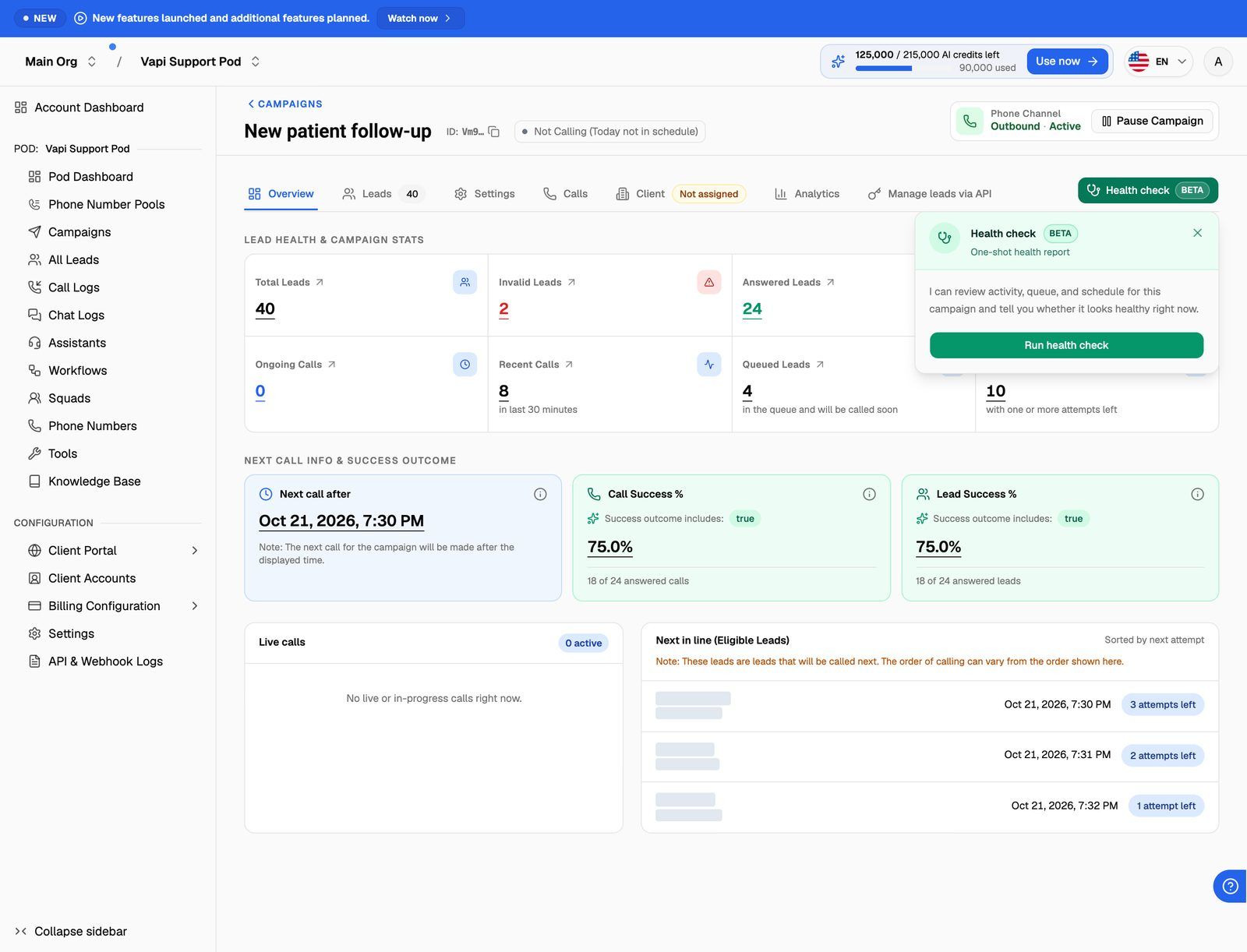
Campaign details page of an active outbound campaign, with the green 'Health check' button (stethoscope icon and Beta badge) at the right end of the tab bar, clicked open so the panel shows its intro state: 'Health check' title, Beta badge, 'One-shot health report', the intro sentence and the 'Run health check' button.

After a few seconds the panel shows the result. To check again later, click Run this again. There's a short wait between checks on the same campaign. While you wait, the panel shows Next check available in with a countdown.

What the health check looks at

The check runs through these areas in order and reports the first problem it finds. Fix that one, then run the check again to see if anything else needs attention.

  1. Provider setup (webhook sync). On Vapi, Retell AI, ElevenLabs and Bolna Pods, it checks that the campaign's agent, phone number and (for inbound widget campaigns) widget agents are connected to VoiceAIWrapper's webhook. Without this, VoiceAIWrapper can't track calls. VAW Native and Ultravox Pods skip this step.
  2. Campaign status. Whether the campaign is switched off, paused for billing, still a draft, scheduled, paused or ended. For inbound campaigns on ElevenLabs and Bolna, only the switch and billing are checked.
  3. Calling window. For outbound campaigns, and for inbound campaigns on Vapi and Retell AI, whether you're inside the campaign's days and hours right now.
  4. Pre-call webhook. For outbound campaigns with a pre-call context webhook and If the webhook doesn't answer set to Call later: whether any lead was pushed back in the last 60 minutes because your webhook didn't give a usable answer.
  5. Leads and dialer. For outbound campaigns: whether there are leads, whether every lead is already finished, whether calls are going out, and whether leads are waiting for their next attempt or for a free line.

Read the result

The coloured banner at the top is the headline:

  • Green: the campaign looks healthy.
  • Amber: something needs a look, but it may be expected (for example, you're outside the calling window).
  • Red: the campaign can't work until you fix something.

Below it, a table shows the numbers behind the result, then Checked at with the time of the check in the campaign's timezone.
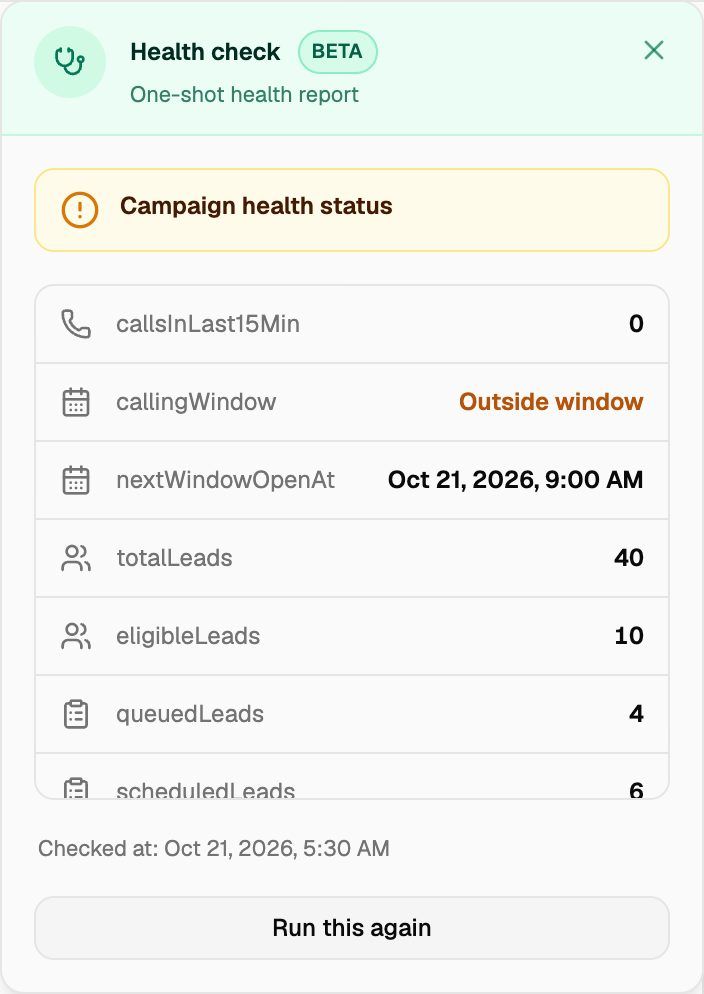
The Health check panel after a run on an outbound campaign that is outside its calling window: the amber banner with the result message, the metrics table (Calls in last 15 min, Calling window showing 'Outside window', Next window opens at, Total leads, Eligible to dial, Queued, Scheduled, Answered, Invalid, Do not call, Max attempts reached, Next attempt after), the 'Checked at' line and the 'Run this again' button.
MetricWhat it showsShown for
Calls in last 15 minCalls the campaign made or received in the last 15 minutes.All campaigns
Calling windowIn window now or Outside window.Outbound; inbound on Vapi and Retell AI
Next window opens atWhen the next calling window starts.Outbound; inbound on Vapi and Retell AI
Total leadsAll leads in the campaign.All campaigns
Eligible to dial, Queued, ScheduledLeads waiting to be called, being dispatched now, or booked for a later time.Outbound
Answered, Invalid, Do not call, Max attempts reachedLeads that are finished and won't be called again.Outbound
Next attempt afterThe earliest time a waiting lead can be retried.Outbound

Results and what to do

Provider setup

ResultWhat to do
The agent, assistant, workflow, squad member, phone number or widget agent "is missing the correct webhook URL" (or secret)Re-sync the webhook. Open the campaign's Settings β†’ General Settings. Next to the agent or phone number you'll see Sync our webhook to use this … with a Sync now button. For a widget agent, use Sync now on the campaign's Web Widget tab. See Sync Webhooks So VoiceAIWrapper Can Track Calls.
Vapi or Retell AI phone number "has a default destination set", "has a default agent or routing set" or "is tied to an assistant, workflow, or squad"Use Sync now on the phone number. Its warning reads Sync our webhook and remove default destination to use this phone number.
ElevenLabs post-call webhook "is not configured", "was not found", "does not point to VoiceAIWrapper" or "is disabled", or the ElevenLabs agent "is not linked to the correct post-call webhook"Check the workspace webhook in your ElevenLabs account, then re-sync from the campaign settings.
"Vapi assistant is missing required server events"Open the assistant in your Vapi account and turn on the server events listed in the message.
"The Vapi squad has no members to validate."Add assistants to the squad in Vapi, or pick a different squad.
"Could not verify provider configuration. Try again or check your API credentials."Run the check again. If it repeats, check the API keys on your Pod. See Manage Pods: Rename, Update Keys, Switch and Delete.

Campaign status and schedule

ResultWhat to do
"Campaign is disabled. Enable it to start calling."Turn on the Campaign Switch on the Campaigns list.
"Campaign is paused due to billing. Resolve billing to resume calling."Settle the billing issue, then resume.
"Schedule this campaign to start calling."The campaign is still a draft. Click Schedule Campaign or Activate Campaign.
"Campaign is scheduled and will start when its start date is reached."Nothing, unless the start date is wrong.
"Campaign is paused. Resume it to start calling."Click Resume Campaign.
"Campaign has ended. Reactivate it to start calling again."Click Reactivate Campaign.
"Outside the calling window. Next window opens …"Expected outside your hours. Change the schedule if the window is wrong. See Set the Schedule and Calling Window.

For what each status means, see Campaign Statuses and the Campaign Switch.

Pre-call webhook

ResultWhat to do
Pre-call webhook not answering: "Leads are being moved to later because the pre-call webhook isn't answering. Check the webhook URL and that your endpoint is up."Check the Pre-call context webhook URL in Settings β†’ Webhooks and Emails, and that your endpoint is running and answering quickly. See Pre-Call Context Webhook.

Leads and dialer (outbound)

ResultWhat to do
"Add leads to start calling."Add leads on the Leads tab. See Import Leads from a CSV File.
"All leads have been answered."The campaign has finished its work. Add new leads to keep calling.
"All leads are marked invalid." / "All leads are on the do-not-call list." / "All leads have reached the maximum call attempts." / "All leads are finished (answered, invalid, DNC, or max attempts)."Nothing is left to call. Add new leads, or fix and re-allow leads on the Leads tab.
"Calls are queued or in progress."Healthy. Calls are going out.
"Next call after …"Healthy. Leads are waiting for the redial wait to pass.
"Provider concurrency is fully in use; eligible leads are waiting for a slot."All your lines are busy. Leads are called as lines free up. See 'Concurrency Limit Reached' and '429 Too Many Requests'.
"Campaign is active but in an unexpected state. Run another check or contact support."Wait a minute and run the check again. If it repeats, contact support.

Inbound campaigns that pass every step show "Campaign is ready and handling inbound calls."

Frequently asked questions

The check reports one headline at a time and looks at the campaign as it is right now. Work through My Outbound Campaign Isn't Calling for the less common causes.

You ran a check on this campaign moments ago. Wait for the countdown in Next check available in to finish, then run it again.

No. It only reads the campaign and reports what it finds. Use the steps in the tables above to fix the issue, then run the check again to confirm.

When you contact support about a campaign, include a screenshot of the health check result. It saves a round of questions.