Phone Numbers on Vapi, Retell, ElevenLabs and Bolna
Numbers you buy or import in Vapi, Retell AI, ElevenLabs or Bolna appear in VoiceAIWrapper automatically. Sync Vapi and Retell AI numbers so calls route through campaigns.
Written By voiceaiwrapper
Last updated 26 days ago
On Vapi, Retell AI, ElevenLabs and Bolna Pods (an engine or provider connection), your phone numbers live in your provider account. You buy or import them there, and VoiceAIWrapper lists them for you automatically. Vapi and Retell AI numbers need one extra step: sync our webhook onto the number, so VoiceAIWrapper can send its inbound calls through your campaigns.
Applies to: Vapi, Retell AI, ElevenLabs and Bolna Pods (your own provider accounts). On VAW Native you buy and connect numbers inside VoiceAIWrapper. See Buy a New Phone Number.
Before you start
- A connected Pod for your provider account. See Connect Vapi, Connect Retell AI or Connect ElevenLabs Agents.
- At least one number in that provider account. Buy or import it in the provider's dashboard first. The provider bills you for it, not VoiceAIWrapper.
Where your numbers come from
VoiceAIWrapper doesn't buy, import, rename or delete numbers on these Pods. You do that in the provider's dashboard. When you open the Phone Numbers page, VoiceAIWrapper reads the current list from the provider account the Pod is connected to. A number you add there shows up the next time you open or reload the page.
Find your numbers
In the sidebar, under your Pod, open Phone Numbers. The page title and what you can do there depend on the provider:
Use the search box to find a number, and the filter button to narrow the list. On Vapi and Retell AI you can filter by Webhook: Synced or Out of sync. Under the search box you'll see how many numbers are showing.
On Vapi, Edit in Vapi in the Actions column opens that number in your Vapi dashboard.
Sync the webhook on a Vapi or Retell AI number
For inbound calls, VoiceAIWrapper decides which campaign answers each call to the number. Syncing points the number at VoiceAIWrapper:
To sync a number:
- Open the Pod's Phone Numbers page.
- In the Webhook column, look for Sync required. Hover over it to see the reason ("Sync our webhook and remove default destination to use this phone number.") and the webhook the number uses now.
- Click Sync now next to it.
You'll see a confirmation, and the column shows a green Synced badge.
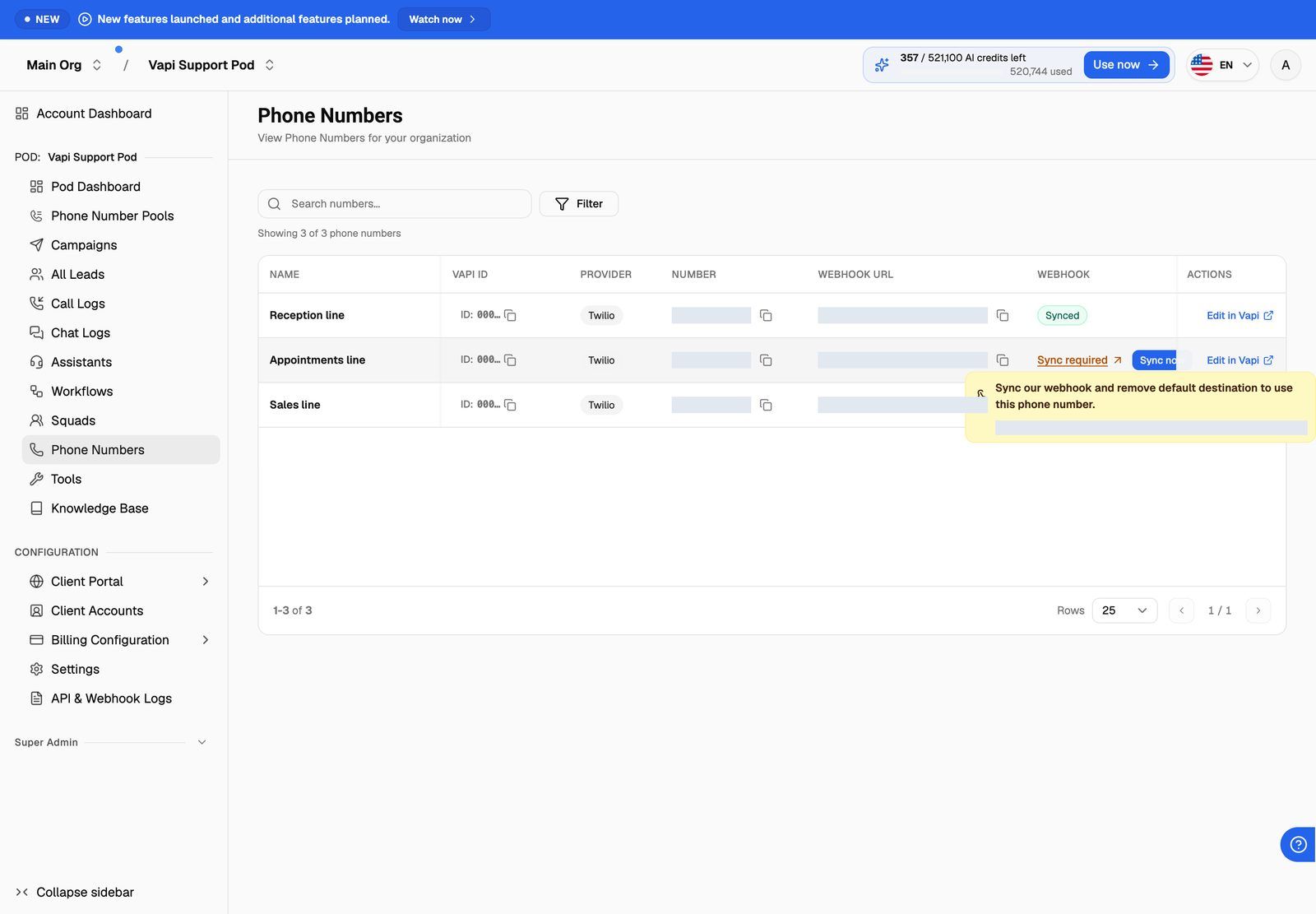
Syncing replaces the number's current webhook in your provider account and detaches the assistant or agent that used to answer it. After that, an inbound call is answered only while an active inbound campaign uses the number, directly or through a phone number pool, and only within that campaign's schedule. Set up that campaign right after you sync, or callers won't reach an agent. See Run an Inbound Phone Campaign.
If someone later attaches an assistant or agent, or changes the webhook in the provider's dashboard, the number goes back to Sync required. Click Sync now again.
ElevenLabs and Bolna numbers have no webhook to sync. VoiceAIWrapper doesn't change who answers them.
Use the number
Once a Vapi or Retell AI number is synced (or straight away for ElevenLabs and Bolna), you can use it:
- In campaigns. In the campaign wizard's number picker, Vapi and Retell AI numbers that still need syncing are marked with a warning sign. If you pick one as a single number, the wizard shows the same sync notice with a sync button, and won't continue until it's synced: "Sync webhooks on the selected agent and phone number before continuing." See Create a Campaign with the Campaign Wizard.
- In phone number pools, to rotate caller IDs. You can also sync a number from the pool's details. See Rotate Caller IDs with Phone Number Pools.
- In client workspaces. Numbers that aren't synced can't be assigned to a client: "Some selected phone numbers have invalid webhook URLs. Please sync them first." See Create a Workspace and Assign Assets.
On Bolna, the campaign settings remind you to select the right telephony provider in the agent's own configuration in Bolna (Agent → Call → Telephony Provider). Check it there before you start a campaign.
Troubleshooting
A number I added in my provider account isn't showing.
A number I added in my provider account isn't showing.
Reload the Phone Numbers page. If it's still missing, check that you added it to the same provider account (and API key) the Pod is connected to. If the page shows a red error above the list, VoiceAIWrapper couldn't reach your provider. Check the Pod's API key. See Manage Pods: Rename, Update Keys, Switch and Delete.
Sync now didn't work.
Sync now didn't work.
You'll see an error message (on Retell AI, "Failed to update webhook"), and the number stays on Sync required. This usually means the Pod's API key no longer works, or the number was removed in the provider. Check both, then try again.
The number is synced but nobody answers inbound calls.
The number is synced but nobody answers inbound calls.
A synced number has no agent of its own. It needs an active inbound campaign that uses it, directly or through a pool, and the call has to arrive inside the campaign's schedule. Check that the campaign exists, is active, is switched on and has this number or pool selected. See My Phone Number Doesn't Ring.
I want to remove a number.
I want to remove a number.
Delete or release it in your provider's dashboard. It disappears from VoiceAIWrapper the next time the page loads. Take it out of any campaign or pool first so they don't keep trying to use it.
Related articles
Was this helpful?
Still need help? Share an idea