Data Retention: Recordings, Transcripts, Logs and Exports
How long VoiceAIWrapper keeps call recordings, transcripts, API and webhook logs, export files and recording links, and how to change it for VAW Native Pods.
Written By voiceaiwrapper
Last updated 26 days ago
This page lists how long VoiceAIWrapper keeps each kind of call data, and which of those periods you can change. Use it to answer client questions about data retention, and to set VAW Native recordings and transcripts to match your own policy.
At a glance
VAW Native recordings and transcripts
Applies to: VAW Native Pods. For Vapi, Retell AI and ElevenLabs, see "Recordings on Vapi, Retell AI and ElevenLabs" below.
Each VAW Native Pod (an engine or provider connection) has two retention settings:
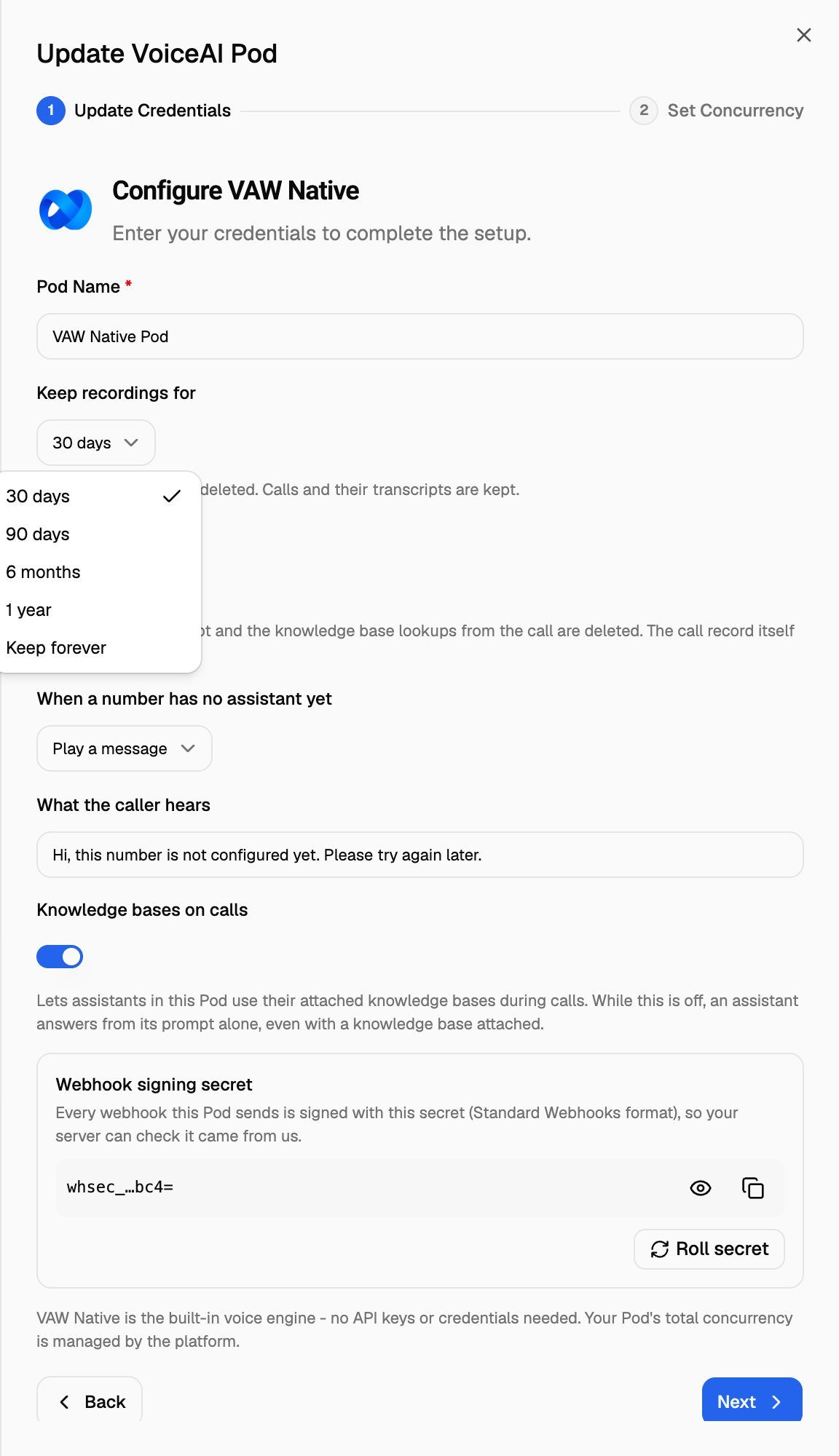
Both settings offer the same choices: 30 days, 90 days, 6 months, 1 year and Keep forever. The period is counted from the day of the call or chat, and a check runs once a day to remove anything past it.
Whether a call is recorded at all is set per agent, with Record calls on the agent's Call Settings tab. See Call Settings: Recording, Silence Timeout and Maximum Call Length.
Change the retention period
- Open the Pod selector in the sidebar. For the Pod you're in, click the pencil (Edit) button. For another Pod, open its ⋮ menu and choose Edit. The Update VoiceAI Pod drawer opens.
- Under Keep recordings for, choose how long to keep call audio.
- Under Keep transcripts for, choose how long to keep transcripts and chat messages.
- Click Next to save. You'll see VoiceAI pod credential updated successfully, and the drawer moves on to Set Concurrency. You can close it there if you don't want to change concurrency.
A shorter period applies to past calls too. If you change Keep recordings for from 1 year to 30 days, every recording older than 30 days is deleted at the next daily check. Deleted recordings and transcripts can't be recovered, and choosing a longer period later doesn't bring them back. Download anything you need first.
What you see after data is removed
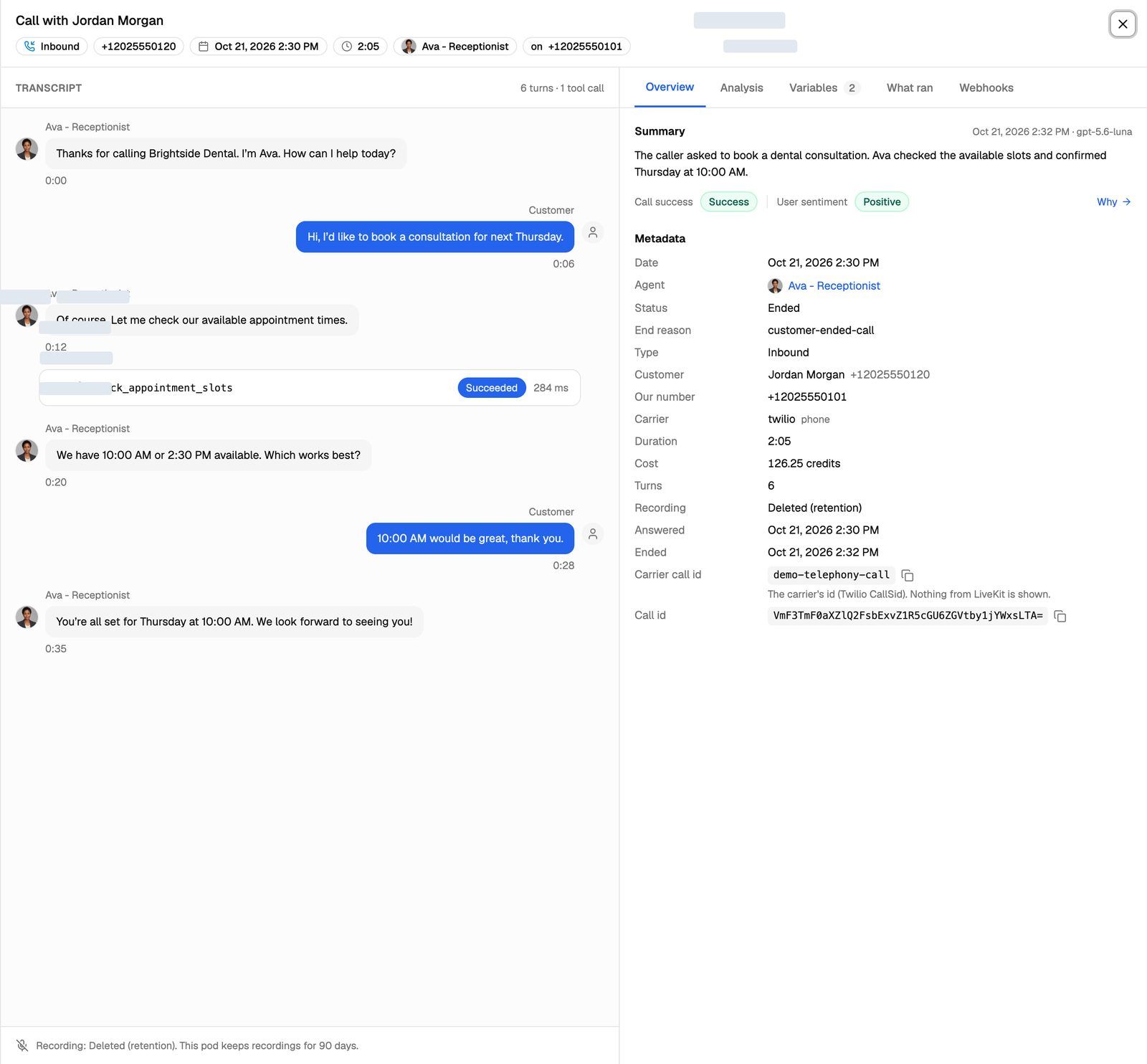
- Recording removed: under the transcript, the call's details show Recording: Deleted (retention). followed by how long the Pod keeps recordings. The transcript and summary are still there.
- Transcript removed: the call shows No transcript is available for this call. A chat shows The messages were deleted after this Pod's transcript retention period. The tool calls, analysis and cost are kept.
Recordings on Vapi, Retell AI and ElevenLabs
For Pods that use your own provider account, the recording stays in that account. VoiceAIWrapper doesn't keep its own copy. When you or your client play or download a recording, it's fetched from your provider at that moment.
That means your provider's retention rules apply. If the provider deletes a recording, it can no longer be played in VoiceAIWrapper either. Recording links that VoiceAIWrapper creates for these calls don't expire on their own, but they stop working once the provider deletes the audio. Check your provider's settings if you need recordings kept for a set time.
The call log entries themselves (status, transcript, summary) stay in VoiceAIWrapper until you delete the campaign or the Pod.
API & Webhook Logs
API & Webhook Logs in the sidebar lists API requests and webhook deliveries for your organization. How long these logs are kept depends on your plan. The page shows the number of days at the top ("Logs are retained for … days on your current plan."). Older entries are removed automatically.
If your plan doesn't store API logs, the sidebar item is hidden. VAW Native webhook deliveries are still kept for 14 days on every plan, and you can see them on each VAW Native call's Webhooks tab.
See API & Webhook Logs.
Export files
Lead exports, call log exports and chat log exports run in the background and appear under Export History. Each file is kept for 7 days. After that, the file and its entry in Export History are deleted. Download your exports within 7 days, and run the export again if you need a fresh copy.
See Export Leads and Export Call and Chat Logs.
Recording links in VAW Native webhooks
Call events sent to an agent's webhook URL can include a link to the call recording. The link works for 7 days after it's sent. After that it returns This link is invalid or has expired. If you need the audio for longer, download it and store it on your side when the event arrives.
The link also stops working if the recording is removed by the Pod's retention setting first. It then returns No recording is available. See VAW Native Agent Webhooks: Events and Delivery.
Inactive campaigns
Campaigns with no activity are marked and then deleted after a warning period of at least 30 days, together with their leads and their Vapi, Retell AI and ElevenLabs call and chat logs. VAW Native call and chat records are kept. See How Campaign Cleanup Works.
Data you delete yourself
Some deletions remove data straight away and can't be undone:
- Deleting a campaign removes its leads, its web widget, its exports, and its Vapi, Retell AI and ElevenLabs call and chat logs.
- Deleting a Pod removes all of its campaigns, phone number pools, calls, analytics data, client configurations and related Stripe products. See Manage Pods: Rename, Update Keys, Switch and Delete.
- Deleting your account: see Delete Your Account and Inactive Free Accounts.
Frequently asked questions
Can I keep recordings forever?
Can I keep recordings forever?
Yes, on VAW Native Pods. Set Keep recordings for to Keep forever. Recordings already deleted under the old setting can't be restored.
Do retention settings apply to my client's calls too?
Do retention settings apply to my client's calls too?
Yes. Retention is set per Pod, so it covers every call and chat on that Pod, whichever client or campaign it belongs to.
My export link stopped working.
My export link stopped working.
Export files are deleted 7 days after they're created. Run the export again from the same page.
Related articles
Was this helpful?
Still need help? Share an idea