Post-Call Event Webhook
Send every call event from a campaign to your own URL, with the lead and campaign attached, and see what each engine sends.
Written By voiceaiwrapper
Last updated 26 days ago
The post-call event webhook sends what happens on each campaign call to your own URL: call status, transcript, recording, analysis and cost, depending on the engine. Each request also says which campaign and which lead the call belongs to, so your CRM or automation can update the right record without looking anything up.
It takes a minute to set up. You need one URL that accepts POST requests with a JSON body, such as a Make, n8n or Zapier webhook trigger, or your own server.
Before you start
- A campaign of any type: outbound phone, inbound phone or inbound widget.
- The campaign in Draft or Paused. Settings are locked while a campaign is Active or Scheduled. Pause an active campaign, or move a scheduled one back to Draft, then come back.
- A URL that accepts POST requests. On VAW Native it must start with
https://.
Add the webhook to a campaign
- Open the campaign and go to the Settings tab.
- Open Webhooks and Emails.
- Paste your URL into Post-call event webhook.
- Optional: open Custom headers under the field and click Add header to send a header with every request, for example
Authorization. See Add Custom Headers to Webhooks. - Click Save Settings.
You can also fill it in at the Webhooks & email step when you create an outbound or inbound phone campaign.
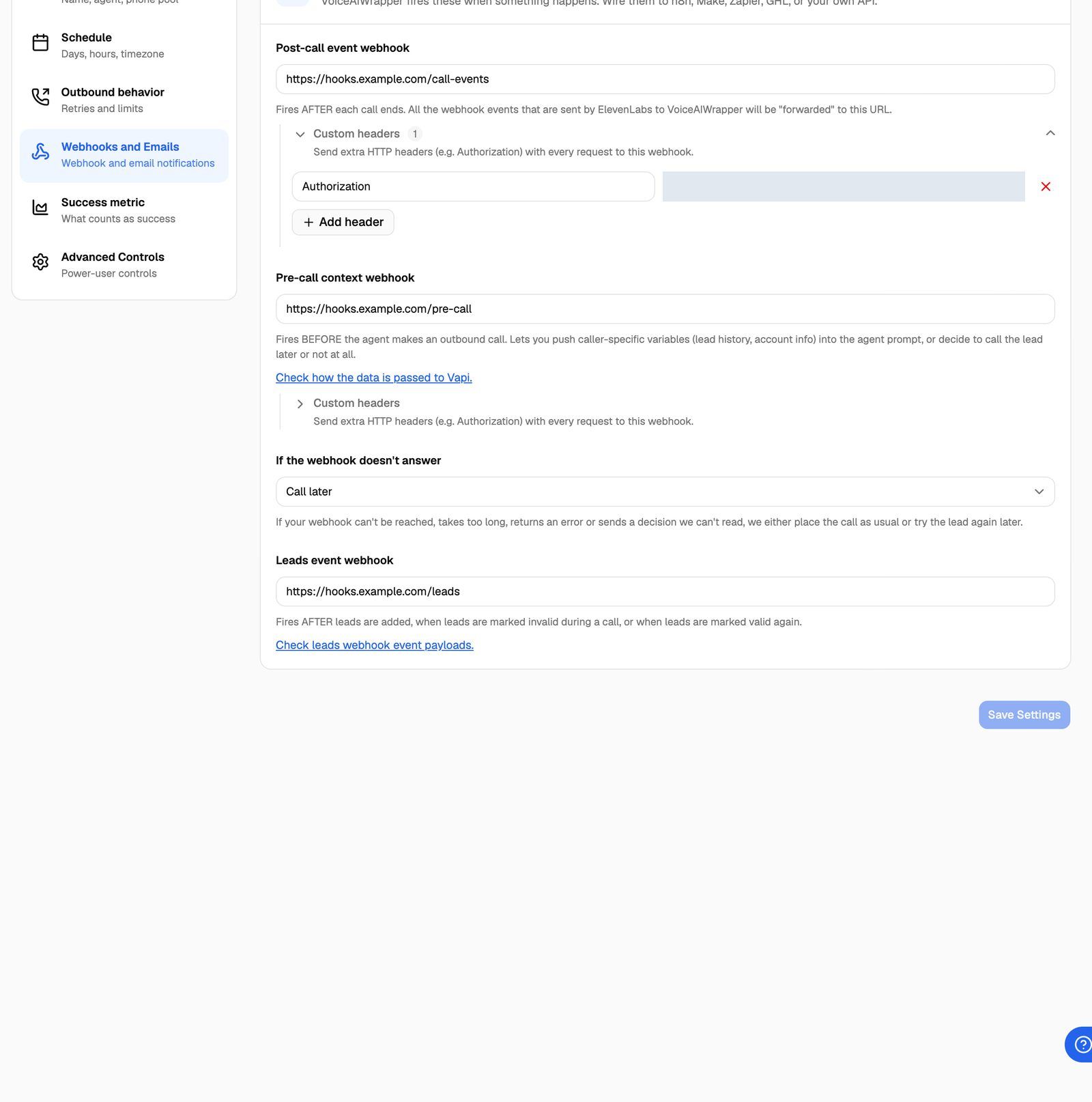
If your agent sent its events to your own tool before you synced it with VoiceAIWrapper, paste that old URL here. You'll keep receiving the same events, now with the campaign and lead attached. See Sync Webhooks So VoiceAIWrapper Can Track Calls.
If you see "Looks like you are trying to add our webhook URL. This can create an infinite loop. Please use a different URL.", you pasted a VoiceAIWrapper address. Use your own endpoint instead.
What each engine sends
The webhook receives one request per event, so a single call usually produces several requests. Which events you get depends on the campaign's engine.
For the exact fields of each engine's own events, see that engine's documentation. VAW Native events are described in VAW Native Agent Webhooks: Events and Delivery.
What VoiceAIWrapper adds (Vapi, Retell AI, ElevenLabs, Bolna, Ultravox)
The engine's event is passed through unchanged. VoiceAIWrapper adds two objects at the top level, unless the event already has a key with the same name:
{
  "_campaign_metadata": {
    "campaign_id": "Vm9pY2VDYW1wYWlnblR5cGU6MTIzNDU2Nw==",
    "campaign_name": "Spring renewals",
    "type": "OUTBOUND",
    "status": "ACTIVE",
    "tenant_id": "VGVuYW50VHlwZTox",
    "voice_provider_id": "VGVuYW50Vm9pY2VQcm92aWRlclR5cGU6MQ==",
    "assigned_client": { "id": "Q2xpZW50VHlwZTo0Mg==", "name": "Acme Dental" },
    "asset_group_id": null
  },
  "_lead_metadata": {
    "id": "Vm9pY2VDYW1wYWlnbkxlYWRUeXBlOjEyMzQ1Njc4",
    "first_name": "John",
    "last_name": "Doe",
    "email": "john@example.com",
    "phone_number": "+14155550182",
    "custom_fields": { "plan": "Gold" },
    "attempts_made": 1,
    "invalid_reason": null,
    "answered": true,
    "answer_type": null,
    "answered_at": "2026-10-15T14:03:10+00:00"
  }
}
_campaign_metadatais on every event.assigned_clientnames the client account the campaign is assigned to, or isnull.tenant_ididentifies your organization andvoice_provider_idthe Pod._lead_metadatais added when the call has a lead: outbound calls and inbound phone calls (an inbound caller who isn't a lead yet is added to the campaign as one). Web widget calls and chats have no lead, so they arrive without it.
VAW Native campaigns
On VAW Native the webhook receives the same events, in the same format, as an agent's own Webhook URL. The campaign and lead are inside the call object:
"campaign": { "id": "Vm9pY2VDYW1wYWlnblR5cGU6MzEy", "name": "Spring renewals", "type": "OUTBOUND" },
"lead": {
  "id": "Vm9pY2VDYW1wYWlnbkxlYWRUeXBlOjQ4MjE=",
  "first_name": "Sam",
  "last_name": "Lee",
  "email": "sam@example.com",
  "phone_number": "+15555550100",
  "custom_fields": { "plan": "Silver" }
}
Chat events from a widget campaign carry a chat object instead, with campaign but no lead.
If the agent also has a Webhook URL, both URLs receive every event. If both are the same URL, it receives each event once.
How requests are delivered
On VAW Native, check the signature with your Pod's Webhook signing secret instead of a custom header. See Verify Webhook Signatures. Each call's Webhooks tab shows every delivery, its response, and a Resend button.
Answer quickly with a 2xx status and do the heavy work afterwards. Your endpoint will receive several events per call, and some arrive close together.
Troubleshooting
Nothing arrives at my URL.
Nothing arrives at my URL.
Check that:
- The URL is saved in Post-call event webhook on the campaign that placed the call. Calls placed outside a campaign (test calls, one-off calls) don't use campaign webhooks.
- On Vapi, Retell AI and ElevenLabs, the campaign's agent and phone number are synced, so the engine sends its events to VoiceAIWrapper. See Sync Webhooks So VoiceAIWrapper Can Track Calls.
- On VAW Native, the URL starts with
https://and points to a public address. Open a call's Webhooks tab to see what happened.
For more checks, see My Webhook Isn't Receiving Data.
Some requests have no _lead_metadata.
Some requests have no _lead_metadata.
That's expected for calls without a lead: web widget calls and chats.
I receive several requests for one call.
I receive several requests for one call.
Each event is a separate request. Use the event type (for example call.analyzed on VAW Native or call_analyzed on Retell AI) to act only on the one you need, usually the last one, which carries the analysis.
My endpoint needs an API key in a header.
My endpoint needs an API key in a header.
On Vapi, Retell AI, ElevenLabs, Bolna and Ultravox, add it under Custom headers. On VAW Native, verify the request signature instead. See Add Custom Headers to Webhooks.
Related articles
Was this helpful?
Still need help? Share an idea