Use a Phone Number You Already Own
Connect a number that's already in your Twilio account to a VAW Native agent, for free. Includes how to bring numbers from other carriers.
Written By voiceaiwrapper
Last updated 26 days ago
If you already have numbers in your Twilio account, you can put a VAW Native agent on any of them. Your clients keep the number their customers already know.
Connecting a number you own is free. VoiceAIWrapper points the number at your agent, and Twilio keeps billing your account exactly as before.
Applies to: VAW Native Pods. For Vapi, Retell AI and ElevenLabs, see Phone Numbers on Vapi, Retell, ElevenLabs and Bolna.
Before you start
You'll need:
- A connected and verified Twilio account that holds the number. See Connect Your Twilio Account to VAW Native.
- A number that can take voice calls. Numbers that Twilio reports as not voice-capable can't be connected.
- An agent to answer it (optional). You can connect the number now and choose the agent later.
Connecting a number takes over its incoming calls. VoiceAIWrapper changes the number's voice settings in Twilio so calls go to your agent. Whatever handled calls on that number before, such as another app or a Twilio Studio flow, stops receiving them. If the number is in use, plan the switch for a quiet time.
Step 1: Pick the number
- In your VAW Native Pod, open Phone Numbers and click Add a number.
- Stay on the Use a number you own tab.
- If more than one of your Twilio connections has passed its check, choose the one that holds the number under Connection.
- Find your number in the list. To narrow it down, type part of the number or its Twilio name in Filter by number or name.
- Click the number.
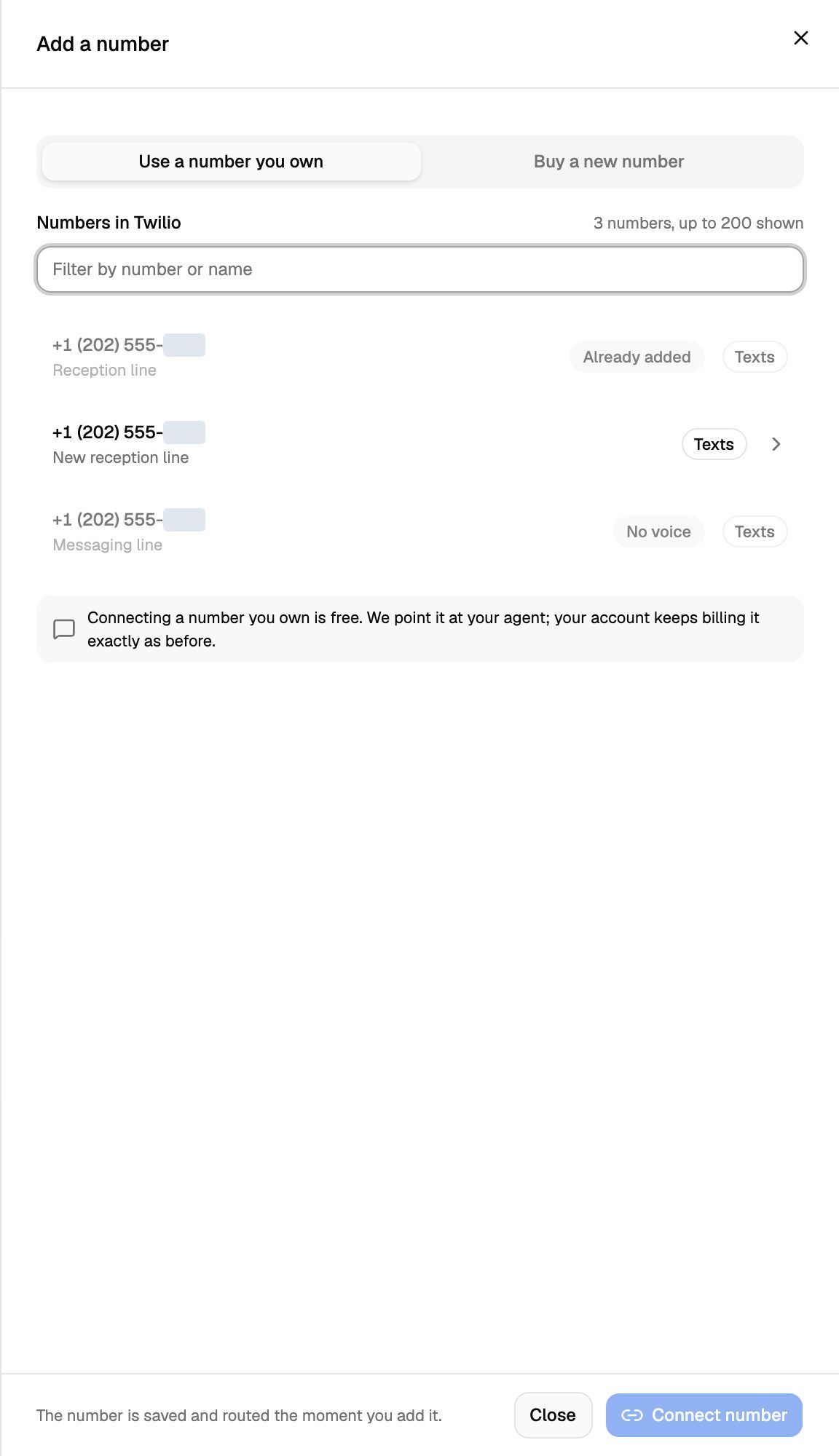
The list reads the numbers straight from your Twilio account and shows up to 200 of them. Each row can have these badges:
Rows marked Already added or No voice are greyed out.
Step 2: Choose who answers and connect
- Under Answers as, choose the agent that should answer the number, or leave No agent yet. Only agents in this Pod are listed.
- Phone number's nickname is filled in with the number's name from Twilio. Change it to something you'll recognise, such as
Main lineorAfter hours. - Click Connect number.
You'll see "number connected", and the number's settings open. Calls to the number now go to the agent you chose.
Call the number from your own phone to check that your agent answers. If you left No agent yet, you'll hear your Pod's response for numbers without an agent: a message or a busy tone.
On the Phone Numbers page, the Source column shows Connected from your account for numbers you brought in this way, and Bought here for numbers you bought through VoiceAIWrapper.
Bring a number from another carrier
VAW Native can only use numbers that are in a Twilio account. If your number is with another phone company, such as your current business line, move it into Twilio first:
- In your Twilio Console, start a request to port the number in, and follow Twilio's steps.
- When the number shows up in your Twilio account, follow the steps above to connect it.
Twilio is the only telephony provider VAW Native supports today. See Supported Countries, Carriers and SIP.
Frequently asked questions
Does connecting a number cost anything?
Does connecting a number cost anything?
Not from VoiceAIWrapper. Twilio keeps billing the number to your Twilio account as before. Calls on the number use your Twilio account and your AI credits as usual.
My number isn't in the list.
My number isn't in the list.
Check that you've chosen the right Twilio account under Connection, and that the number is in that account (not in a different Twilio account or subaccount). The list shows up to 200 numbers, so in a very large account a number may not appear. If it still isn't there, contact support with the number.
The number says "Already added".
The number says "Already added".
A number can only be connected in one place in VoiceAIWrapper, and this one already is: usually in this Pod, another of your VAW Native Pods, or a client's portal. To move it, disconnect it where it is now, then connect it here. If you can't find it anywhere, contact support with the number. See Disconnect or Release a Number.
"… is not in that Twilio account."
"… is not in that Twilio account."
Twilio doesn't list the number under the connection you chose. Pick the connection for the Twilio account that holds the number, then try again.
"… cannot receive voice calls."
"… cannot receive voice calls."
Twilio reports the number as unable to take voice calls. Use another number, or buy one. See Buy a New Phone Number.
It says "No numbers in that account yet", but the account has numbers.
It says "No numbers in that account yet", but the account has numbers.
VoiceAIWrapper may not be able to read your numbers from Twilio. Open Connected telephony accounts and click Re-check on the connection. If the check fails, use Update credentials. See Connect Your Twilio Account to VAW Native.
If I disconnect the number later, do I lose it?
If I disconnect the number later, do I lose it?
No. Disconnecting a number you brought in only stops VoiceAIWrapper from answering it, and it stays in your Twilio account. VoiceAIWrapper clears the number's voice settings in Twilio, so point it back to wherever it went before in your Twilio Console.
Related articles
Was this helpful?
Still need help? Share an idea