Define What Counts as a Successful Call
Choose how VAW Native judges call success: pass or fail, a score, a percentage, a descriptive scale or a checklist of required items.
Written By voiceaiwrapper
Last updated 26 days ago
Every VAW Native call can get a call success verdict: did the call do what your agent is there for? You decide how that's judged. A booking agent might need an appointment confirmed; a survey agent might need every question answered. A clear definition makes the verdict something you can trust, filter on and report to clients.
Applies to: agents on a VAW Native Pod (an engine or provider connection). For Vapi, Retell AI and ElevenLabs, success comes from the provider's own analysis.
Before you start
- Post-call analysis turned on for the agent, with Call success switched on. Both are on for new agents. See Post-Call Analysis: Summary, Sentiment and Call Success.
- A clear idea of the agent's goal. Write down what has to happen on a good call before you set this up.
How success is judged by default
Out of the box, the analysis model reads your agent's prompt to work out what the agent is meant to achieve, then decides whether this call achieved it. The default scale is Pass or fail.
If you built the agent with the AI Agent Builder, Call success is already set to Pass or fail, with instructions the builder wrote from your answers ("A call counts as a success when …"). Check them on the Call success panel and adjust them if needed.
Whatever scale you pick, every call also gets one plain verdict: Success, Failure or Unknown. Unknown means the transcript was too thin to judge, and it's an honest answer rather than a guess. This verdict is what the Call success column and filter in Call Logs use, so you can compare calls across agents that use different scales.
Step 1: Open the Call success settings
- In the sidebar, open Agents and click your agent.
- Open the Analysis tab.
- Click the Call success row. A panel opens on the right.
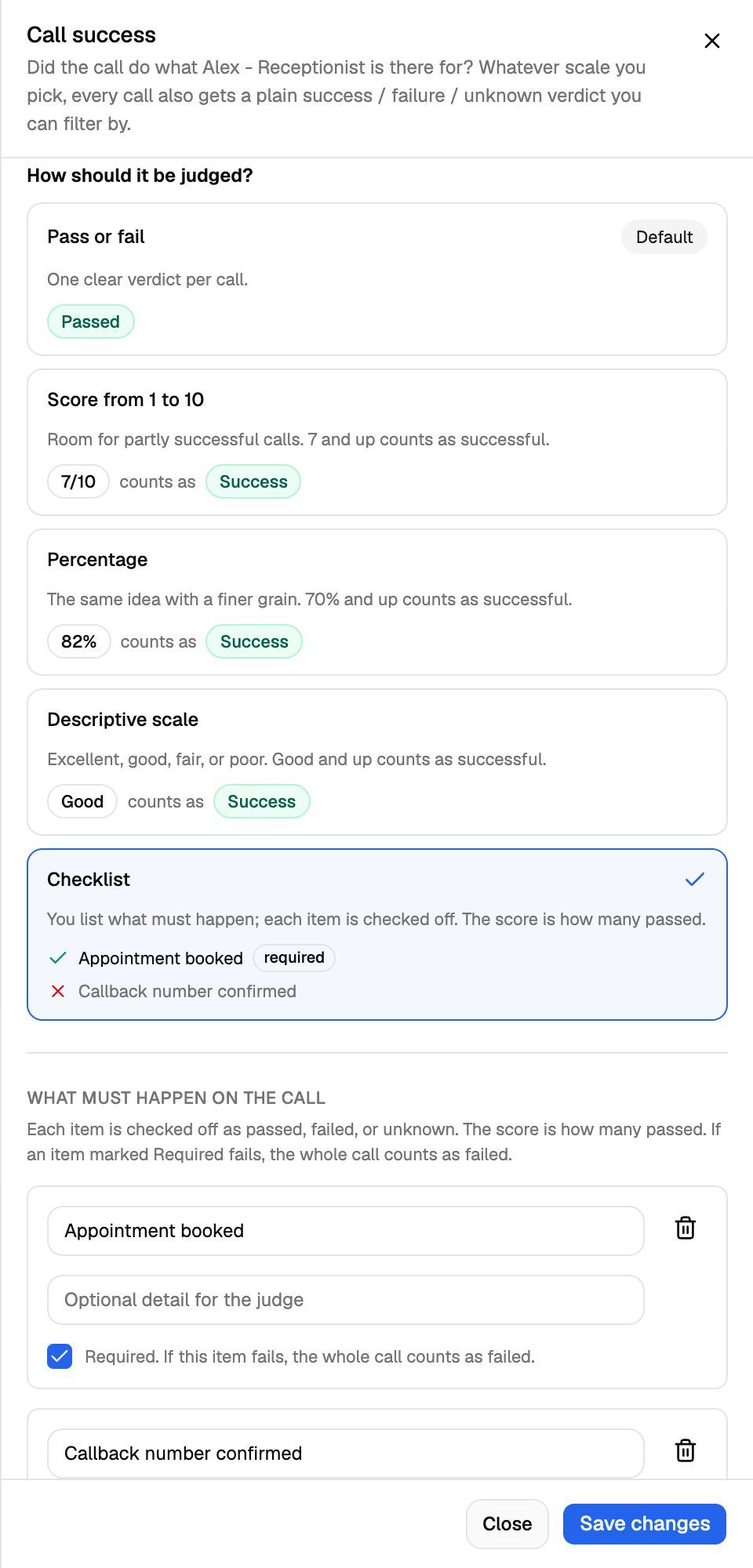
The panel asks whether the call did what your agent is there for, and reminds you that every call also gets a plain success / failure / unknown verdict you can filter by.
Step 2: Choose how it should be judged
Under How should it be judged?, pick one of five scales. Each card shows an example of the result it produces.
How to choose:
- Pass or fail suits agents with one clear outcome, such as booking an appointment.
- A score, percentage or descriptive scale suits calls that can go partly well, such as sales or support calls. The 70 mark is fixed; you can't change it.
- Checklist suits calls with several outcomes you want to track one by one.
Step 3: Build a checklist (optional)
If you pick Checklist, a What must happen on the call section appears.
- Click Add item.
- In the first box, describe what must happen, for example "Appointment booked".
- Optionally, add detail in Optional detail for the judge, for example "A date and time were agreed and read back to the caller".
- Tick Required if the call can't count as a success without this item: "If this item fails, the whole call counts as failed."
- Repeat for each item, up to 10. The button changes to Limit of 10 items reached when you hit the cap.
How a checklist is scored:
- The score is the share of items that passed. On the call it shows as, for example, "3/5 passed".
- The verdict depends only on required items. If any required item failed, the call is a Failure. If none failed but one is unknown, the call is Unknown. Otherwise it's a Success.
- A checklist with no required items always comes out as Success. Mark at least one item Required if you want calls to be able to fail.
A checklist needs at least one item, and every item needs a label. If not, saving shows "The Checklist rubric needs at least one item" or "Every checklist item needs a label".
Write each item as one thing you could check by reading the transcript: "Caller gave their email address", not "Caller was happy". Use User sentiment for feelings.
Step 4: Add your own instructions (optional)
Under Add your own instructions, tell the judge anything it should weigh, for example "Only count it a success if a follow-up time was agreed." You can write up to 1,000 characters. Your instructions add to the standard behaviour; they never replace it.
Then click Save changes. Calls that end from now on are judged with the new definition. Earlier calls keep the result they already have.
See the result on each call
Open a call in Call Logs and select the Analysis tab. Under Call success you'll see:
- The Success, Failure or Unknown badge.
- The scale's own answer when it adds something, such as a score of 7 or "3/5 passed".
- A one-line reason from the judge.
- For a checklist, every item with a tick, a cross or a question mark, its required tag, and the reason for each.
Use call success in a campaign
A campaign can count its successful calls using this verdict.
- Open the campaign's settings and go to Success metric ("What counts as success"). In the campaign wizard, it's the Success metric step.
- Turn on Enable Call Success Metric: "Count a call as successful when its post-call analysis says the call succeeded."
- Save the campaign.
The campaign then counts an answered call as successful when its verdict is Success. Make sure the campaign's agent has Call success switched on, or none of its calls can count. See Define a Campaign Success Metric and Campaign Analytics.
Frequently asked questions
Too many calls come back as Unknown.
Too many calls come back as Unknown.
The judge answers Unknown when the transcript doesn't show whether the goal was met. Give it something concrete: add instructions that say what success looks like, or switch to a Checklist with items that can be checked from the transcript. Very short calls are skipped entirely and get no verdict at all.
Can I change the 70 threshold?
Can I change the 70 threshold?
No. For scores, percentages and the descriptive scale, 70 out of 100 is fixed. If you need a different cut-off, use Pass or fail with instructions that say exactly where the line is, or a Checklist.
I changed the scale. Will old calls be re-judged?
I changed the scale. Will old calls be re-judged?
No. Only calls that end after you save use the new scale.
Related articles
Was this helpful?
Still need help? Share an idea