Install from the GoHighLevel Marketplace
Install VoiceAIWrapper from the GoHighLevel marketplace, then sign in or sign up within an hour to attach it to your organization.
Written By voiceaiwrapper
Last updated 26 days ago
You can start the GoHighLevel connection from the GoHighLevel marketplace instead of from VoiceAIWrapper. GoHighLevel doesn't tell us which VoiceAIWrapper organization the install belongs to, so VoiceAIWrapper holds it for you until you sign in or sign up and attach it to an organization.
You have 1 hour from the install to finish. After that, the install is cancelled and VoiceAIWrapper removes the app from your GoHighLevel agency, so your next attempt starts cleanly.
Your plan needs GoHighLevel integration. You can install from the marketplace on any plan, but you can only attach the install to an organization whose plan includes GoHighLevel integration.
Before you start
- Use one browser from start to finish. The pending install is remembered in the browser you install from. If you switch browsers or devices, VoiceAIWrapper won't know about it.
- Be an owner or admin of the organization you want to connect. The install is finished on the Settings page, which members can't open.
- Have your clients and workspaces ready if you want to map sub-accounts straight away. See Connect GoHighLevel and Map Sub-Accounts.
Step 1: Install the app in GoHighLevel
- In your GoHighLevel agency, open the marketplace and find VoiceAIWrapper.
- Install it, choose the sub-accounts to install it into, and approve.
- GoHighLevel sends you to VoiceAIWrapper.
What happens next depends on whether you're signed in and whether this agency is already connected.
If the install fails on the GoHighLevel side, you'll see "GoHighLevel did not complete the install. Go back to your GoHighLevel marketplace and try again." Nothing is held in that case. Start again from the marketplace.
Step 2: Sign in or sign up
If you weren't signed in, the sign-up and sign-in pages show a banner naming your agency:
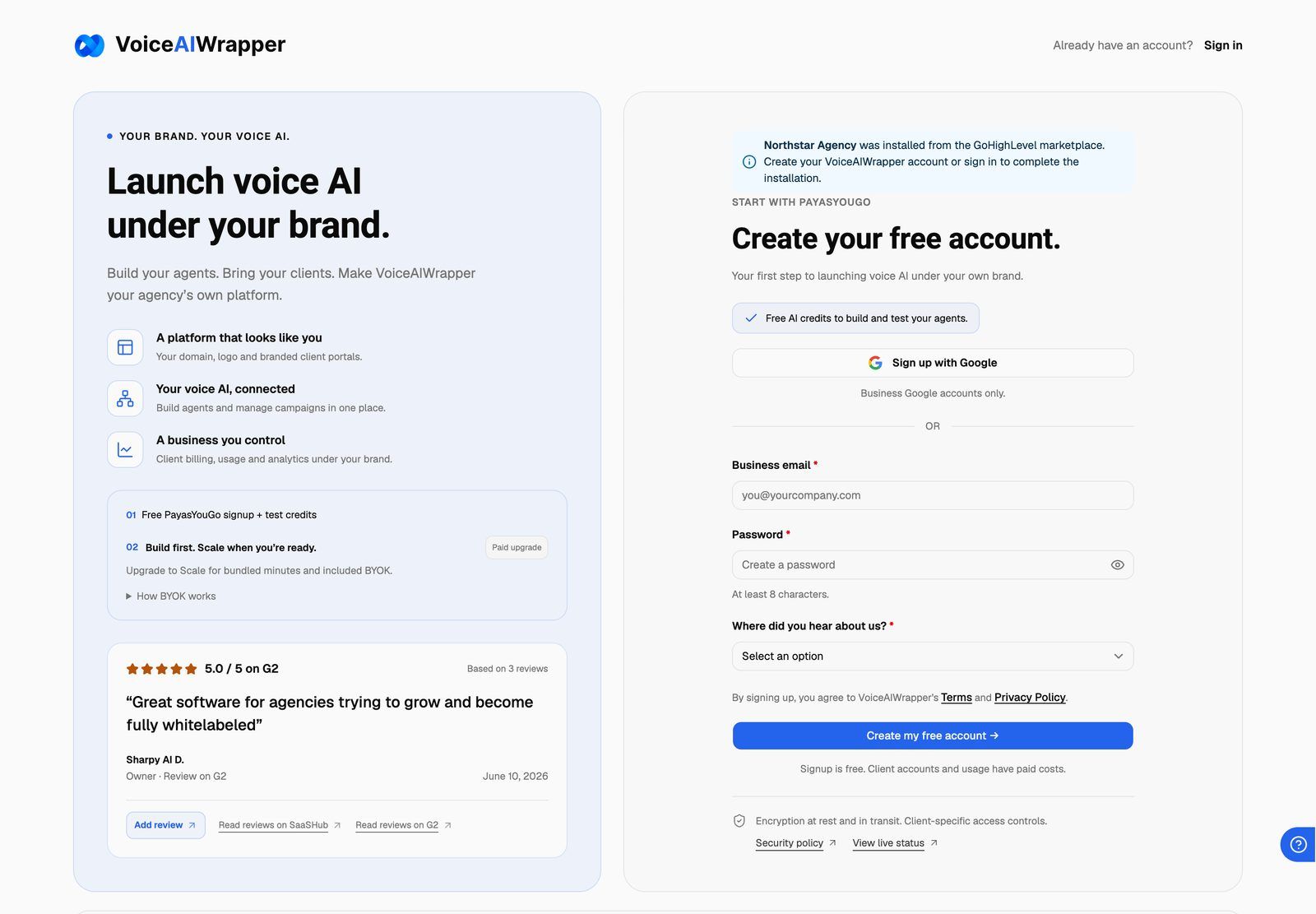
- Already have an account? Sign in.
- New to VoiceAIWrapper? Create your account. Finish choosing a plan and the onboarding steps first. As soon as your organization has an active subscription, VoiceAIWrapper takes you to Settings → Integrations to finish. See Create Your Account and Sign In.
Keep an eye on the clock: the 1-hour window keeps running while you sign up.
Step 3: Finish connecting GoHighLevel
On Settings → Integrations, VoiceAIWrapper attaches the install to an organization.
- You're an owner or admin of exactly one organization, and its plan includes GoHighLevel: it connects automatically. You'll see GoHighLevel connected. Found 4 sub-accounts. (with your own count).
- You're an owner or admin of more than one organization: the Finish connecting GoHighLevel dialog asks which one. Choose it under Organization, then click Connect to followed by the organization's name.
- None of the organizations you own or administer has a plan that includes GoHighLevel: you'll see Your plan doesn't include the GoHighLevel integration, and the install ends. See the table below.
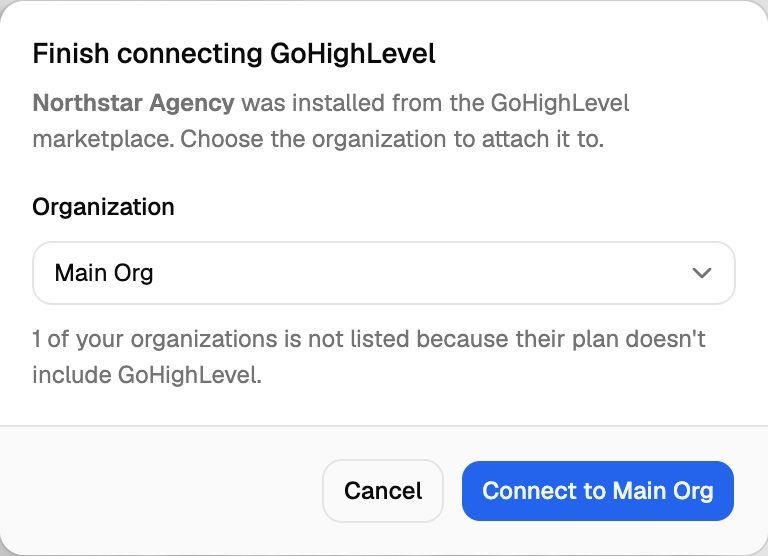
Only organizations where you're an owner or admin are offered. Organizations whose plan doesn't include GoHighLevel aren't listed, and the dialog says how many were left out. If this GoHighLevel agency is already connected to one of your organizations, only that organization is offered.
Clicking Cancel forgets the pending install in this browser. To connect later, click Connect on the GoHighLevel card instead, or install from the marketplace again.
Step 4: Map your sub-accounts
The connection is live, but nothing syncs until you map each sub-account to a client and workspace. Click Manage sub-accounts on the GoHighLevel card. See Connect GoHighLevel and Map Sub-Accounts.
If the message says Found 0 sub-accounts, open Manage sub-accounts and click Refresh.
What you might see instead
If the banner on the sign-in or sign-up page says Your GoHighLevel install link has expired, the hour has passed. Install again from the marketplace, or connect later from Settings → Integrations.
Frequently asked questions
What happens to an install nobody finishes?
What happens to an install nobody finishes?
Once the hour is up, VoiceAIWrapper cancels it and removes the app from your GoHighLevel agency, so your next attempt starts cleanly. If you install again before then, the newer install replaces the older one.
Can I attach the install to a second organization?
Can I attach the install to a second organization?
Not while the agency is connected to another VoiceAIWrapper organization. A marketplace install for that agency can only go to the organization that already holds it. To move it, disconnect GoHighLevel in the first organization, then install again.
Is installing from the marketplace different from clicking Connect?
Is installing from the marketplace different from clicking Connect?
The result is the same connection. Clicking Connect in Settings → Integrations skips the waiting step, because VoiceAIWrapper already knows which organization you're in.
Related articles
Was this helpful?
Still need help? Share an idea