Bill Chat Conversations
Charge clients for web widget chats by converting chat sessions into billable minutes on their Stripe billing plan.
Written By voiceaiwrapper
Last updated 26 days ago
When visitors on your clients' sites chat with an agent through a web widget, you can charge for those conversations the same way you charge for calls. You set a conversion rate on the billing plan, such as "10 chats = 1 minute", and every chat is billed as that fraction of a minute at the plan's normal per-minute price.
Without chat billing, chats are free for the client. Turn it on before you let a client use chat mode in their widgets.
Available on: plans that include Web widget. Without it, the Bill chat sessions option doesn't appear in the billing plan wizard.
Before you start
- Stripe connected and at least one billing plan, or be ready to create one. See Create a Billing Plan.
- A widget that offers chat. See Web Widgets: Voice, Chat or Both.
- A conversion rate in mind. Decide how many chats should cost the same as one minute of calling.
How chats are counted
Each chat session counts as one chat, however many messages it has. A chat is counted once, when it ends. On VAW Native, chats that never got started (for example, ones that failed to start) aren't counted.
The plan's conversion rate turns chats into minutes:
Those minutes are then charged exactly like call minutes on the client's plan:
- Subscription + Usage Packs: chat minutes come out of the client's included minutes, then their usage pack minutes.
- Usage Only, Subscription + Overage and Subscription + Usage: chat minutes are added to the usage Stripe bills at the end of the period.
- During a trial with a minute limit: chat minutes count against the trial minutes.
For the pricing models, see Choose a Pricing Model.
Turn on chat billing for a plan
- In the sidebar, open Billing Configuration → Stripe.
- Open the Billing Plans tab. Click Add Billing Plan for a new plan, or open an existing plan and click Edit plan.
- Click Next until you reach the Options step.
- Turn on Bill chat sessions ("Convert widget chats into billable minutes.").
- In Voice Minutes to Chat Conversion, enter how many chats equal one minute, for example
10. Decimals are allowed. The value must be greater than 0. - Click Next. On the Review step, the Chat billing row shows your rate, for example "1 min = 10 chats".
- Click Create plan (or Update plan).
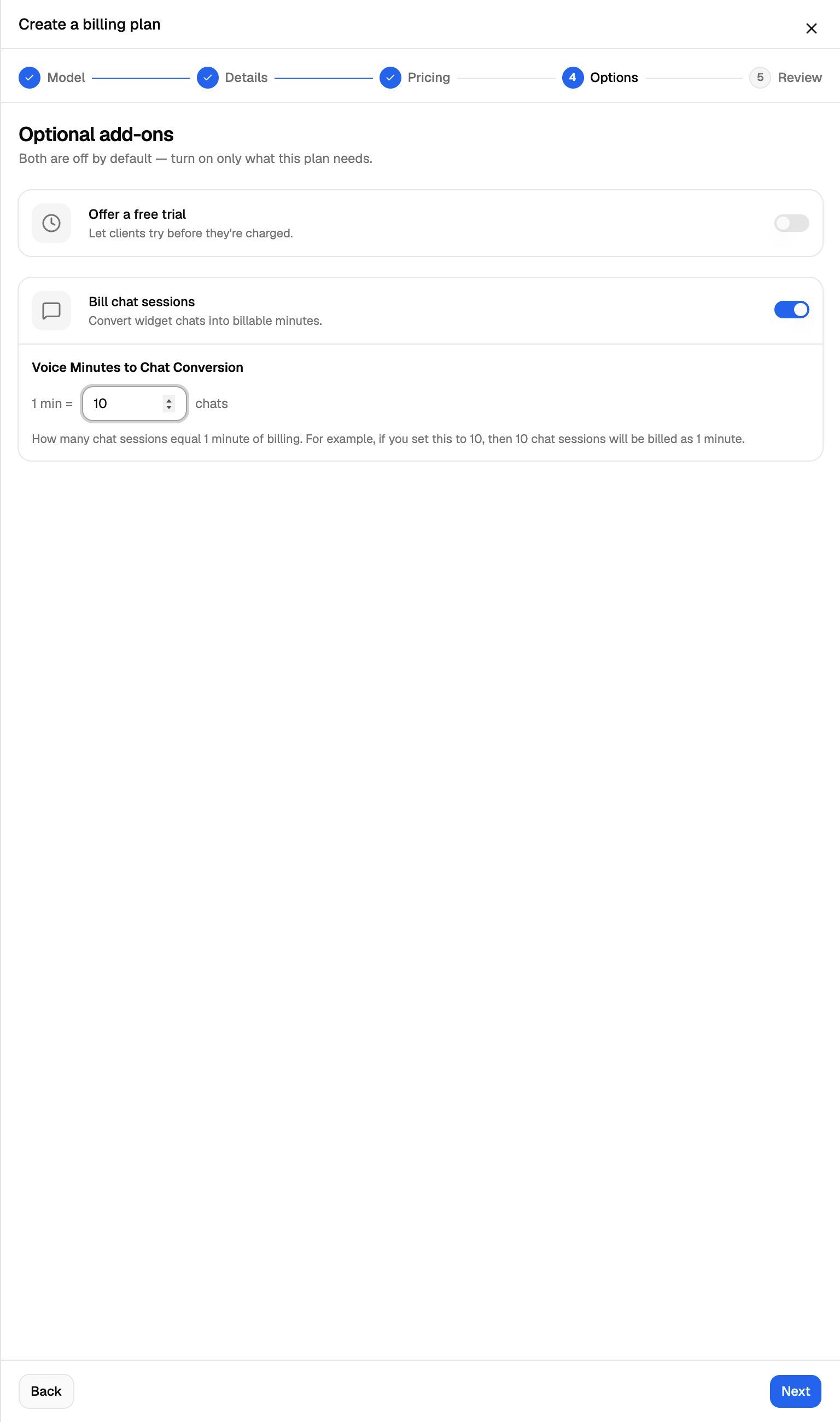
If you leave the rate empty, you'll see "Voice Minutes to Chat Conversion is required when chat billing is enabled."
Let the client use chat in their widgets
Chat billing only charges for chats. To let a client's widgets offer chat, you also need to allow it in the client's permissions:
- Open Client Accounts → the client → Workspaces, and edit the workspace.
- On the Access Control step, give the client access to Web Widget Chat (it sits under Web Widget in the campaign permissions).
- Click Update Workspace.
The webapp reminds you of this pairing. The widget builder shows "Important: To enable chat mode for clients, you must:" followed by both steps. On VAW Native workspaces, the Web Widget Chat permission also says chat is billed from the client's Stripe product plan, so check chat billing is on there, or chat usage won't be charged.
See Set Client Permissions on Vapi, Retell and ElevenLabs Workspaces or Set Client Permissions on VAW Native Workspaces.
If the client's plan doesn't have Bill chat sessions on, the client's widget chats aren't charged at all. Nothing warns you after the fact, so check the plan before you allow chat.
What changes when you edit a plan
Each client's chat rate is fixed when they first get chat billing. Changing it later works like this:
What your clients see
In the client portal, Billing → Current Subscription shows the chat rate next to the per-minute price (for example "per minute or 10 chats") and a Chat sessions count for the current billing period. See Billing, Trials and Usage Packs in Your Portal.
Frequently asked questions
Do test chats count?
Do test chats count?
They can. On VAW Native, a chat with an agent that's assigned to a client is billed to that client even when it isn't part of a campaign, including chats you start from the agent's test panel. Use an agent that isn't assigned to a client for testing.
Are chats charged if the client has no active subscription?
Are chats charged if the client has no active subscription?
No. Chats, like calls, are only charged while the client has a subscription. See Assign a Plan and Manage a Client's Subscription.
Can I bill chats for clients on External billing?
Can I bill chats for clients on External billing?
Yes. External billing plans have their own Chat billing section with Include chat interactions in billing and a Voice minutes to chat conversion rate. See External Billing: Plans, Usage Packs and Payment Requests.
I don't see "Bill chat sessions" in the plan wizard.
I don't see "Bill chat sessions" in the plan wizard.
Your own VoiceAIWrapper plan doesn't include Web widget. See A Feature Is Locked or Asks Me to Upgrade.
Related articles
Was this helpful?
Still need help? Share an idea