Do-Not-Call: Sources and Reasons
See who turned on do-not-call for a lead and why, from you, the API, Smart Do Not Call, GoHighLevel or your pre-call webhook, and how to allow calling again.
Written By voiceaiwrapper
Last updated 26 days ago
When a lead is marked do-not-call, the campaign skips it and doesn't schedule another attempt. VoiceAIWrapper records where that flag came from and, when one was given, the reason. This helps you answer "why isn't this lead being called?" without guessing, and decide whether it's safe to call again.
Where do-not-call can come from
When a reason was recorded, it follows the sentence as Reason: …. Reasons are cut at 500 characters.
To set these up, see Smart Callback and Smart Do-Not-Call, GoHighLevel Do-Not-Disturb Sync, Pre-Call Decisions: Call Later, Do Not Call and Reject and Leads API Quick Start.
See why do-not-call is on
- Open your Pod (an engine or provider connection), select Campaigns, and click the campaign.
- Open the Leads tab, then the Do not call status tab to list only those leads.
- In the Do not call column, hover over the info icon next to the switch.
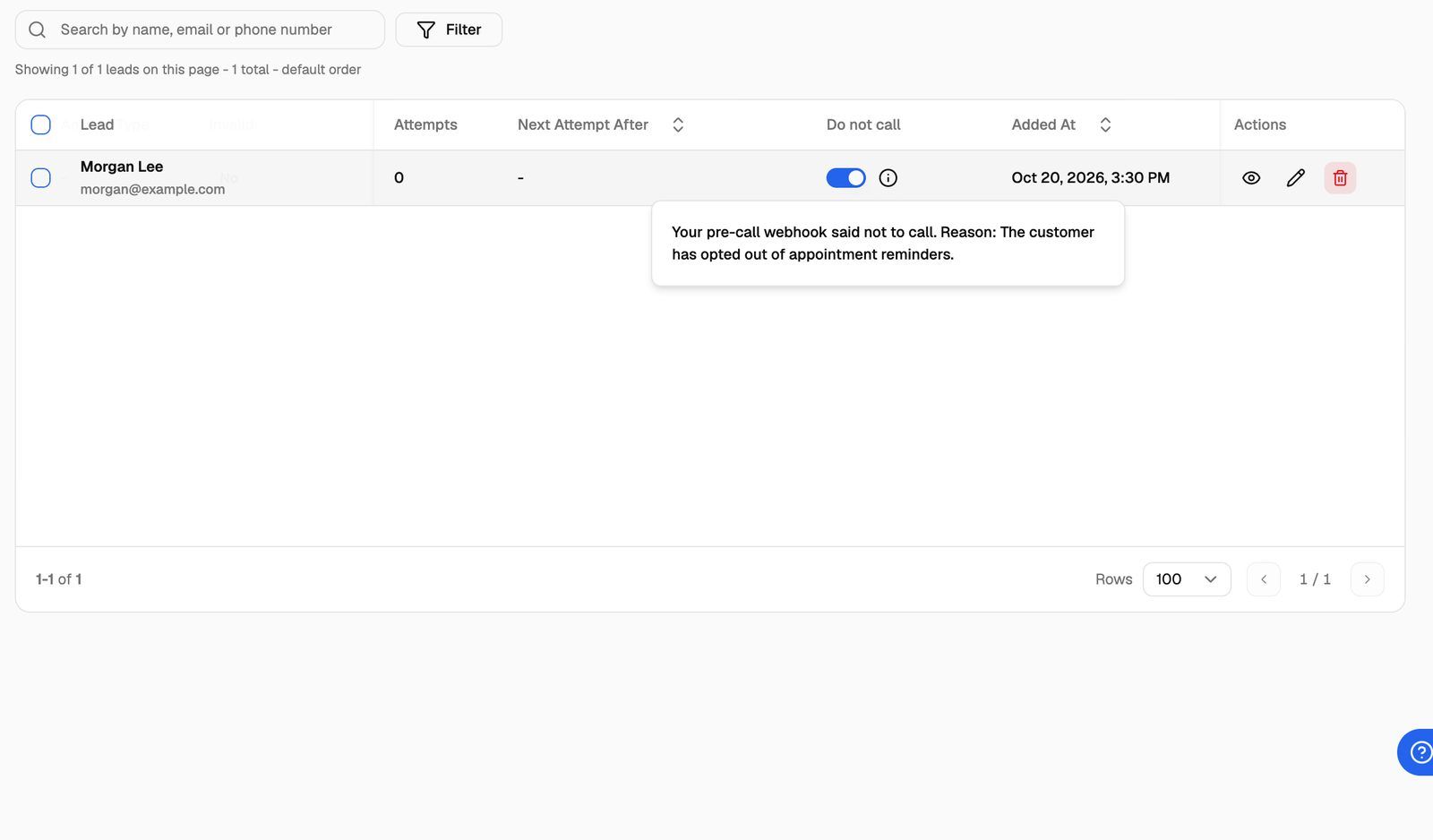
The same switch and info icon appear on the Pod's All Leads page. See All Leads: Search Leads Across a Pod.
The Do not call column only appears on outbound campaigns, because that's where it stops calls.
The first source wins. If a lead is already do-not-call and another source tries to set it again, the lead keeps its original source and reason. For example, a lead that asked not to be called keeps The lead asked not to be called again. even if you later mark it do-not-call yourself.
Find the reason outside the webapp
The source and reason travel with the lead, so you can act on them in other tools:
- Lead exports: the CSV has a
do_not_call_reasoncolumn, written as the source then the reason, for examplePre-call webhook: Already booked. The source labels areUser,API,Smart DNC,GHLandPre-call webhook. See Export Leads. - Leads API (v2) and the Leads event webhook: lead data includes
do_not_call_reason, with the source, the reason and when it was set. - GoHighLevel: the Get Lead Status workflow step returns the same one-line reason as the CSV.
Allow calling again
Only do this when you're sure the person can be called. A lead that asked not to be called, or is do-not-disturb in your CRM, usually shouldn't be.
For one lead:
- In the Leads tab (or on All Leads), turn off the lead's Do not call switch.
For several leads:
- In the Leads tab, open the Do not call status tab and tick the leads.
- Click Bulk Actions (n) → Do Not Call → Do Not Call = False.
- Confirm in the Allow Calling dialog.
Turning do-not-call off also clears the recorded source and reason. The lead goes back into the calling queue if it still meets the other conditions: not answered, not invalid, and attempts left. See Lead Statuses Explained.
Through the API, update the lead with do_not_call set to false.
Turning off do-not-disturb in GoHighLevel doesn't turn calling back on. The do-not-disturb sync only ever turns do-not-call on, so a lead that asked to stop is never called by accident. Turn it off in VoiceAIWrapper as shown above. In a GoHighLevel workflow, only a Bulk Update Leads step that sets do_not_call to false for that lead turns it off; the Update Lead in Voice Campaign step can't. If the contact is still do-not-disturb in GoHighLevel and GoHighLevel sends another do-not-disturb update, the lead is marked do-not-call again.
Frequently asked questions
The Do not call switch is on, but there's no info icon.
The Do not call switch is on, but there's no info icon.
The lead was marked do-not-call before VoiceAIWrapper started recording sources and reasons. Older flags weren't backfilled, so there's nothing to show. The lead still won't be called.
My GoHighLevel workflow says the contact "was not added to the campaign".
My GoHighLevel workflow says the contact "was not added to the campaign".
GoHighLevel refuses to add a contact who is already marked do-not-contact in GoHighLevel, with the message "This contact is marked do-not-contact in GoHighLevel, so they were not added to the campaign." Clear do-not-disturb on the contact in GoHighLevel first if you have permission to call them.
My clients see "Turned on from your CRM" instead of GHL.
My clients see "Turned on from your CRM" instead of GHL.
That's on purpose. The client portal doesn't name third-party tools, so clients see Turned on from your CRM (do not disturb). The meaning is the same.
Does do-not-call stop inbound calls from that number?
Does do-not-call stop inbound calls from that number?
No. Do-not-call stops the campaign from placing outbound calls to the lead. To turn away inbound callers before the call is answered, use a pre-call webhook with a reject decision. See Pre-Call Decisions: Call Later, Do Not Call and Reject.
Related articles
Was this helpful?
Still need help? Share an idea