Introduction to VAW Native, the Built-In Voice Engine
What VAW Native is, why it needs no provider keys, how calls are paid for with AI credits, and what you can build with it.
Written By voiceaiwrapper
Last updated 26 days ago
VAW Native is the voice engine built into VoiceAIWrapper. You build, test and run voice agents without signing up for Vapi, Retell AI or ElevenLabs and without pasting in any API keys. Every organization already has one, so you can start building right away.
This article explains what VAW Native is, how it's paid for, and what you can build with it.
Applies to: VAW Native Pods. If you use your own Vapi, Retell AI or ElevenLabs account, see What Is a Voice AI Pod?.
What VAW Native is
In VoiceAIWrapper, a Pod (an engine or provider connection) is where your agents, phone numbers and calls live. There are two kinds:
VAW Native is available on every plan. It doesn't count toward your limit of BYOK connections.
Your VAW Native Pod is already set up
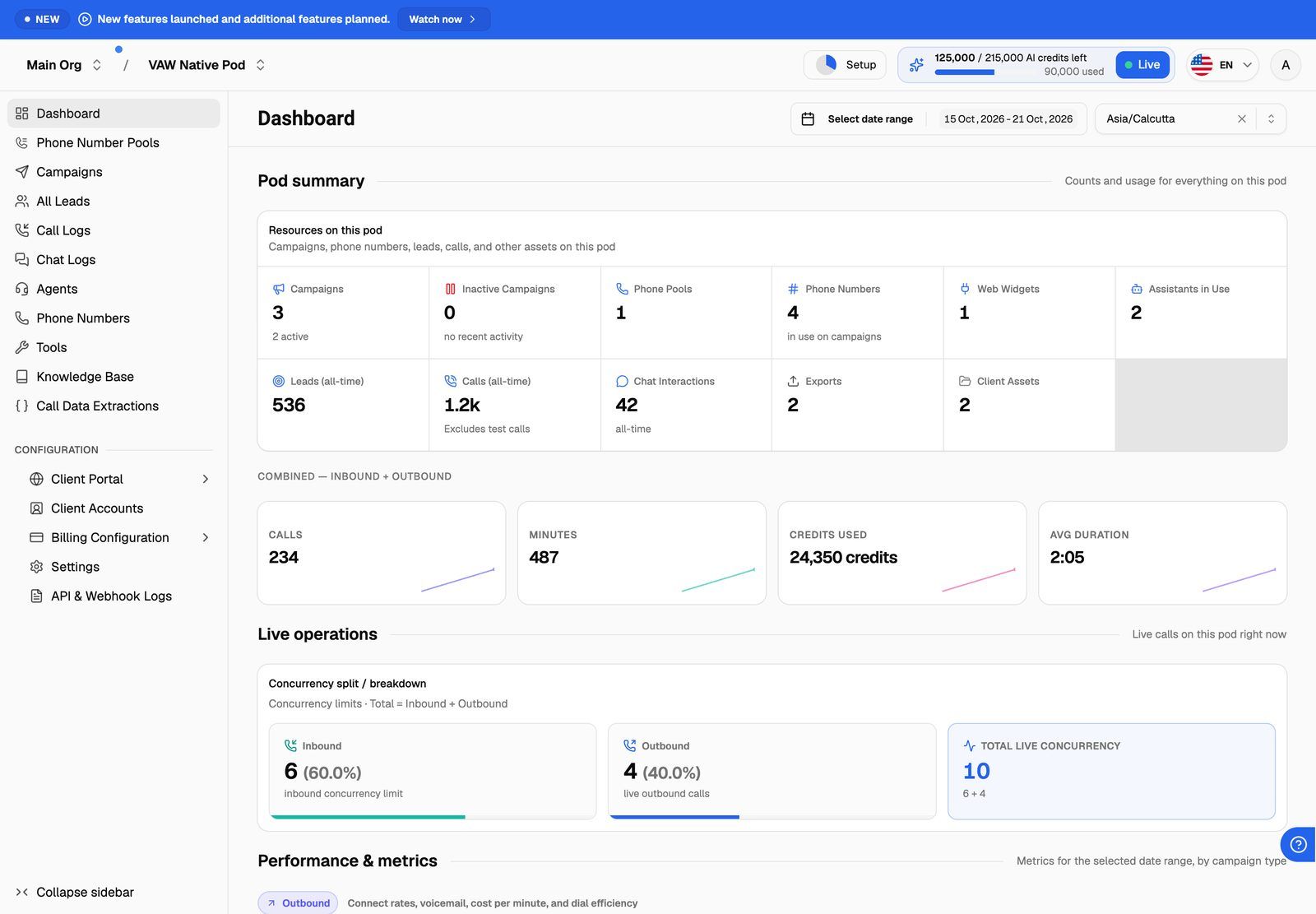
Every organization gets a VAW Native Pod, named VAW Native Pod, when it's created. You don't add it or connect anything. Each organization has one VAW Native Pod. It can't be deleted, though you can rename it in the Pod's settings.
If VAW Native is your organization's only Pod, its dashboard appears in the sidebar as Dashboard. If you've also connected a BYOK Pod, select the VAW Native Pod in the Pod selector and open Pod Dashboard.
The Pod's settings also hold choices that apply to every agent in it, such as how long recordings and transcripts are kept and whether agents can use knowledge bases on calls.
How VAW Native is paid for
VAW Native calls and chats are paid for with AI credits from your organization's credit balance. You don't get a separate bill from a voice provider.
- Calls use credits per minute. The cost is a per-minute platform rate plus what the agent uses: the AI model, the voice, speech recognition, and a knowledge base if one is attached. The AI model picker on each agent shows an estimated cost in credits per minute, so you can compare before you choose.
- Chats use credits for each reply the agent sends.
- Post-call analysis and data extraction use credits each time they run, and are added to that call's cost.
- The AI Agent Builder uses credits to read a business website and write the agent.
Each call's cost appears on the call in Call Logs, and your balance and history are in your billing settings. When your credits run out, new calls and chats can't start until you add more. A call that's already running isn't cut off.
Test calls are real calls and use credits too. Keep test calls short while you're tuning an agent.
For balances, grants and top-ups, see How AI Credits Work and What Happens When You Run Out of Credits.
What you can build
Everything below lives inside your VAW Native Pod and is managed from the sidebar.
Phone calls go through your own Twilio account, so Twilio bills you directly for numbers and phone minutes. Web widgets and phone number pools need a plan that includes Web widget and Phone number pools.
What VAW Native doesn't do yet
- Voicemail detection. Agents can't tell when an outbound call reaches voicemail.
- Keypad input (DTMF). Callers can't press keys to make choices.
- Carriers other than Twilio. Phone numbers must come from a Twilio account.
- Agent templates and duplicating agents. Each agent starts from the AI Agent Builder or from blank.
Next steps
- Open Agents in the sidebar and click New agent.
- Choose Create using VAW Assistant to have an agent written from a business website, or Start blank to set it up yourself.
- Test it with a web call before you connect a phone number.
Frequently asked questions
Do I need a Vapi, Retell AI or ElevenLabs account to use VAW Native?
Do I need a Vapi, Retell AI or ElevenLabs account to use VAW Native?
No. VAW Native runs inside VoiceAIWrapper, so there are no provider keys to enter. You only need a Twilio account if you want your agents on the phone.
Can I use VAW Native and my own provider account at the same time?
Can I use VAW Native and my own provider account at the same time?
Yes. Your VAW Native Pod sits alongside any BYOK Pods you connect. Switch between them with the Pod selector. See Use Several Providers and Organizations in One Account.
Can my clients use VAW Native agents in their portal?
Can my clients use VAW Native agents in their portal?
Yes. The client portal has VAW Native pages for agents, call and chat logs, phone numbers, knowledge bases, tools and extractions. What each client can see and change depends on the access you give them.
Related articles
Was this helpful?
Still need help? Share an idea