API & Webhook Logs
See every API request and webhook delivery for your organization, with status codes, timing and full request and response bodies.
Written By voiceaiwrapper
Last updated 26 days ago
API & Webhook Logs shows the traffic between your systems and VoiceAIWrapper: API requests your tools send in, and webhooks VoiceAIWrapper sends out. When an integration isn't working, this is where you check whether a request arrived, what it contained and what came back.
Available on: plans that include API & webhook logs. Without it, API & Webhook Logs doesn't appear in the sidebar. VAW Native webhook deliveries are the exception: they're stored on every plan and kept for 14 days, and each call's Webhooks tab shows them.
Before you start
- Something to log. Rows appear once your systems call the VoiceAIWrapper API (see Create and Manage API Keys) or VoiceAIWrapper sends a webhook to a URL you've set.
- Know roughly when it happened. The newest requests are at the top, so the time of the call or request helps you find the right row.
Open the page
In the sidebar, click API & Webhook Logs (below Settings).
Under the title you'll see how long your plan keeps logs, in a line such as Logs are retained for … days on your current plan. The number depends on your plan. Older rows are deleted automatically.
What each row shows
The line above the table, Showing {count} of {total} API logs, tells you how many rows match. You can show 25, 50, 100 or 200 rows per page.
Find a request
- Search path or URL…: type part of an endpoint or your webhook address.
- Click the filter button to filter by:
- Method:
GET,POST,PUT,DELETEorPATCH. - Type: Incoming or Outgoing.
- Status: common codes from 200 OK to 503 Service Unavailable.
- Webhook: only VAW Native deliveries, as Agent webhook (call and chat events), Inbound webhook (the phone number's webhook that routes inbound calls) or Webhook test (from Send test event).
- Method:
Read the details
Click a row to open API Log Details. It shows the Type, Method, Path, URL, Status and Duration, then the Request body and Response body. JSON bodies are shown as an expandable tree.
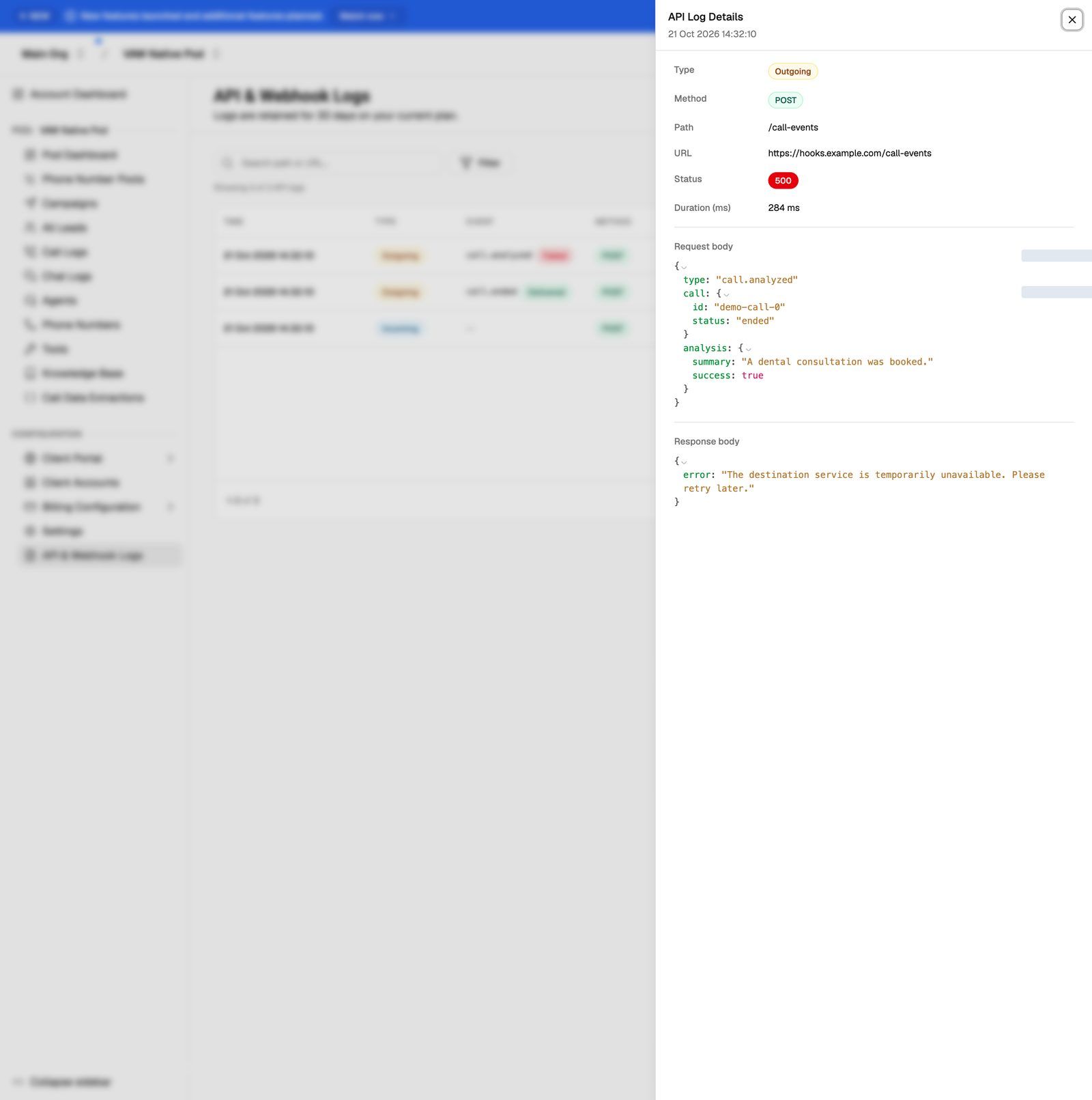
Bodies can contain personal data such as caller names, numbers and transcripts. Treat screenshots and copies of them with care.
VAW Native webhook deliveries
Every attempt to deliver a VAW Native agent webhook gets its own row. A delivery that times out, can't connect, or gets a 408, 429, 500, 502, 503 or 504 response is retried, up to 4 attempts over about 15 minutes. Other error codes aren't retried. Each attempt waits up to 10 seconds for your server to answer.
To resend an event or see every attempt for one call, open the call in Call Logs and go to its Webhooks tab. See VAW Native Agent Webhooks: Events and Delivery.
These rows are stored on every plan and kept for 14 days. If your plan doesn't include API & webhook logs, the page says Your plan doesn't store API logs. VAW Native webhook deliveries are shown on every plan and kept for 14 days., and only those rows appear.
Troubleshooting
I sent an API request but can't find it.
I sent an API request but can't find it.
Search for part of the endpoint path, and set Type to Incoming. Logs are written shortly after the request, so give it a moment and refresh. If your plan doesn't include API & webhook logs, API requests aren't stored at all.
My webhook shows a 3xx, 4xx or 5xx status.
My webhook shows a 3xx, 4xx or 5xx status.
Your server received the request but returned an error. Webhooks don't follow redirects, so a 3xx status means the URL redirects somewhere else: use the final address instead. Open the row and read the Response body: it usually says what your server didn't like. A 401 or 403 often means your server is checking a header or signature. See Verify Webhook Signatures and My Webhook Isn't Receiving Data.
A webhook row has no status code.
A webhook row has no status code.
No response came back, for example because your server timed out or couldn't be reached, or because the URL isn't allowed. Open the row to see the reason. Check that the URL is public and answers quickly: agent webhooks wait up to 10 seconds, and the phone number's inbound webhook waits up to 5 seconds and is tried only once, while the call is ringing.
How long are logs kept?
How long are logs kept?
The page tells you how many days your plan keeps them. VAW Native webhook deliveries are kept for 14 days on every plan. See Data Retention: Recordings, Transcripts, Logs and Exports.
Related articles
Was this helpful?
Still need help? Share an idea