Disconnect or Release a Number
Stop a VAW Native number answering calls. Disconnect keeps it in your Twilio account; Release gives a number you bought here back to Twilio and stops the charge.
Written By voiceaiwrapper
Last updated 26 days ago
When you no longer need a phone number on a VAW Native Pod (an engine or provider connection), you have two options. Disconnect stops your agents answering it but leaves the number in your Twilio account, so you can connect it again later. Release hands a number you bought here back to Twilio, which stops Twilio's monthly charge for it. Releasing is permanent.
Applies to: VAW Native Pods. On Vapi, Retell AI, ElevenLabs and Bolna you remove numbers in the provider's own dashboard. See Phone Numbers on Vapi, Retell, ElevenLabs and Bolna.
Before you start
- Take the number out of every phone number pool. A number in a pool can't be disconnected or released. Open Phone Number Pools, edit each pool that holds it, untick the number and click Save. See Rotate Caller IDs with Phone Number Pools.
- Move campaigns to another number. If the number's details show In campaign: {campaign name}, or an outbound campaign dials from it, pick a different number or pool in that campaign's settings first. An outbound campaign whose number is gone pauses at its next call.
Disconnect or release: which one?
Either way, calls to the number stop reaching your agent, and the number disappears from the Pod's Phone Numbers list.
Disconnect when you might use the number again, or when you use it somewhere else outside VoiceAIWrapper. Release when you bought the number here and you're finished with it for good.
Disconnect a number
- In the sidebar, open your VAW Native Pod's Phone Numbers page.
- Click the number to open its details on the Overview tab.
- At the bottom of the sheet, click Disconnect. If an agent answers the number, the button reads Disconnect and disassociate from agent.
- Read the Disconnect {number}? dialog and click Disconnect.
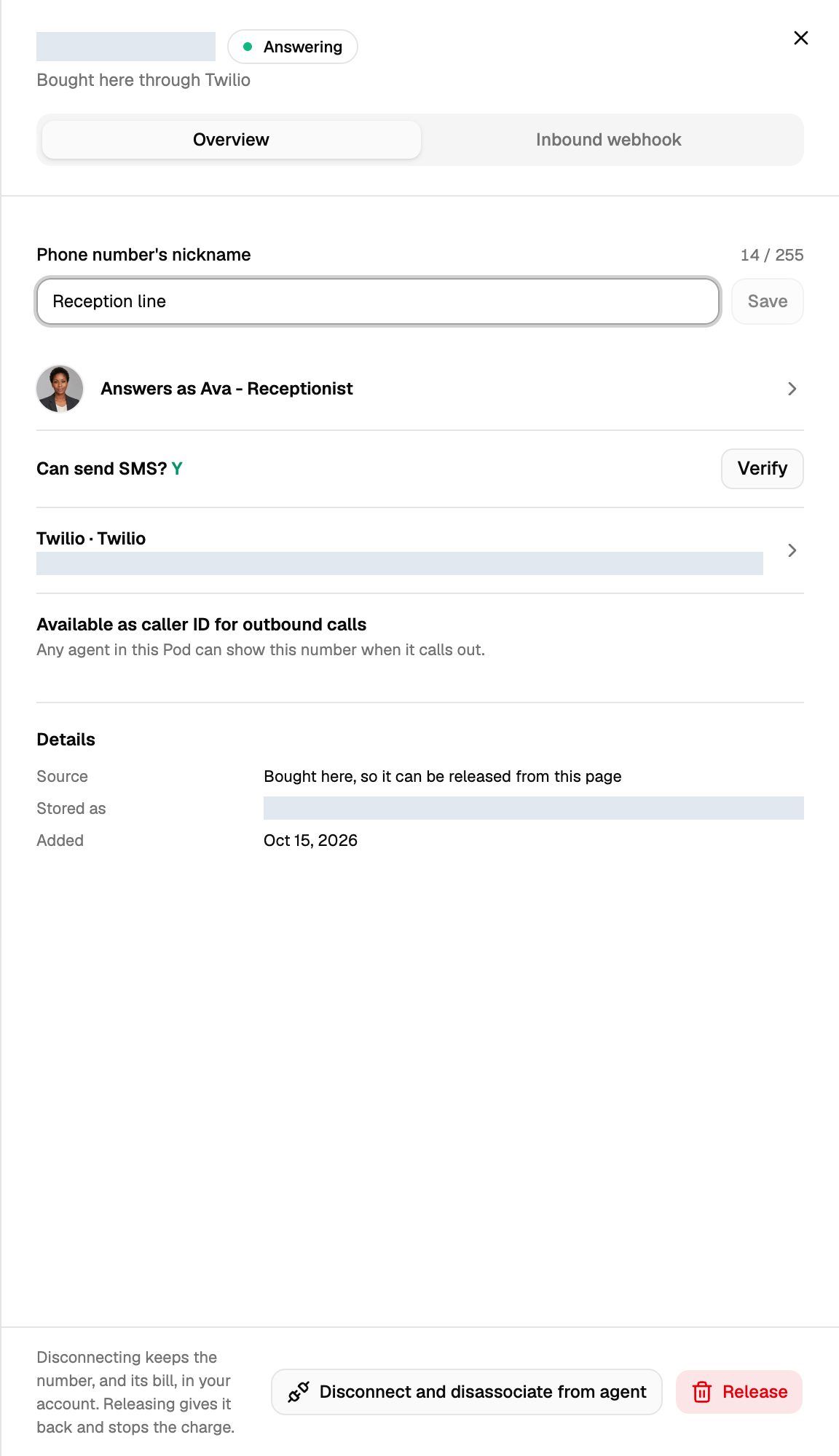
You can also disconnect straight from the list. Click the bin icon (Disconnect number) in the Actions column to open the same dialog. The list has no Release option; Release is only in the number's details.
The dialog tells you what happens: calls stop reaching the agent (or the Pod), VoiceAIWrapper removes the number's route and stops answering it, and the number stays in your Twilio account. For a number bought here, it adds that Twilio keeps billing it and that you should use Release if you want the charge to stop too.
When it's done you'll see "{number} disconnected".
To use a disconnected number again, add it back with Add a number → Use a number you own. Connecting a number you own is free. See Use a Phone Number You Already Own.
Release a number you bought here
Releasing can't be undone. Twilio stops billing the number to your connection and puts it back into the public pool. You can't get it back, and anyone who has it saved will reach whoever gets it next.
- Open the Pod's Phone Numbers page and click the number. Its Source must say Bought here.
- At the bottom of the Overview tab, click Release.
- In the Release {number} back to Twilio? dialog, tick Yes, permanently release {number} and stop the billing. The Release button stays disabled until you tick it.
- Click Release.
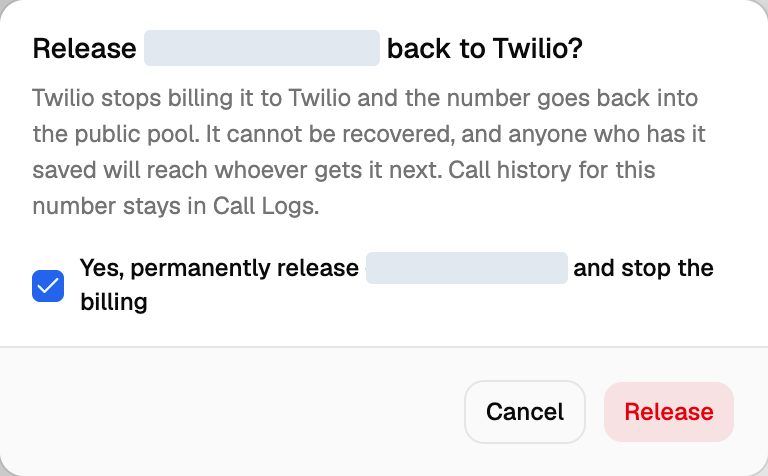
You'll see "{number} disconnected and released", and the number disappears from the list. Its past calls stay in Call Logs.
Numbers you didn't buy here
Release only appears for numbers bought through VoiceAIWrapper. Numbers you added with Use a number you own show Connected from your account as their source. For those:
- Disconnect the number here.
- If you no longer want it at all, release it in your Twilio Console.
This keeps VoiceAIWrapper from deleting a number you might still use somewhere else.
If you disconnect a number you bought here and later add it back with Use a number you own, it counts as connected from your account. Release won't appear for it any more, so you'd release it in Twilio instead.
Troubleshooting
It says the number "is in the phone number pool … and cannot be deleted".
It says the number "is in the phone number pool … and cannot be deleted".
The number belongs to one or more pools, and the campaigns rotating through those pools would lose it. Open Phone Number Pools, click Edit on each pool named in the message, untick the number and click Save. Then disconnect or release it again.
I don't see a Release button.
I don't see a Release button.
Release only shows on numbers whose Source is Bought here. Numbers you brought from your own Twilio account can only be disconnected here. Release them in your Twilio Console if you want the charge to stop.
The release failed with an error.
The release failed with an error.
If Twilio refuses the release, you'll see Twilio's reason, the number stays on the list and Twilio keeps billing it. VoiceAIWrapper removes the number's route before it asks Twilio, so after a failed release the number may no longer answer calls. Don't leave it in that state:
- Check that the Twilio connection still works under Connected telephony accounts. If it failed its last check, click Update credentials.
- Click Release again.
- If you decide to keep the number after all, click Disconnect, then add it back with Add a number → Use a number you own so it answers again.
It says "Twilio has no record of that resource — it may already have been released."
It says "Twilio has no record of that resource — it may already have been released."
The number is no longer in your Twilio account, usually because someone released it in the Twilio Console. Click Disconnect instead to remove it from VoiceAIWrapper.
I can't disconnect my Twilio connection.
I can't disconnect my Twilio connection.
A connection can't be removed while phone numbers or tools still use it. The message tells you how many still use it. Disconnect or release those numbers first. See Connect Your Twilio Account to VAW Native.
Can my clients disconnect or release numbers?
Can my clients disconnect or release numbers?
Only if you allow it. In the client workspace's permissions, set the Phone Numbers section to View & Edit, set Connections to View & Edit, and turn on Disconnect/Release. Even then, client users can only remove numbers on telephony connections they created themselves. Numbers on your connection stay yours to remove. See Set Client Permissions on VAW Native Workspaces.
Related articles
Was this helpful?
Still need help? Share an idea