Manage Agents: Avatar, Agent ID, Delete
Find agents in the list, read the agent header at a glance, change an agent's avatar, copy its ID for webhooks, and delete it.
Written By voiceaiwrapper
Last updated 26 days ago
As you build more agents, you'll want to find them quickly, see at a glance how each one is set up, and tidy up the ones you no longer need. This article covers the agents list, the information at the top of every agent's page, and three agent-level actions: changing the avatar, copying the agent ID, and deleting an agent.
Applies to: agents in a VAW Native Pod (an engine or provider connection). For Vapi, Retell AI and ElevenLabs agents, see How Provider Agents Appear in VoiceAIWrapper.
The agents list
In the sidebar, open Agents. Each row shows:
To find an agent, type in Search agents..., or filter by Model or Created. The Model filter matches a model name or its provider, such as anthropic. Click a row to open the agent.
To add an agent, click New agent. See Create an Agent with the AI Agent Builder or Create an Agent from Scratch.
The agent page header
Every agent's page starts with the same header. Use All agents above it to go back to the list.
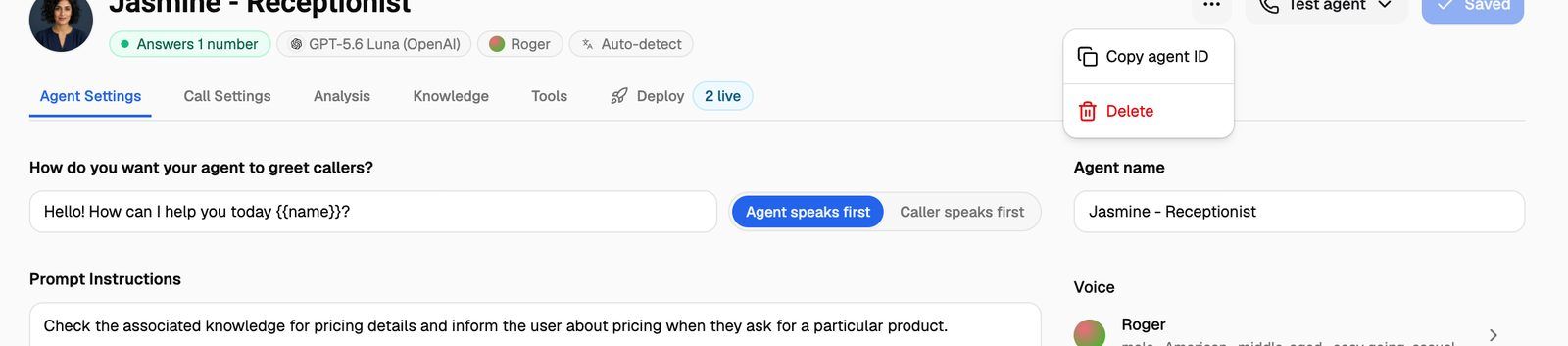
Under the agent's name, a row of pills sums up its setup:
The model, voice and language pills update as soon as you change those settings, even before you save.
On the right are the agent's actions:
- …: Copy agent ID and Delete.
- Test agent: test with a web call, phone call or chat. See Test Your Agent: Web Calls, Phone Calls and Chat.
- Save changes: saves your edits. When there's nothing to save, it reads Saved.
If you click All agents (or another link on the agent's page) with unsaved changes, you'll see Discard unsaved changes? Click Leave page to leave without saving, or cancel and save first. Links in the sidebar don't warn you, so save before you move to another page.
Change the avatar
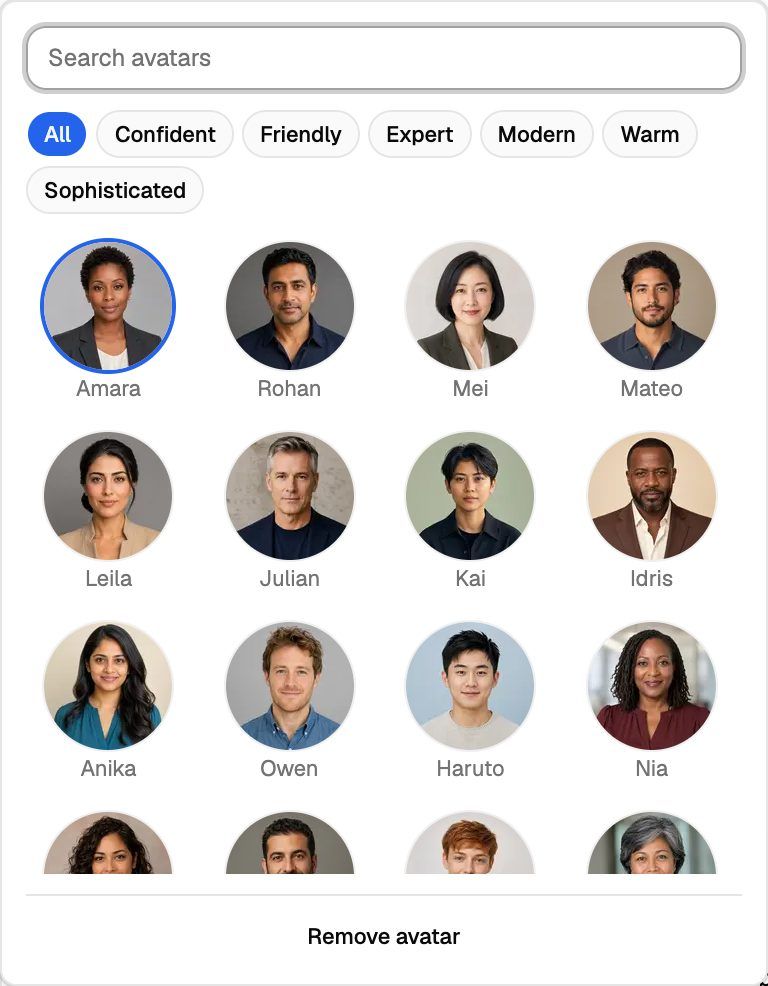
The avatar is the face shown for the agent in the agents list, on its page and in the Test sheet.
- On the agent's page, click the avatar next to the name.
- Browse the avatars, or narrow them down with Search avatars or a personality: Confident, Friendly, Expert, Modern, Warm or Sophisticated.
- Click the avatar you want. To show the agent's initials instead, click Remove avatar.
- Click Save changes.
To rename the agent, change Agent name on the Agent Settings tab, then click Save changes.
Copy the agent ID
Each agent has a unique ID. You need it when your own systems refer to a specific agent.
- On the agent's page, click ….
- Click Copy agent ID. You'll see Agent ID copied, and the ID is on your clipboard.
Where you use it:
- Routing inbound calls. When a phone number's inbound webhook replies with
agent_id, that agent answers the call instead of the number's usual agent. The agent must be in the same Pod as the number. See Route Inbound Calls with the Phone Number Webhook. - Matching webhook events. The agent's webhook events include the agent's ID, so your system can tell which agent handled a call or chat. See VAW Native Agent Webhooks: Events and Delivery.
Delete an agent
You can delete an agent from the list (the bin icon in Actions) or from its page (… → Delete).
- Click Delete.
- In Delete {agent}?, click Delete agent.
You'll see Agent deleted. If you deleted it from its page, you're taken back to the agents list.
Deleting an agent can't be undone. The agent stops taking calls immediately. Any number it answered is left without an agent, so callers hear whatever the Pod plays for numbers with no agent (a message or a busy tone, set under When a number has no assistant yet in the Pod settings). Its website widget is deleted too, so it disappears from every page that embeds it.
What happens to everything connected to the agent:
Want to keep the agent but stop it answering a number? Disconnect the number on the agent's Deploy → Inbound tab instead. See Put Your Agent to Work: The Deploy Tab.
Before you delete an agent, open Campaigns and pick a new agent for any campaign that uses it, so no calls are missed.
Frequently asked questions
Can I duplicate an agent or save it as a template?
Can I duplicate an agent or save it as a template?
Not yet. To make a similar agent, create a new one and copy the prompt and settings across, or use the AI Agent Builder to build one from your answers.
I deleted an agent by mistake. Can I get it back?
I deleted an agent by mistake. Can I get it back?
No. Deleted agents can't be restored. Its past calls and chats are still in the logs, so you can read its transcripts while you rebuild it.
Related articles
Was this helpful?
Still need help? Share an idea