Key Concepts: Organizations, Pods, Agents, Campaigns, Clients and Workspaces
A plain-language glossary of the building blocks in VoiceAIWrapper and how they fit together, from your organization down to your clients' users.
Written By voiceaiwrapper
Last updated 26 days ago
VoiceAIWrapper uses a handful of words in a specific way: organization, Pod, agent, campaign, client account and workspace. Once you know what each one means and what sits inside what, the rest of the webapp and this help center are much easier to follow. This article is a reference you can come back to.
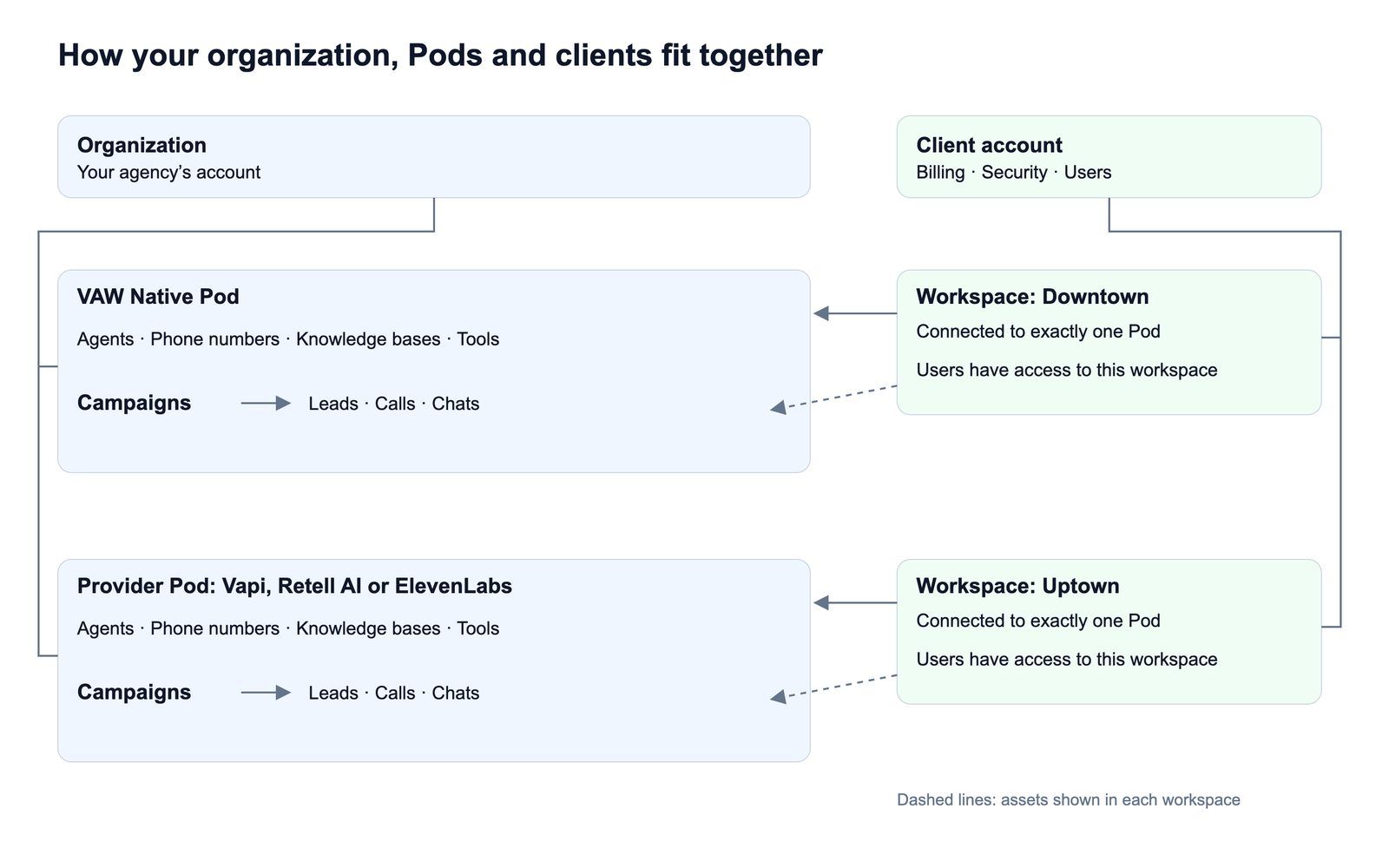
The big picture
Your side of the webapp:
- Organization (your agency)
- Team members
- Pods, one per engine or provider connection
- Agents, phone numbers, knowledge bases and tools
- Campaigns, which put an agent to work
- Leads, calls and chats
Your clients' side:
- Client account (one business you sell to)
- Workspaces, each linked to one Pod and showing the assets you pick
- Users, who log in to your branded client portal
Your side: organization, Pods and what's inside them
Organization
Your organization is your agency's account in VoiceAIWrapper. Your plan, AI credits, team, settings and branding all belong to it.
- Invite your team under Settings and give each person a role: Owner, Admin or Member.
- You can belong to more than one organization and switch between them from the organization selector at the top of the page.
See Organization Settings Overview.
Pod
A Pod (an engine or provider connection) is where your agents, numbers and calls live. There are two kinds:
- VAW Native Pod. The voice engine built into VoiceAIWrapper. Every organization gets one automatically, with no keys to enter.
- BYOK Pod. "Bring your own keys": a connection to your own Vapi, Retell AI or ElevenLabs account. You can add several, including more than one account from the same provider.
Once you have more than one Pod, the sidebar shows the Pod you're working in (POD: and its name), and you switch Pods with the Pod selector at the top of the page. While the VAW Native Pod is your only Pod, the sidebar leaves out the Pod name and the Account Dashboard, and shows the Pod's own page as Dashboard.
The Pod's pages change with the engine. For example, Vapi calls its agents Assistants, while other engines say Agents.
What's inside a Pod
On a BYOK Pod, most of these items are created in your provider account and then appear in VoiceAIWrapper. On VAW Native, you create them in VoiceAIWrapper.
Campaign
A campaign puts one agent to work on a channel and tracks the results. There are three types:
Campaigns are also how you hand work to a client: you assign a campaign to a client's workspace. See Campaign Types: Outbound Phone, Inbound Phone and Inbound Widget.
Leads, calls and chats
- Leads are the people a campaign calls, or the callers it captures. You add them by hand, from a CSV file or through the API.
- Calls and chats are logged with transcripts, recordings (where recording is on) and analysis. Find them under Call Logs in the sidebar (and Chat Logs, on engines that support chat), or on each campaign.
Your clients' side: client accounts, workspaces and users
Client account
A client account represents one business you sell to. It holds that client's workspaces, users, security settings and billing. Manage them under Client Accounts in the sidebar.
Workspace
A workspace is the slice of your setup a client can see. When you add one, you:
- Give it a name and choose the VoiceAI Pod it connects to. Each workspace connects to exactly one Pod.
- Pick which of that Pod's assets it shows: campaigns, agents, phone numbers, knowledge bases, tools and so on.
- Set what the client can do with each area: No Access, View Only or View & Edit. Some areas have extra switches for single actions, such as exporting.
A client can have several workspaces, for example one per location or one per Pod.
Client users
Client users are the people at your client's business who log in to your white-label portal. They see the workspaces of their own client account and switch between them with the workspace selector at the top of the portal's sidebar, which shows the current workspace's name. They never see your other clients or the parts of your Pods you didn't assign.
See How Client Accounts and Workspaces Work.
Other terms you'll see
AI credits
AI credits pay for usage on VAW Native: calls, chats, call analysis, and building agents with the AI Agent Builder. Your plan may include monthly credits, and you can buy more. When you buy credits, $1 gets you 1,000 credits. Calls on a BYOK Pod are paid to your provider instead. See How AI Credits Work.
Concurrency
Concurrency is how many calls a Pod can run at the same time. Each Pod has a total, which you split between Inbound and Outbound calls. On the VAW Native Pod you get automatically, your plan sets the total. VAW Native also has a separate Website chats limit: "Chats your website widgets can have open at once. They use no call lines." See Split Concurrency Between Inbound and Outbound Calls.
BYOK
Short for "bring your own keys". It means connecting your own Vapi, Retell AI or ElevenLabs account as a Pod, so calls run and are billed on your provider account. Whether BYOK is included or offered as an add-on depends on your plan. See Add-Ons: BYOK Connections, Client Accounts and Team Members.
Related articles
Was this helpful?
Still need help? Share an idea