Setup and Upkeep: No Provider Keys or Webhook Syncing
What it takes to start and keep running on VAW Native compared with a Vapi, Retell AI or ElevenLabs Pod: keys, concurrency, webhook sync and provider-side changes.
Written By voiceaiwrapper
Last updated 26 days ago
A Vapi, Retell AI or ElevenLabs Pod (an engine or provider connection) runs on an account you manage elsewhere, so it needs keys, matching settings and a webhook sync before VoiceAIWrapper can track its calls. VAW Native runs inside VoiceAIWrapper, so most of that work isn't needed. This article compares what each engine asks of you on day one and every week after, and what goes wrong when someone changes the provider account outside VoiceAIWrapper.
Side by side
Getting started on VAW Native
Your VAW Native Pod exists from the moment your organization is created, on every plan, and it can't be deleted. There's nothing to connect, and you can open Agents and start building straight away.
To see what the Pod asks for, open the Pod selector in the header and click the pencil (Edit) on your VAW Native Pod. The Update VoiceAI Pod drawer opens on Update Credentials, but there are no credentials on it. It holds the Pod's name and its settings: how long recordings and transcripts are kept, what callers hear on a number with no agent yet, and Knowledge bases on calls. The note at the bottom reads "VAW Native is the built-in voice engine - no API keys or credentials needed. Your Pod's total concurrency is managed by the platform."
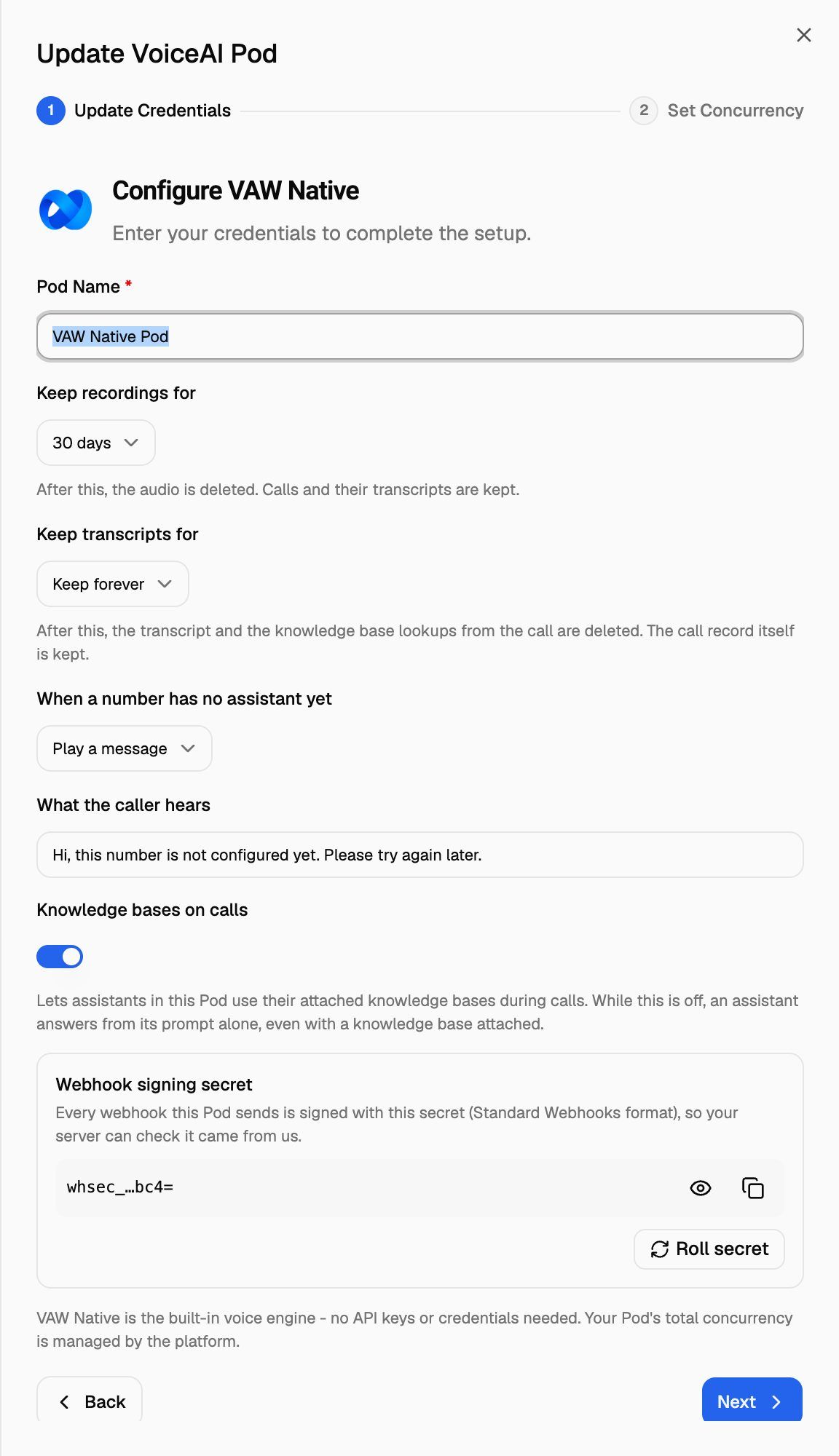
The Webhook signing secret on the same drawer is for your own systems. VoiceAIWrapper signs the webhooks this Pod sends you with it, so your server can check they're genuine. You only need it if you receive webhooks from this Pod: agent webhooks, a phone number's inbound webhook, or campaign webhooks. See Verify Webhook Signatures.
The one thing you do connect: Twilio
VAW Native places and answers phone calls through your own Twilio account. Web calls, test calls in the browser and website widgets work without it.
You connect Twilio once with your Account SID and Auth Token. After that, VoiceAIWrapper points each number you add at your agent, and sets up the outbound connection in your Twilio account the first time an agent calls out. See Connect Your Twilio Account to VAW Native.
Getting started on a provider Pod
Each provider takes a few steps more:
- Vapi: your organization name and ID, private and public keys, and your Vapi Concurrency Limit. See Connect Vapi.
- Retell AI: your Retell API Key. The concurrency is read from your Retell AI account. See Connect Retell AI.
- ElevenLabs: create a webhook in ElevenLabs with the URL VoiceAIWrapper gives you, then enter an unrestricted API key and the webhook's ID and secret. See Connect ElevenLabs Agents.
Then sync each agent you'll use, and on Vapi and Retell AI each number too. Syncing points the agent's or number's webhook at VoiceAIWrapper, so calls show up in Call Logs and campaigns can track leads.
Keeping a provider Pod running
On a provider Pod, the Assistants (Vapi) or Agents (Retell AI, ElevenLabs) page shows each agent's state in the Webhook column: Synced, or Sync required with a Sync now button. The Phone Numbers page has the same column for Vapi and Retell AI numbers. Campaign setup also stops you until the agent and number you choose are synced.
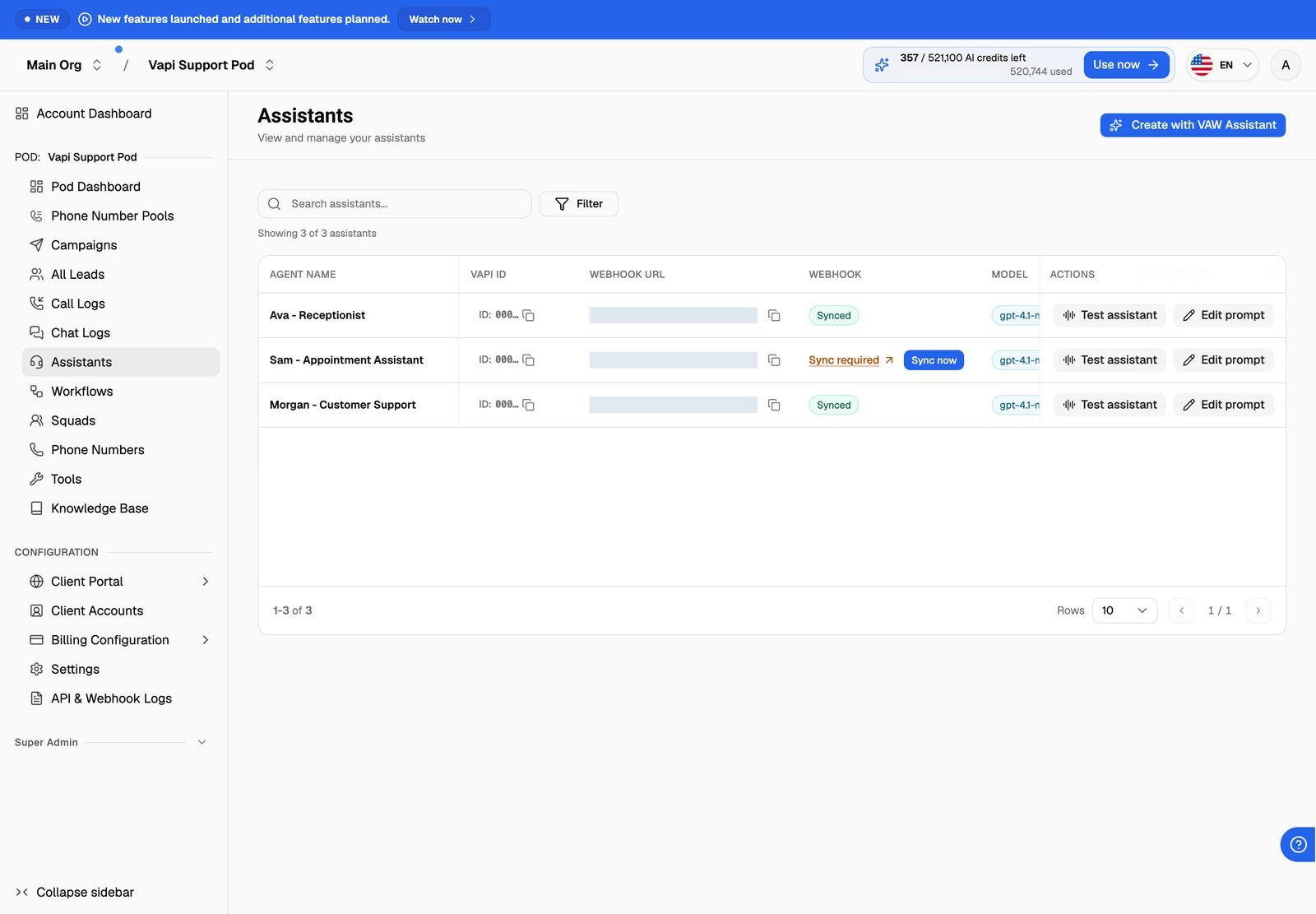
For every detail of what syncing changes in your provider account, see Sync Webhooks So VoiceAIWrapper Can Track Calls.
What breaks when provider settings drift
VoiceAIWrapper reads agents and numbers from your provider account each time you open their pages. Changes made in the provider dashboard show up there, and some of them stop call tracking:
If clients or their developers also have access to the provider account, agree who changes what. A single webhook edit in the provider dashboard can stop a campaign from tracking calls until someone notices Sync required.
Upkeep on VAW Native
There's less to watch, but a few things still matter:
- Rotating your Twilio Auth Token. Update it in Phone Numbers → Connected telephony accounts straight away. Calls on numbers that use that connection stop working until VoiceAIWrapper has the current token. Re-check tests a connection on demand.
- The SIP trunk named VAW Native in your Twilio account. VoiceAIWrapper creates it for outbound calls, so don't delete it. Twilio bills you directly for numbers and phone minutes.
- AI credits. New VAW Native calls and chats pause when your balance runs out. See What Happens When You Run Out of Credits.
- Total concurrency follows your plan. To change the total, contact support. You can move lines between inbound and outbound yourself.
Frequently asked questions
Do I need to sync anything after I edit a VAW Native agent?
Do I need to sync anything after I edit a VAW Native agent?
No. VAW Native agents live in VoiceAIWrapper, so a saved change applies to the next call or chat. There's no webhook to keep in step.
Do I need to sync again after I edit a provider agent's prompt?
Do I need to sync again after I edit a provider agent's prompt?
No. Prompt, voice and model changes don't touch the webhook. You only sync again when the webhook or Server URL changes, or when an agent is re-attached to a synced number.
Can I use VAW Native without a Twilio account?
Can I use VAW Native without a Twilio account?
Yes, for web calls, test calls in the browser and website widgets. You need a Twilio account for phone numbers.
Related articles
Was this helpful?
Still need help? Share an idea