Campaign Types: Outbound Phone, Inbound Phone and Inbound Widget
The three campaign types, which engines support each one, when you need a campaign at all, and how your plan's campaign limit shows up.
Written By voiceaiwrapper
Last updated 26 days ago
A campaign puts an agent to work with real people. It decides who the agent calls or answers, when it works, where the results go, and which client they belong to. Every campaign has one of three types, and choosing the type is the first step when you create one.
This article explains what each type does, which engines support it, and when you need a campaign at all.
The three campaign types
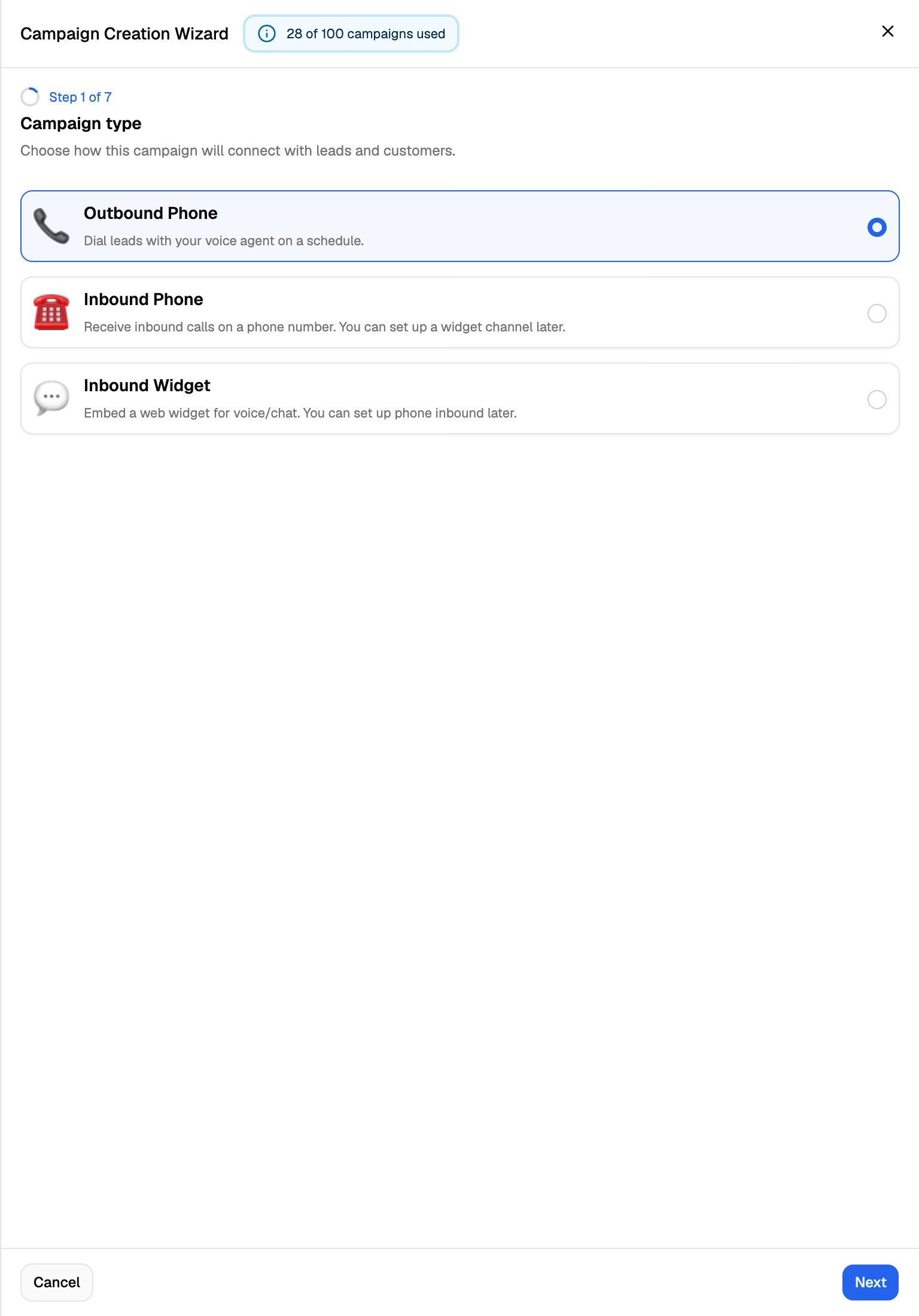
The two inbound types are close cousins. Both are inbound campaigns, and every inbound campaign has a Web Widget tab. On engines that support widgets, an Inbound Phone campaign can add a widget later. The wizard says so on the cards: "You can set up a widget channel later" and "You can set up phone inbound later".
You can't switch a campaign between outbound and inbound later. If you need the other direction, create a new campaign.
Which engines support each type
Each campaign lives inside one Pod (an engine or provider connection). The Pod's engine decides which types you can pick.
When a type isn't available, its card is greyed out and a badge says why:
- Ultravox does not offer Inbound orchestration on the Inbound Phone card in Ultravox Pods.
- Ultravox does not support web call/chat or Not supported for this provider on the Inbound Widget card in Ultravox and Bolna Pods.
- Upgrade required on the Inbound Widget card when your plan doesn't include Web widget. Clicking the card opens the upgrade prompt.
A few things inside a campaign also depend on the engine:
-
Phone number pools (rotating calls across several numbers) are available for every outbound campaign, and for inbound phone campaigns on Vapi, Retell AI and VAW Native. Pools need a plan that includes Phone number pools. See Rotate Caller IDs with Phone Number Pools.
-
Inbound Phone campaigns on ElevenLabs and Bolna have no schedule and no start or pause button. When you create the campaign, VoiceAIWrapper assigns the agent to the number in your provider account, and the provider answers the line from then on.
For a full side-by-side comparison, see Provider Feature Comparison.
Do you need a campaign?
On Vapi, Retell AI, ElevenLabs, Bolna and Ultravox, campaigns are how VoiceAIWrapper dials your leads, tracks the calls on your numbers, and hands the results to a client. If you want the webapp to place or track calls for you, create a campaign.
On VAW Native, an agent can also go to work without a campaign, from the agent's Deploy and Widget tabs:
Choose a campaign when you need any of these:
- A list of leads called automatically, with retries and a daily calling window.
- Callers saved as leads, with lead statuses, exports and the leads event webhook.
- Business hours for an inbound line.
- Campaign webhooks, a success metric, campaign analytics or call summary emails.
- One place to hand the results to a client.
On VAW Native, an inbound campaign takes over its number. While the campaign is scheduled, active or paused, calls to that number follow the campaign, and the number's own agent and inbound webhook aren't used. See Run an Inbound Phone Campaign.
The Deploy tab links to campaigns with Advanced user? Go to campaign settings. See Put Your Agent to Work: The Deploy Tab.
Your plan's campaign limit
Your plan can cap how many campaigns your organization has. Only campaigns whose Campaign Switch is on count toward the cap. When your plan has a cap, the wizard shows your usage next to its title:
At the limit, clicking Add Campaign opens the Higher Campaign Limits upgrade prompt instead of the wizard. To make room, delete campaigns you no longer need, turn off the Campaign Switch on ones you're not using, or upgrade. See Plan Limits and Upgrade Prompts.
Related articles
Was this helpful?
Still need help? Share an idea