Sync Webhooks So VoiceAIWrapper Can Track Calls
Why your Vapi, Retell AI and ElevenLabs agents and numbers must send their events to VoiceAIWrapper, exactly what syncing changes, and how to keep your own webhook.
Written By voiceaiwrapper
Last updated 26 days ago
When you use your own Vapi, Retell AI or ElevenLabs account, the calls run inside that provider. VoiceAIWrapper only finds out about a call when the provider sends it an event: the call started, the call ended, here is the transcript and recording. Syncing a webhook tells the provider to send those events to VoiceAIWrapper.
Without the sync, calls don't appear in Call Logs, campaigns can't track leads, and inbound numbers aren't routed to your campaigns. Each agent or number takes one click to sync.
Applies to: Vapi, Retell AI and ElevenLabs Pods (and legacy Bolna Pods). VAW Native Pods run on VoiceAIWrapper itself and need no sync.
Before you start
- A connected Pod. See Connect Vapi, Connect Retell AI or Connect ElevenLabs Agents.
- For ElevenLabs: the workspace webhook you created when you connected the Pod (the Webhook Callback URL, with its ID and secret entered in VoiceAIWrapper). Agent syncing points each agent at that webhook.
- If an agent or number already sends events to your own system (for example n8n, Make or your CRM), copy that address before you sync. Syncing replaces it. The last section of this article shows how to keep receiving those events.
What syncing changes in your provider account
Syncing edits settings inside your provider account. Nothing else on the agent changes: prompts, voices and tools stay as they are.
Why numbers lose their default agent
On Vapi and Retell AI, a synced number has no agent of its own. Instead, each inbound call asks VoiceAIWrapper which agent should answer, and VoiceAIWrapper picks the agent from the inbound campaign that uses the number, either directly or through a phone number pool. This is what lets campaign schedules, lead tracking and pre-call webhooks work on inbound calls.
After you sync a Vapi or Retell AI number, it only answers calls through an inbound campaign in VoiceAIWrapper. If no enabled inbound campaign uses the number, or a call arrives outside the campaign's schedule, the call isn't handed to an agent. Set up the inbound campaign before you move live traffic to the number.
Sync agents
- Open the Pod and go to Assistants (Vapi) or Agents (Retell AI, ElevenLabs).
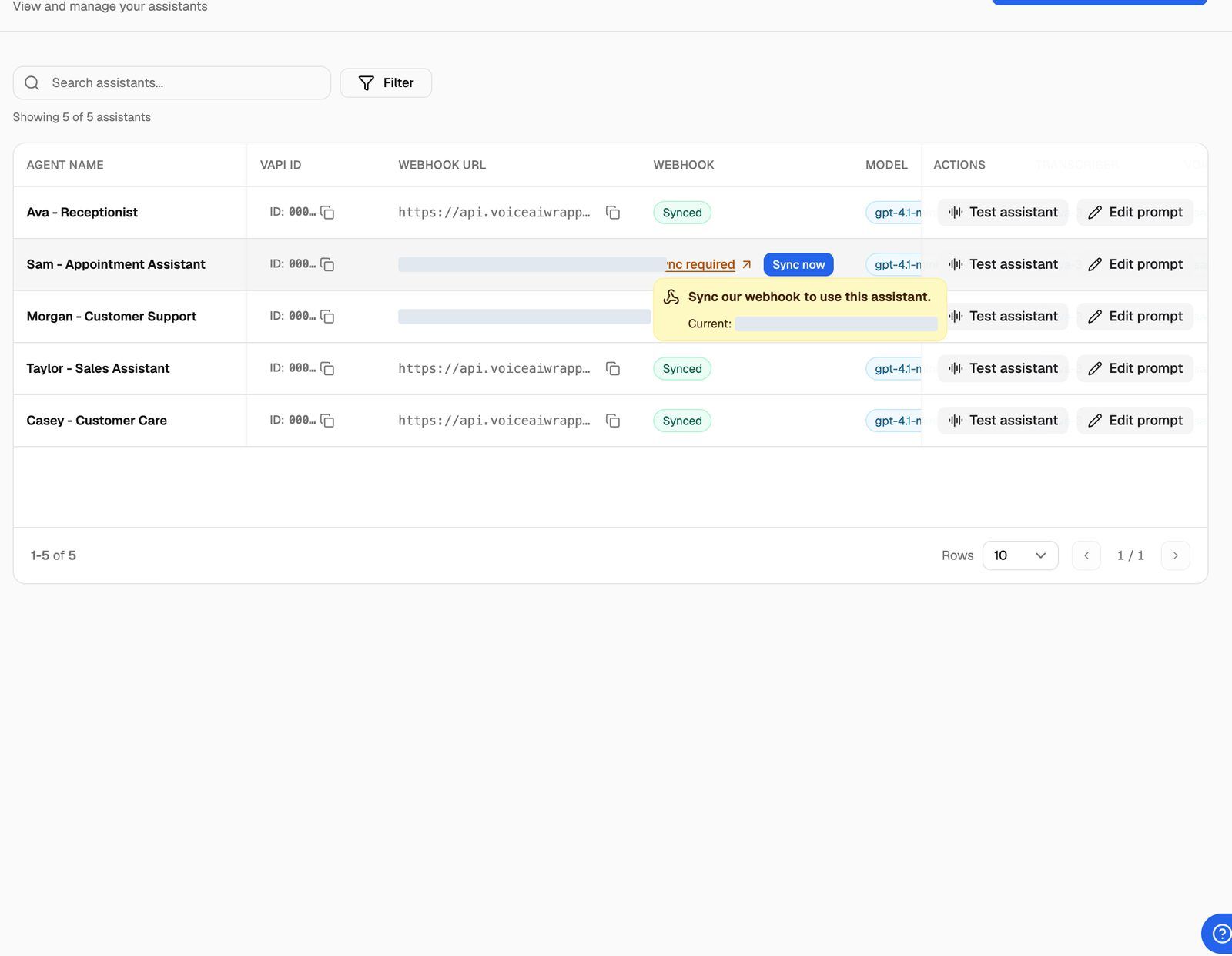
- Find the Webhook column. Each row shows one of:
- Synced: VoiceAIWrapper receives this agent's events. Nothing to do.
- Sync required: events go somewhere else, or nowhere. Hover over it to see "Sync our webhook to use this assistant." (or "agent") and the current address, shown as Current:.
- Click Sync now on the row. You'll see a confirmation, and the row changes to Synced.
On Vapi and Retell AI, the Webhook URL column next to it shows the address the agent sends events to right now, or Not set. ElevenLabs agents only have the Webhook column.
The same controls appear on the other agent pages:
- Workflows (Vapi): a Webhook column with Sync now.
- Squads (Vapi): a Webhook column. It shows All Valid when every assistant in the squad is synced. Otherwise it shows Sync required with Sync All, and hovering lists the assistants that need it ("assistant(s) need webhook sync.").
- Chat Agents (Retell AI): a Webhook column with Sync now.
Sync phone numbers
Vapi and Retell AI numbers have their own sync.
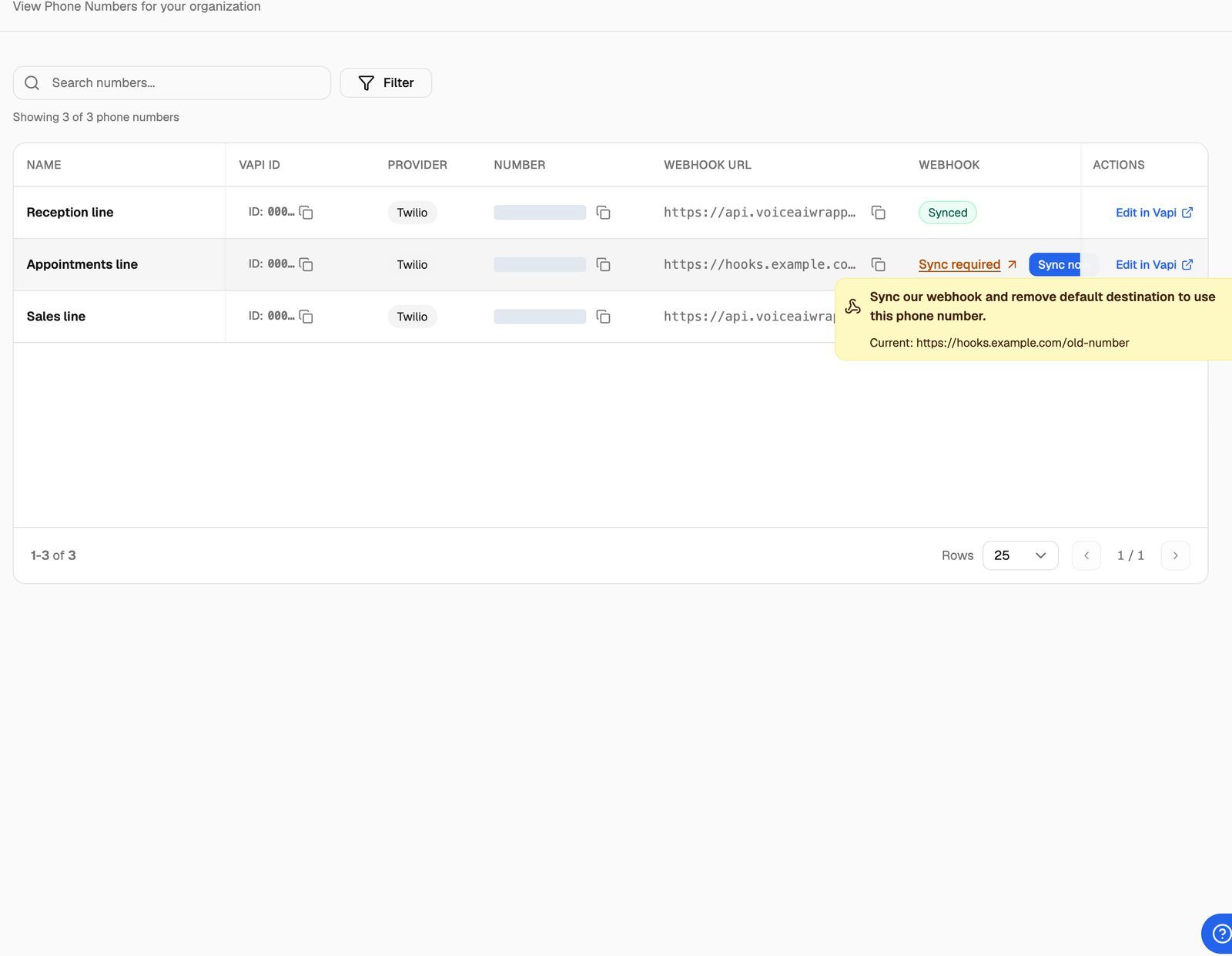
- Open the Pod and go to Phone Numbers.
- In the Webhook column, find numbers marked Sync required. Hover to see "Sync our webhook and remove default destination to use this phone number." and the current address.
- Click Sync now.
A Vapi number shows Synced only when its Server URL points to VoiceAIWrapper and it has no assistant, workflow or squad attached. A Retell AI number shows Synced only when its inbound webhook points to VoiceAIWrapper and it has no inbound agent. If someone re-attaches an agent in the provider dashboard later, the number goes back to Sync required.
Sync while you set up a campaign
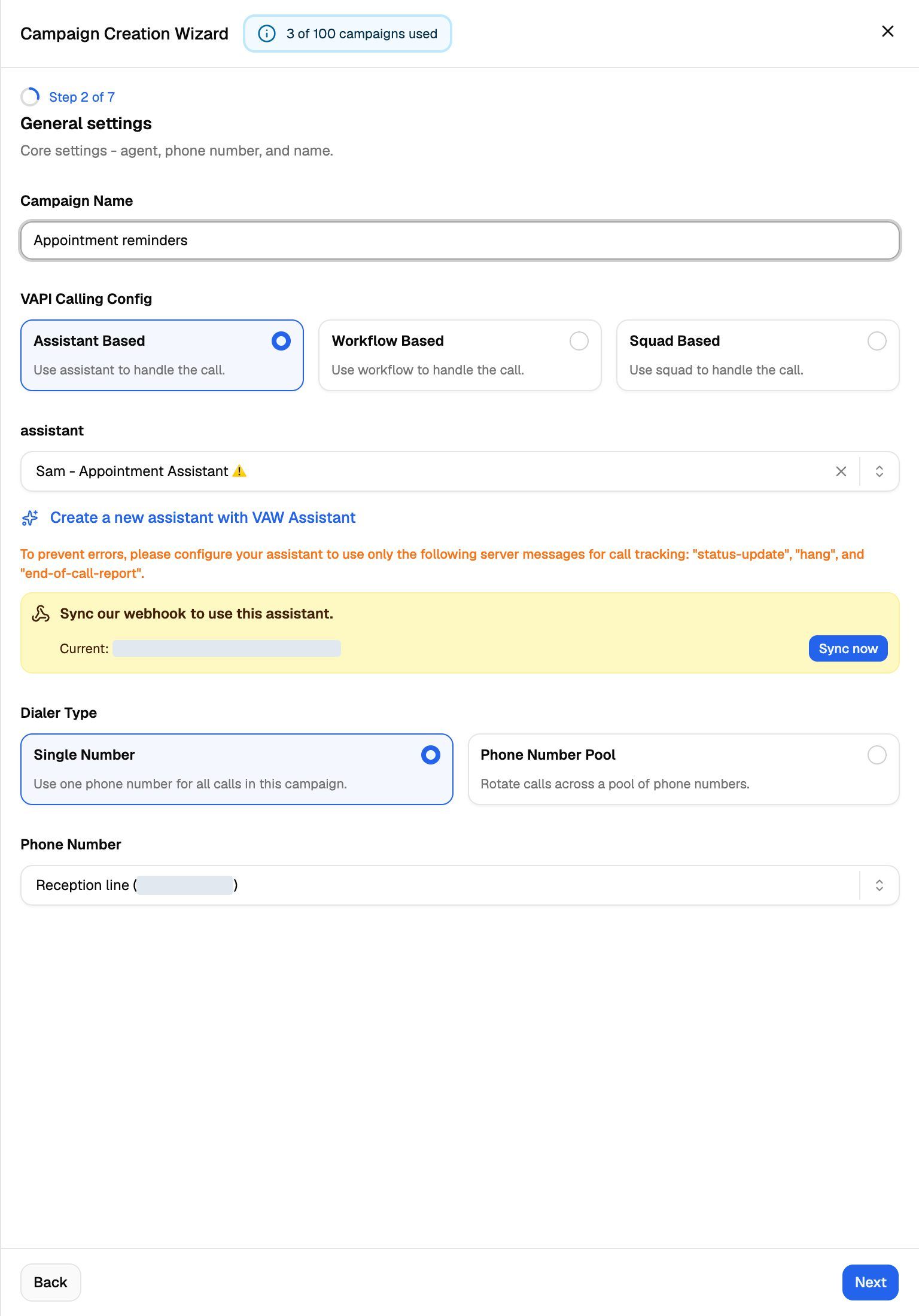
When you create a campaign or change its agent or number, VoiceAIWrapper checks the sync for you. If the agent or number isn't synced, a yellow alert appears under the field with its current address and a Sync now button. In the Campaign Creation Wizard, you can't leave the General settings step until you sync: the webapp shows "Sync webhooks on the selected agent and phone number before continuing."
Two related checks:
- Phone number pools and website widget campaigns skip the number check, because no single number is attached.
- Giving a client workspace access to agents or numbers needs them synced too. Otherwise you'll see "Some selected assistants/agents have invalid webhook URLs. Please sync them first." (or the same message for phone numbers).
Vapi server messages
Syncing sets the Server URL but doesn't change which events Vapi sends. VoiceAIWrapper tracks calls with three server messages: status-update, hang and end-of-call-report. In the assistant's settings in Vapi, turn on only these three; the campaign settings warn that extra server messages can cause errors. The one exception: an assistant you use for chat in a website widget also needs session.created and session.updated.
Keep receiving events at your own URL
Syncing replaces the address the agent sent events to before. To keep receiving events in your own system, add that address to the campaign instead:
- Open the campaign → Settings → Webhooks and Emails.
- Paste your address into Post-call event webhook.
- Click Save Settings.
VoiceAIWrapper then forwards every event the provider sends for calls in that campaign to your address, with the campaign and lead details added. You can add Custom headers (for example an Authorization header) if your endpoint needs them.
If you connected an agent during onboarding and it already had a webhook, VoiceAIWrapper saved that address as the Post-call event webhook of the campaign onboarding created. The Sync now buttons elsewhere don't do this, so copy the old address before you click them.
Troubleshooting
An agent says "Synced" but its calls are missing from Call Logs.
An agent says "Synced" but its calls are missing from Call Logs.
Check the agent's settings in your provider dashboard. Someone may have changed the Server URL or webhook after you synced, and the page shows the state from when it loaded. Refresh the page; if the row now says Sync required, click Sync now. On Vapi, also check the server messages listed above. For ElevenLabs, check that the workspace webhook still exists and is enabled in ElevenLabs.
My Vapi number stopped answering after I synced it.
My Vapi number stopped answering after I synced it.
That's expected if no inbound campaign uses the number. Syncing removes the number's own assistant so that VoiceAIWrapper can route calls. Create an inbound campaign with this number (or a pool that contains it) and check that its schedule covers the current time.
Sync now shows "Failed to update webhook" or "Failed to update assistant".
Sync now shows "Failed to update webhook" or "Failed to update assistant".
VoiceAIWrapper couldn't change the setting in your provider account. The most common cause is a key that no longer works, for example after you rolled it in the provider dashboard. Update the Pod's keys and try again. See Manage Pods: Rename, Update Keys, Switch and Delete.
Do I need to sync again after I edit the agent's prompt?
Do I need to sync again after I edit the agent's prompt?
No. Prompt, voice and model changes don't touch the webhook. You only need to sync again if someone changes the Server URL or webhook in the provider dashboard, or re-attaches an agent to a synced number.
Related articles
Was this helpful?
Still need help? Share an idea