Use VoiceAIWrapper from ChatGPT and Claude
Connect ChatGPT or Claude to your organization, then build receptionists, calling agents and site chatbots, connect numbers and check calls from the chat.
Written By voiceaiwrapper
Last updated 26 days ago
You can work with your VoiceAIWrapper organization from inside ChatGPT or Claude. Describe a business in the chat, and the AI app builds a working VAW Native agent for it: an inbound receptionist, an outbound calling agent, or a chatbot with a widget for the business's site. It can also connect a phone number, give you widget embed code and tell you how recent calls went.
You connect once, choose which organization the app works in, and can disconnect at any time.
Applies to: VAW Native. Everything the AI app creates or lists is a VAW Native agent, number or call. Agents on Vapi, Retell AI and ElevenLabs Pods aren't shown.
Before you start
- A VoiceAIWrapper account in at least one organization. Any role (Owner, Admin or Member) can connect.
- ChatGPT, or Claude on the web, desktop or mobile apps. Claude Code isn't supported.
- AI credits. Building an agent uses AI credits, the same as building one in the webapp. The one exception: if the organization has no agents yet, the AI app builds its first one free. Calls the agent takes later use credits too. See How AI Credits Work.
Step 1: Add VoiceAIWrapper in your AI app
In ChatGPT or Claude, add VoiceAIWrapper from the app's apps or connectors settings. If the app asks for a server address, use:
https://api.voiceaiwrapper.app/mcp
The AI app then opens VoiceAIWrapper in your browser so you can sign in and approve the connection. If you're not signed in, you'll see the normal sign-in page first, then come straight back. If you don't have an account yet, you can sign up from there. After you verify your email, you're taken on to the approval page.
The connection request lasts 30 minutes. If you take longer, start again from the AI app.
Step 2: Choose the organization and allow access
The page is titled Connect ChatGPT to VoiceAIWrapper (or Connect Claude to VoiceAIWrapper) and shows Signed in as with your email. Check it's the right account.
- Under ChatGPT will be able to: (or Claude will be able to:), read what you're allowing:
- "See your agents, widgets and calls"
- "Create and change agents and widgets, and connect phone numbers"
- Choose the organization:
- If you're in one organization, it's shown under Organization.
- If you're in several, pick one under Choose the organization ChatGPT will work in. Each card shows your role there.
- Click Allow. You're taken back to the AI app.
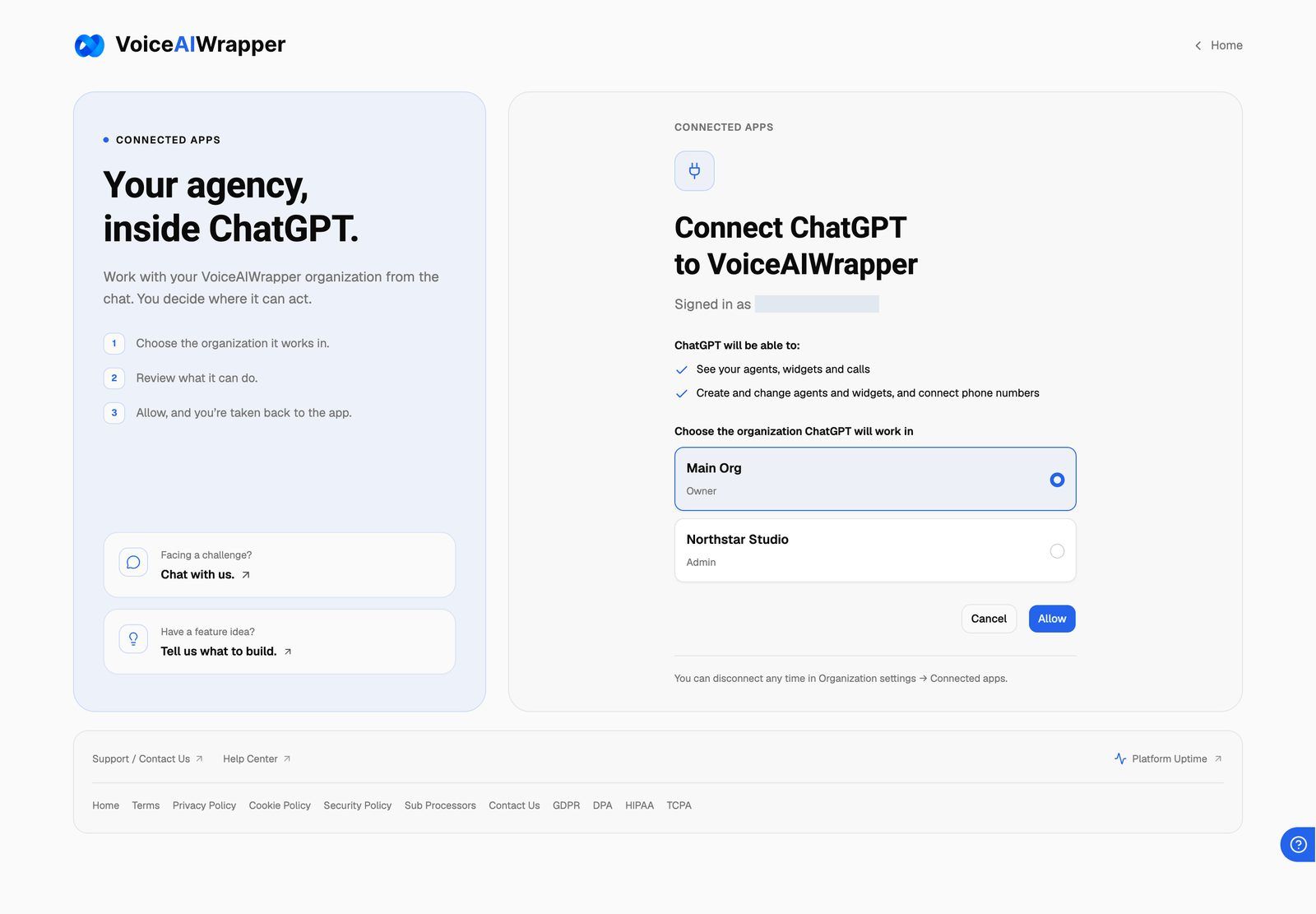
Click Cancel instead to go back without connecting.
Each AI app works in one organization at a time. If you connect the same app again and choose a different organization, the old connection ends and the app moves to the new one.
What you can ask it to do
Ask in plain words. The AI app picks the right action.
For a new agent, give the business name and either its web address or 2 to 3 sentences about what it does. The AI app can also pass opening hours, the agent's name, tone and language. A build takes a minute or two. If one fails, ask the AI app to try again and it carries on where it stopped, without making a second agent.
The agent's language can be English, Spanish, French, German, Hindi, Portuguese, Dutch, Italian or Japanese.
Connecting a phone number changes live call routing straight away. Calls to that number go to the agent from then on.
What it can't do
These stay in the webapp:
- Buying or porting phone numbers. The AI app can only connect numbers you already have free.
- Starting outbound calls. Create a campaign in the webapp. See Create a Campaign with the Campaign Wizard.
- Changing voices, and adding calendar booking, call transfer or text messages.
- Test calls. Use Test on the agent's page in the webapp.
- Showing caller numbers, names, transcripts or recordings. The call list never includes them.
Limits
- 60 actions a minute per connection. Past that, you'll see "Too many requests. Please try again in a minute."
- Daily limits on building agents and reading sites. When you reach one, the AI app tells you to try again tomorrow.
- One site read at a time per organization. If another build is reading a site, you'll see "Another build is reading a site in this organization. Please try again in a minute."
- Paused organizations can only view. If your organization is paused, you'll see "This organization is paused, so changes can't be made right now. You can still view your agents."
- Out of credits: builds stop with "This organization is out of credits. Add credits in the VoiceAIWrapper app, then try again."
See and disconnect connected apps
- In the sidebar, click Settings.
- Scroll to Connected apps.
You'll see each AI app you connected to this organization, with Connected and the date, and Last used. The list only shows your own connections, not other team members'.
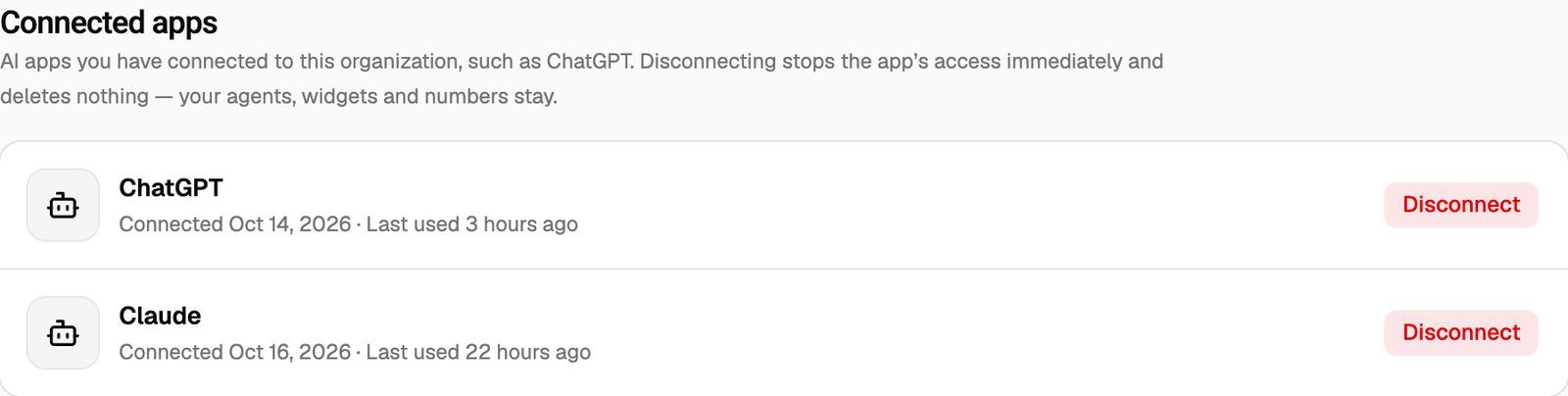
To disconnect, click Disconnect on the app's row, then Disconnect again in Disconnect ChatGPT? (or Disconnect Claude?). The app loses access straight away. Nothing is deleted: agents, widgets and numbers it created stay as they are. You can connect again from the AI app at any time.
Connections also end on their own when you reset your password, when your account is deactivated, or when you're removed from the organization. The AI app then says "Your VoiceAIWrapper connection has ended. Connect your account again to continue."
Troubleshooting
I see "This connection request has expired."
I see "This connection request has expired."
Requests last 30 minutes. Go back to ChatGPT or Claude and start the connection again.
I see "VoiceAIWrapper for ChatGPT isn't available for your account yet."
I see "VoiceAIWrapper for ChatGPT isn't available for your account yet."
AI app access isn't turned on for your account. Contact support through Need help? → Help Chat.
I see "You aren't in an organization yet, so there is nothing to connect."
I see "You aren't in an organization yet, so there is nothing to connect."
Finish setting up your account in the webapp, or accept an invitation to an organization, then start the connection again from the AI app.
I see "You're not a member of that organization any more."
I see "You're not a member of that organization any more."
You were removed from the organization you picked while the page was open. Choose another organization, or ask an Owner or Admin to invite you again.
The AI app can't find an agent I can see in the webapp.
The AI app can't find an agent I can see in the webapp.
The AI app only works with VAW Native agents in the organization you chose when connecting. Check which organization it's using by asking "which account am I connected as". Agents on Vapi, Retell AI or ElevenLabs Pods aren't available to it.
It says there's no free number.
It says there's no free number.
All your numbers are already connected, or the organization has none. Buy or connect a number in the webapp first. See Buy a New Phone Number.
Related articles
Was this helpful?
Still need help? Share an idea