Billing: One Balance in AI Credits Instead of a Separate Provider Bill
How call costs flow on VAW Native (one AI credit balance) and on Vapi, Retell AI or ElevenLabs Pods (your provider's bill), and what happens when the money runs out.
Written By voiceaiwrapper
Last updated 26 days ago
On VAW Native, every call and chat is paid from one balance of AI credits in your VoiceAIWrapper account, and you can see what each one cost. On a Vapi, Retell AI or ElevenLabs Pod (an engine or provider connection), your provider bills you directly for calls, on its own bill and at its own rates. This article shows how money flows on each engine, where to track it, and what happens when it runs out.
How costs flow on each engine
VAW Native: one balance in AI credits
Where your credits come from
Plan credits after the first payment: Growth includes 11,000 credits on monthly billing or 110,000 on annual billing; Scale includes 70,000 on monthly billing or 700,000 on annual billing. Check the Credits card for release and expiry dates; the yearly total does not establish a monthly release schedule.
Pay-as-you-go includes 1,000 one-time welcome credits for testing. Growth and Scale each include 1,000 credits during the 7-day trial, with the full allowance starting at the first payment. A card is required; billing starts automatically after 7 days unless cancelled.
Credits you buy. Click Buy credits on the Credits card and enter an amount from $7 to $500. Purchased credits expire 12 months after you buy them.
To see what your plan includes, open Settings → Billing. The Renews line on the Credits card shows the date your plan credits renew and how many were added for the current period. For the full rules on expiry and rollover, see How AI Credits Work.
What a call or chat costs
Every VAW Native call is charged for its answered time, measured to the second. A call nobody answers costs nothing. VAW Native doesn't detect voicemail yet, so an outbound call picked up by voicemail is charged as answered.
For example, a call answered for 4 minutes by an agent with a knowledge base attached:
Platform: 4 minutes × 60 credits = 240 credits
Knowledge base: 4 minutes × 5 credits = 20 credits
Fixed lines together: 260 credits, or $0.26
Then add the AI models the call actually used, and the analysis run after it ends.
A chat in which the agent sends 8 replies, with a knowledge base attached, costs 8 × 5 = 40 credits plus 8 × 0.5 = 4 credits, so 44 credits, plus the models it used.
Building a VAW Native agent with VAW Assistant (Agents → New agent → Create using VAW Assistant) also uses credits, for what its AI steps cost. The agent built during sign-up onboarding is free. It shows in Credit history as a Usage line.
The pickers show estimates. The Cost on each finished call is what you're actually charged. For more worked examples, see What a Call Costs on VAW Native.
Where to track VAW Native usage
Credits card, on Settings → Billing: your Available balance, a rough ≈ minutes of calling estimate, and each batch of credits with its expiry date.
Credit history: click View history on the Credits card. Every credit in and out is listed, with your balance after each line.
Call Logs: the Credits column shows each call's total. Open a call and select What ran to see the Cost section line by line.
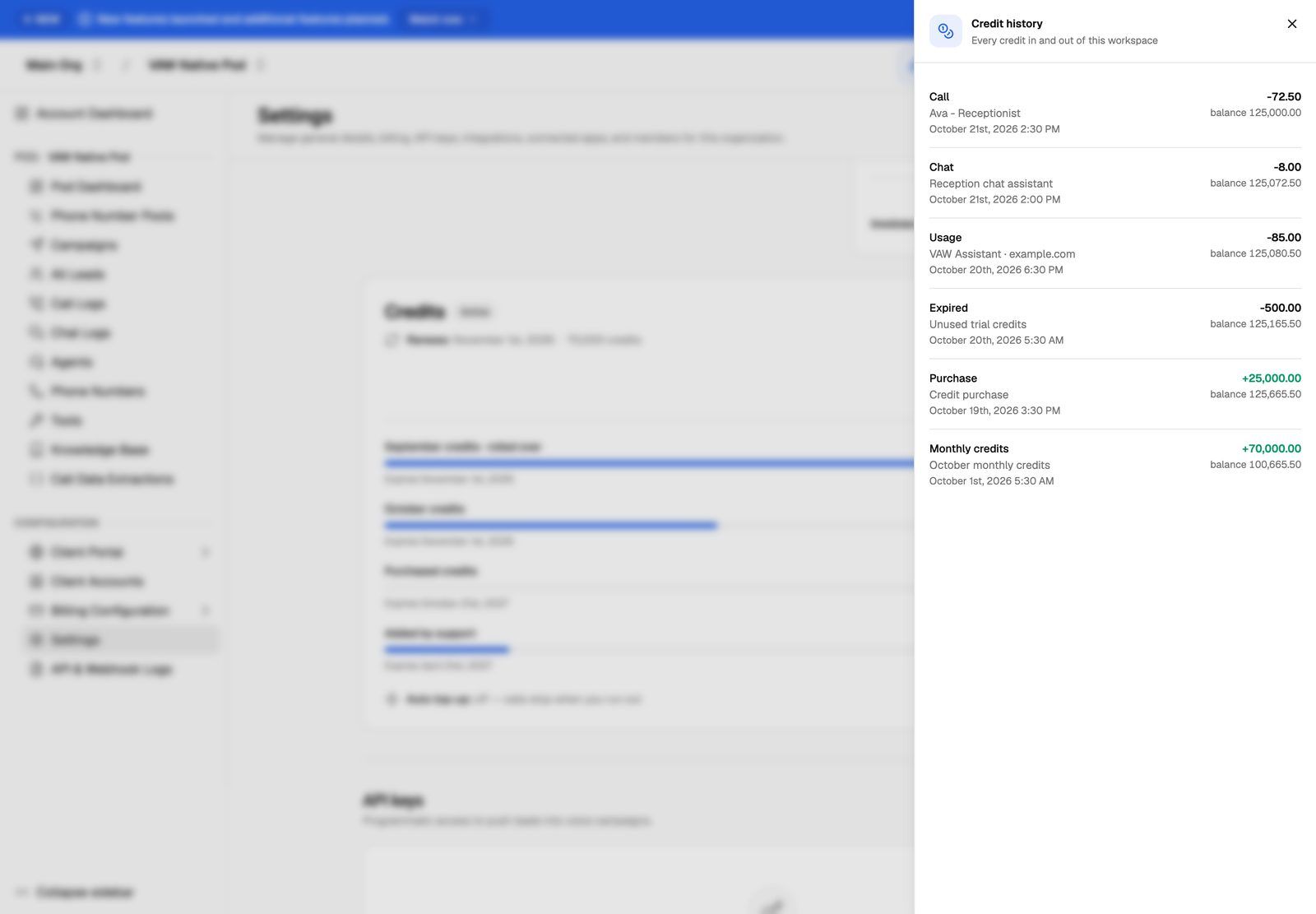
Only Owners and Admins can open Settings. See Credit History and Per-Call Costs.
Vapi, Retell AI and ElevenLabs: a separate provider bill
On a BYOK Pod, calls run in your own provider account, so your provider bills you for them directly. Those calls never use AI credits, and VoiceAIWrapper doesn't bill or mark up those minutes.
What VoiceAIWrapper does charge for is your plan and, on plans that count them, one BYOK provider connections add-on for each Vapi, Retell AI or ElevenLabs Pod. Your VAW Native Pod never counts as a BYOK connection. See Add-Ons: BYOK Connections, Client Accounts and Team Members.
To see what your provider calls cost, open a campaign's Analytics tab. Total Spend and the cost-per metrics add up the costs your provider reports for that campaign's calls: in dollars for Vapi and Retell AI, and in Tokens for ElevenLabs. For the full picture, check your provider's own billing. See What a Call Costs When You Bring Your Own Provider.
When the money runs out
If a client account runs on VAW Native, its calls use your organization's credits. Keep an eye on the balance before you launch a large outbound campaign for a client.
What your clients see
Your costs stay with you. In the client portal, the Credits column in call logs and the Cost section of a call's What ran tab are hidden, so clients never see what a VAW Native call cost you. You set your own prices and bill clients separately, through your own Stripe account or outside VoiceAIWrapper. See Price Your Services for Clients.
Frequently asked questions
Do test calls cost anything?
Do test calls cost anything?
On VAW Native, yes. Test calls and test chats are real and use credits like any other. On a BYOK Pod, your provider bills test calls the same way it bills other calls.
Can I use credits to pay for my Vapi, Retell AI or ElevenLabs calls?
Can I use credits to pay for my Vapi, Retell AI or ElevenLabs calls?
No. Credits only pay for work on VAW Native. Calls on a BYOK Pod are always billed by your provider.
Why did a VAW Native call cost more than 60 credits a minute?
Why did a VAW Native call cost more than 60 credits a minute?
60 credits a minute is only the platform line. The call also pays for the AI models it used, a knowledge base if one is attached, and the analysis after it ends. Open the call's What ran tab to see each line.
Related articles
Was this helpful?
Still need help? Share an idea