Delete Your Account
Permanently delete your login, and the organizations you created, from the Danger zone on your Profile page. Cancel any paid plan first.
Written By voiceaiwrapper
Last updated 26 days ago
You can delete your VoiceAIWrapper login yourself from your Profile page. If you created an organization, deleting your account also deletes that organization and everything in it. This can't be undone, so read what gets deleted before you start.
If you only want to stop paying, cancel or pause your plan instead. See Pause, Cancel or Resume Your Subscription.
Before you start
Review and cancel billing before deleting. For a Growth or Scale trial, cancel before the 7-day trial ends to avoid automatic billing. Both require a card and include 1,000 trial credits. Do not rely on deleting your login as your cancellation method. For an active paid subscription, follow the cancellation and deletion eligibility date shown in Billing.
Save anything you need. Deleted data can't be recovered.
Tell your team and clients. If you created the organization, their access ends too.
What gets deleted
What's deleted depends on whether you own the organization.
If you created more than one organization, deleting your account deletes all of them. Each one must have no active paid subscription.
Your login is removed completely, so you also lose access to any other organization you belong to. We keep a record of your email address, your sign-up date and the feedback you leave.
Step 1: Cancel your plan
Open Settings → Billing and cancel your plan. See Pause, Cancel or Resume Your Subscription.
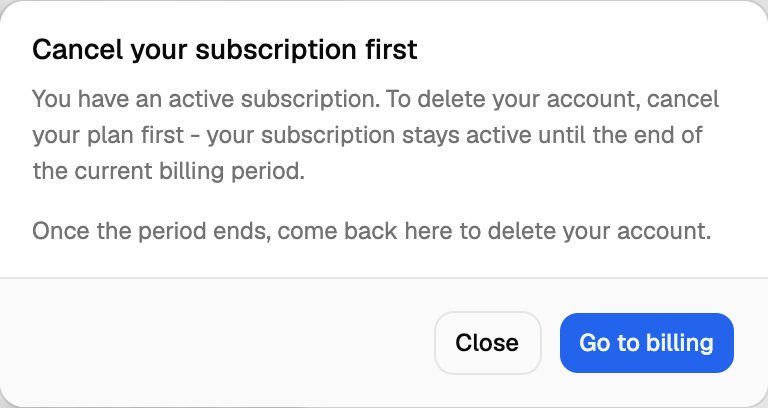
Wait until the end of your billing period. Until then, the plan is still active and deletion stays blocked.
If your organization has no plan, continue to Step 2. If you are on a Growth or Scale trial, first cancel before the 7-day trial ends and check the account-deletion requirements shown for your account.
Step 2: Delete your account
Click your avatar in the top-right corner of the header, then click Profile.
Scroll to the bottom, to Danger zone ("Everything below this line is permanent. Read before you click.").
Click Delete account.
Read the list under "This will permanently delete the following:".
Under Where did we lose you?, write at least 40 characters about why you're leaving.
Tick I understand this is permanent and cannot be undone.
Click Delete account.
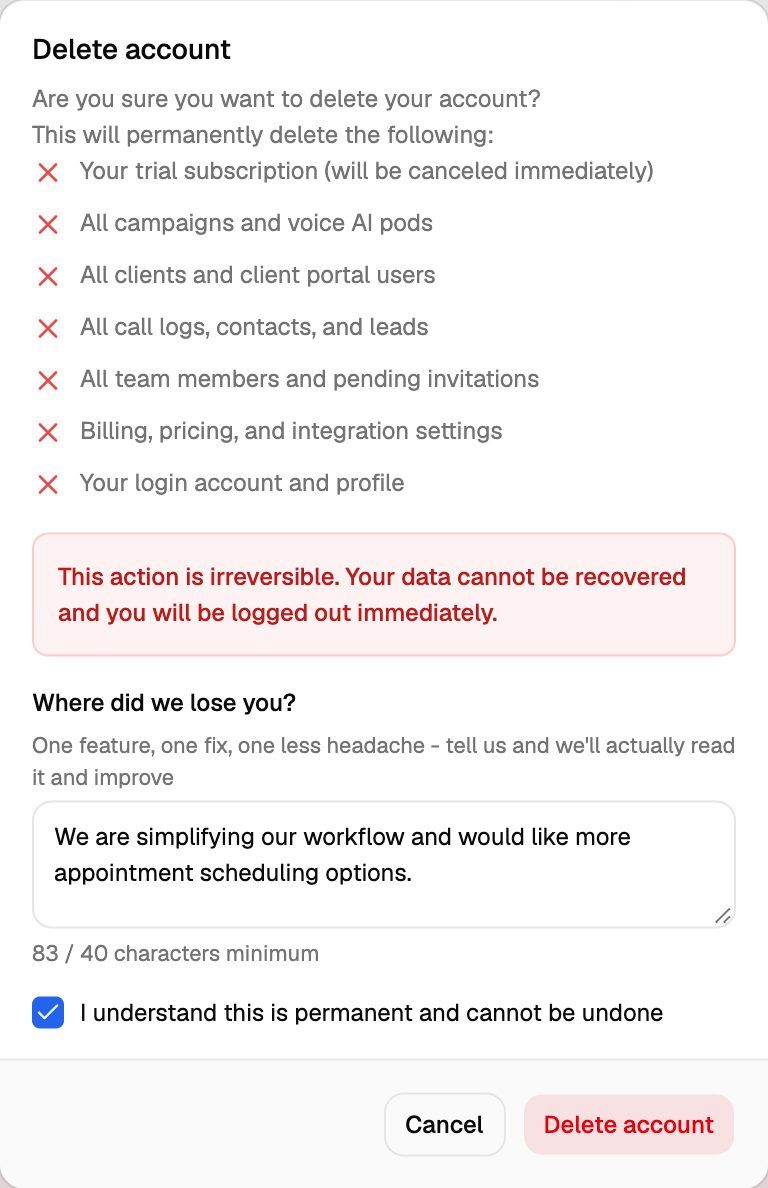
You're logged out straight away.
Deleting your account permanently removes your login, and if you own the organization, every campaign, Pod, client, call log, lead and setting in it. Your data can't be recovered.
If your organization has no plan (for example, after a cancellation ended), the plan picker that replaces the webapp also has a Delete my account button. It opens the same dialog.
If deletion is blocked
When you click Delete account, one of these may open instead:
Frequently asked questions
The Delete account button doesn't do anything.
The Delete account button doesn't do anything.
The button in the dialog stays greyed out until you've written at least 40 characters in Where did we lose you? and ticked the confirmation box.
I only want to leave one organization, not delete my login.
I only want to leave one organization, not delete my login.
Deleting your account removes your login everywhere. To leave just one organization, ask an Owner or Admin of that organization to remove you. See Invite Team Members and Assign Roles.
I see an error starting "Cancel your subscription first" or "Your subscription is still active" when I confirm.
I see an error starting "Cancel your subscription first" or "Your subscription is still active" when I confirm.
You created another organization that still has an active plan. Deletion checks every organization you created, not just the one you're in. Switch to that organization, cancel its plan, and try again after its billing period ends. See Join, Create and Switch Organizations.
Can I get my data back after deleting?
Can I get my data back after deleting?
No. Deletion is permanent and the data can't be recovered.
Related articles
Was this helpful?
Still need help? Share an idea