How Provider Agents Appear in VoiceAIWrapper
Agents you build in Vapi, Retell AI or ElevenLabs show up in VoiceAIWrapper automatically. Learn what the list shows and how webhook sync works.
Written By voiceaiwrapper
Last updated 26 days ago
When you connect your own Vapi, Retell AI or ElevenLabs account, you keep building agents where you always have: in that provider's dashboard. VoiceAIWrapper reads them straight from your provider account, so every agent you create there appears in VoiceAIWrapper on its own, ready to use in campaigns and to share with clients. There's nothing to import.
This article explains what the agents list shows, what the webhook sync status means, and what you can do from the list.
Applies to: BYOK Pods on Vapi, Retell AI and ElevenLabs. Agents on your built-in engine work differently. See Introduction to VAW Native, the Built-In Voice Engine.
Before you start
- Connect your provider as a Pod (an engine or provider connection). See Connect Vapi, Connect Retell AI or Connect ElevenLabs Agents.
- Select that Pod in the Pod selector at the top of the webapp. The sidebar shows the pages for the selected Pod only.
Where to find your agents
In the sidebar, under the Pod's name, open:
- Assistants on a Vapi Pod. Vapi calls its agents "assistants", so VoiceAIWrapper does too.
- Agents on a Retell AI or ElevenLabs Pod.
Some providers have extra agent types, each on its own page:
The Retell AI Agents page lists voice agents only. Chat agents appear on Chat Agents.
How the list stays up to date
VoiceAIWrapper doesn't keep its own copy of your agents. Each time you open the page, it asks your provider for the current list. That means:
- New agents appear automatically. Create an assistant in Vapi, then open or refresh Assistants, and it's there.
- Changes you make in the provider show up the next time the page loads, such as a new name, model or voice.
- Agents you delete in the provider disappear from the list. If a campaign used a deleted agent, open the campaign's Settings tab and choose another agent under General Settings.
If your provider key stops working, the page shows an error instead of the list. Check the Pod's credentials. See Manage Pods: Rename, Update Keys, Switch and Delete.
What the list shows
Each row is one agent from your provider account. The columns depend on the provider:
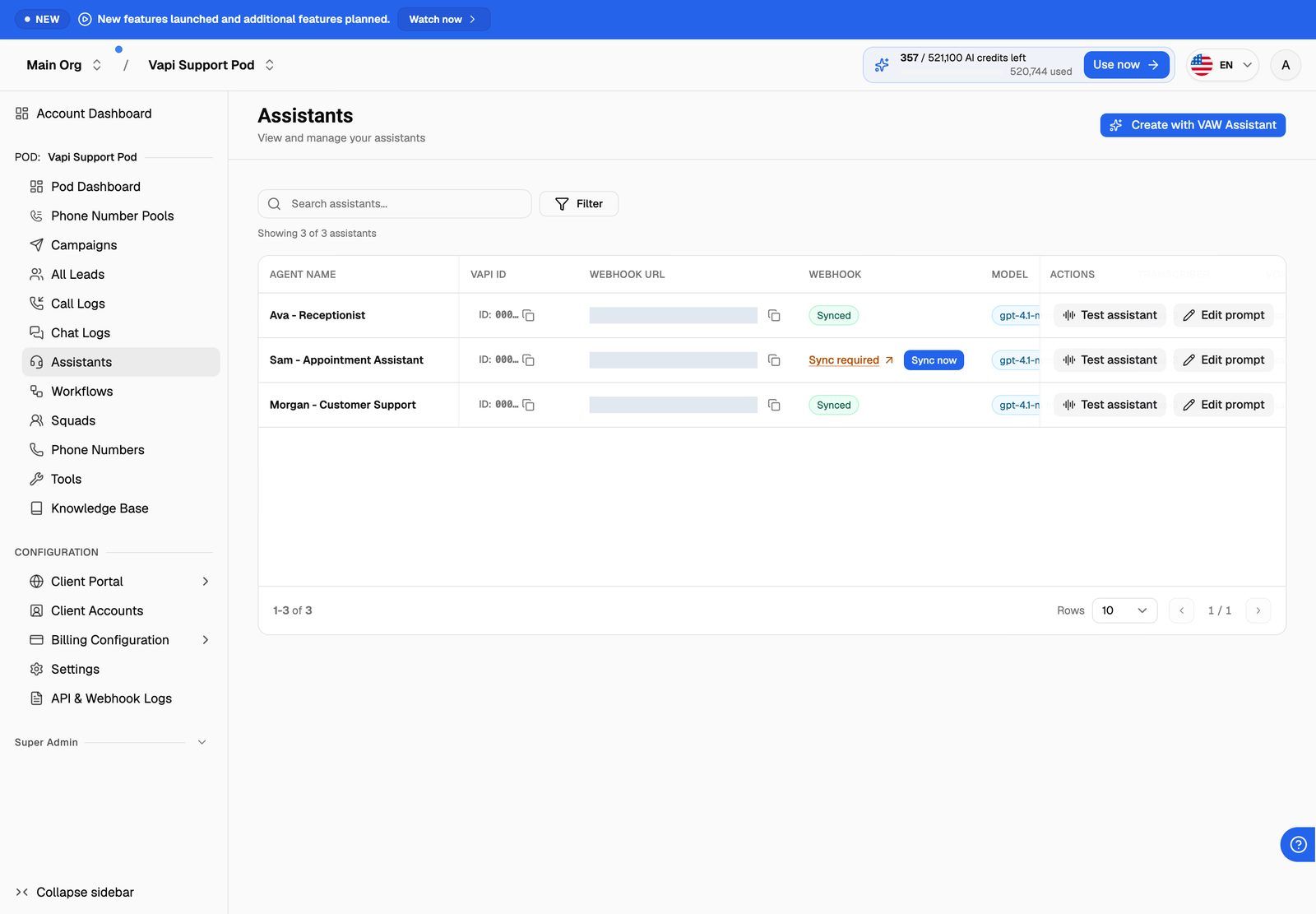
A few things you can do from the list:
- Copy an agent's ID with the copy button in the ID column, for example to share it with support.
- Search with the search box. It matches the agent's name, ID and the other values in the row. To narrow the list further, use the filter button to filter by columns such as model, voice or webhook status (Synced or Out of sync). The filters on offer depend on the provider.
- Test or edit the agent from the Actions column. Clicking a row opens the same Edit prompt sheet. See Edit Prompts and Greetings for Provider Agents.
Webhook sync: the Webhook column
VoiceAIWrapper learns about calls through a webhook: a web address your provider sends call events to, such as "call started" and "call ended" with the transcript. For each agent, VoiceAIWrapper checks whether your provider is sending those events to VoiceAIWrapper.
Hover over Sync required to see "Sync our webhook to use this assistant." (or "agent"), followed by the address the agent currently uses after Current:.
When you click Sync now, VoiceAIWrapper updates the agent in your provider account and shows a confirmation, such as "Assistant updated successfully" on Vapi or "Webhook updated successfully" on Retell AI. The badge turns to Synced. Nothing else about the agent changes.
You must sync an agent before you can use it in a campaign. If you pick an unsynced agent in the campaign wizard, it asks you to "Sync webhooks on the selected agent and phone number before continuing." For the full picture, including phone numbers, see Sync Webhooks So VoiceAIWrapper Can Track Calls.
Syncing replaces the webhook address set on the agent in your provider account. If you were sending that agent's events to your own server, they'll go to VoiceAIWrapper instead. To keep getting call results in your own system, add a post-call event webhook to the campaign. See Post-Call Event Webhook.
Agents you create with VAW Assistant are synced from the start. On Vapi and ElevenLabs, saving an agent's greeting or prompt in the Edit prompt sheet also syncs its webhook.
When the Pod has no agents yet
A new Pod shows "No agents in this pod yet" (or "No assistants in this pod yet" on Vapi). You have two ways to add one:
- Create with VAW Assistant builds an agent for you in your provider account after a few questions. See Build a Provider Agent with VAW Assistant. This button only appears if your plan includes VAW Assistant.
- Open provider dashboard opens your provider's dashboard in a new tab, where you can build the agent yourself. Come back and refresh the page to see it.
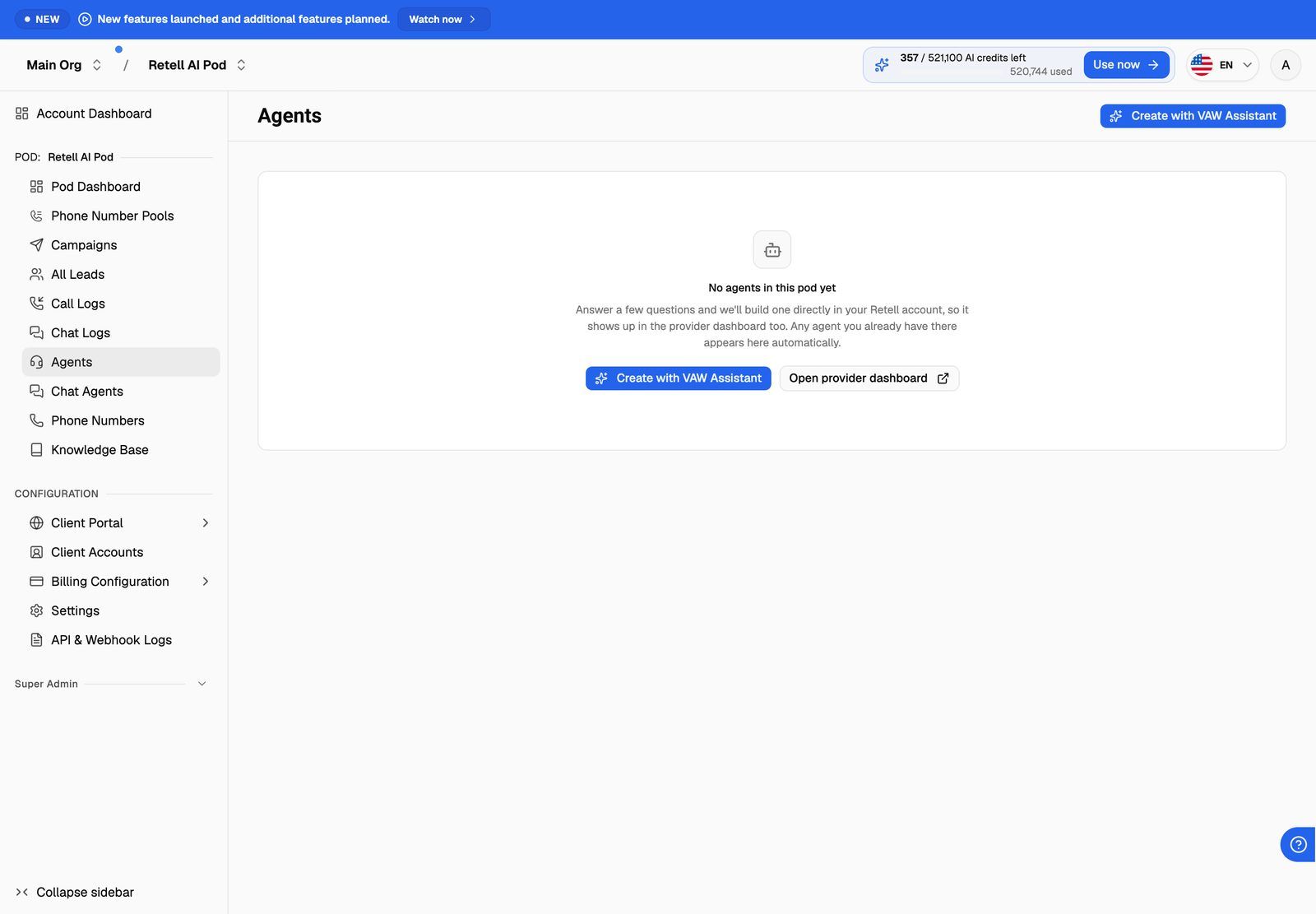
The Create with VAW Assistant button also stays in the top right of the page once you have agents.
What you change where
VoiceAIWrapper lets you edit the greeting and system prompt and run test calls. Everything else about the agent, such as its model, voice, transcriber, tools and knowledge base, you change in the provider's own dashboard. The list picks up those changes the next time you open it.
Frequently asked questions
I created an agent in my provider, but it isn't in the list.
I created an agent in my provider, but it isn't in the list.
Check that:
- You selected the right Pod in the Pod selector. Each Pod shows only its own provider account.
- The agent is in the provider account (and, for Vapi, the organization) that this Pod is connected to.
- On Retell AI, you're looking at the right page. Chat agents are on Chat Agents, not Agents.
Then refresh the page.
Sync now fails with "Failed to update assistant" or "Failed to update webhook".
Sync now fails with "Failed to update assistant" or "Failed to update webhook".
VoiceAIWrapper couldn't update the agent in your provider account. The usual cause is a provider key that has been changed or revoked. Update the Pod's keys, then try again. See Manage Pods: Rename, Update Keys, Switch and Delete.
An agent was synced, but now shows Sync required again.
An agent was synced, but now shows Sync required again.
Something changed the agent's webhook address in your provider, for example someone edited the server or webhook setting in the provider dashboard. Click Sync now again.
Can my clients see these agents?
Can my clients see these agents?
Only the agents you assign to their workspace. See Create a Workspace and Assign Assets.
Related articles
Was this helpful?
Still need help? Share an idea