Credit History and Per-Call Costs
See every AI credit added to and taken from your balance, check each batch's expiry, and find out exactly what a single call or chat cost.
Written By voiceaiwrapper
Last updated 26 days ago
Every AI credit that enters or leaves your balance is recorded. Use Credit history to see where your credits went, and each call's Cost breakdown to see why a single call cost what it did. Together they answer "why did my balance drop?" without guesswork.
Payments are non-refundable except where a refund is required by applicable law. VoiceAIWrapper does not offer a money-back guarantee.
Applies to: VAW Native Pods. Calls on your own Vapi, Retell AI or ElevenLabs account are billed by that provider and don't appear here.
Before you start
Credit history is on the Billing page, which only Owners and Admins can open.
Call and chat costs are in Call Logs and Chat Logs for your VAW Native Pod.
Open your credit history
Open Settings in the sidebar and scroll to Billing.
On the Credits card, click View history.
The Credit history sheet opens on the right. It lists your most recent 100 movements, newest first.
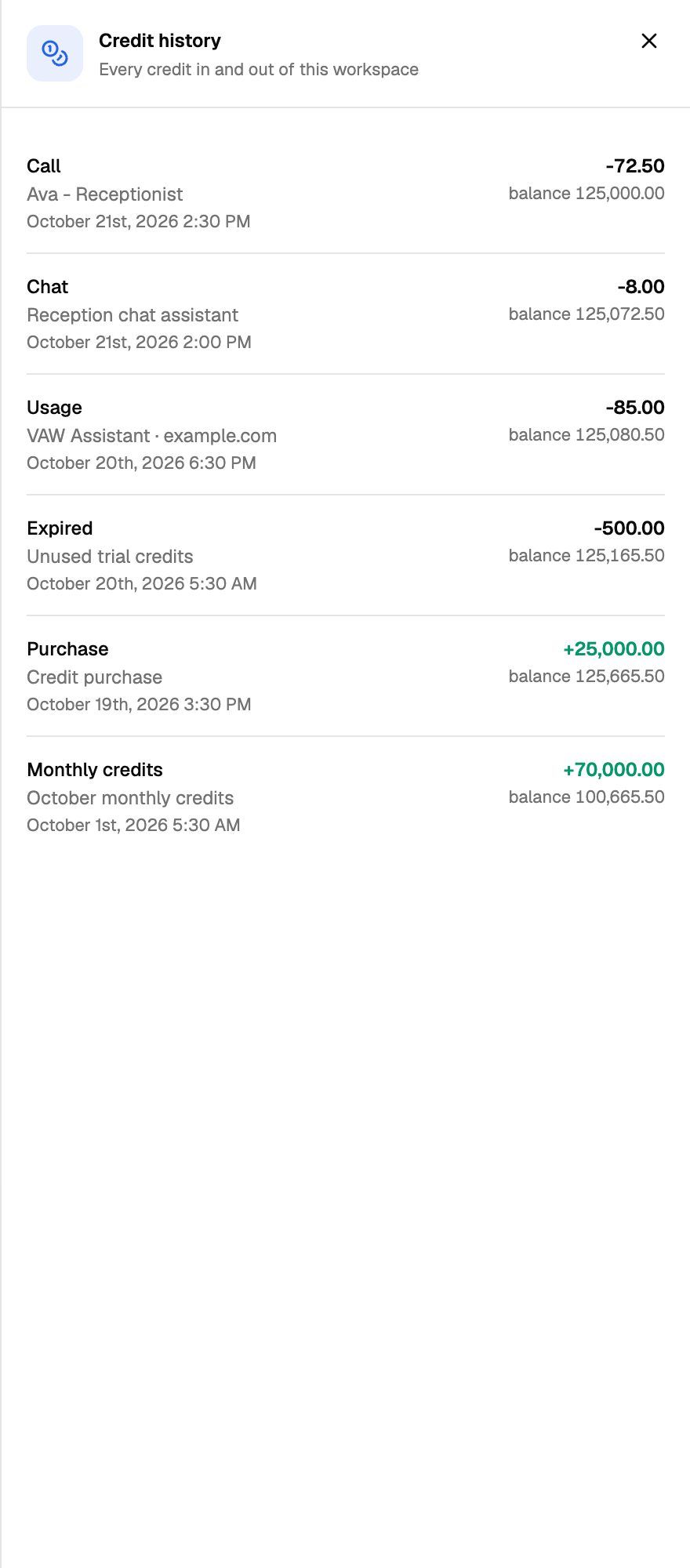
Each line shows:
The type in bold (see the table below), with a detail line under it when there is one, such as which period a grant is for.
The date and time.
The amount. Credits added are green with a +. Credits used show a minus sign.
balance {balance}: your balance right after that line.
Line types
A few things to know:
There's one line per call, chat or build. Post-call analysis is added after a call ends, so the line updates to the final figure rather than adding a second line.
Unanswered calls still appear, at zero credits, so your history shows the call happened.
Call lines don't open the call. To see a call's breakdown, find it in Call Logs.
If your balance dropped and you can't see matching Call or Chat lines, look for Expired. Unused credits expire on their own schedule. See How AI Credits Work.
See each batch and when it expires
The Credits card shows one row per batch of credits. When a row groups several purchases, it shows Next expires {date} and a View all link.
Click View all to open the Credit breakdown ("Each batch of credits and when it expires"). Each batch shows its name, {left} of {total} left, a progress bar that turns amber when the batch is used up, and Expires {date}.
See what a single call cost
In Call Logs, the Credits column shows each call's total. Click the column header to sort by it. To see the breakdown:
Open Call Logs in the sidebar and click a call.
Select the What ran tab.
Scroll to the Cost section.
Each line names the model and provider where relevant, and Total gives the call's cost in credits. You might also see:
not measured on a line: no usage was recorded for that part.
Post-call analysis is still running, so this total can still grow. The analysis hasn't finished yet.
Cost was not tracked for this call. The call ran before per-call costs were recorded.
For the rest of the call details panel, see Call Details: Transcript, Recording, Analysis, Variables and What Ran.
Chats
Chats work the same way. Open a chat in Chat Logs: the Overview tab shows the chat's total Cost, and the What ran tab breaks it down. The Platform line is a fee per agent reply, and the models are charged for what they used. A chat with a knowledge base also has a per-reply Knowledge base line. Until a chat has had a reply charged, it says Nothing has been charged for this chat yet. See Chat Logs.
Your clients don't see what calls and chats cost. In the client portal, call costs and the Credits column are hidden.
Frequently asked questions
Why did a call's cost change after it ended?
Why did a call's cost change after it ended?
The call is charged when it ends, then again after post-call analysis and any extractions finish. The second charge adds only the difference, and the Call line in your history moves to the final figure.
Why don't my call costs add up to the drop in my balance?
Why don't my call costs add up to the drop in my balance?
Your balance also changes when credits expire, when monthly credits arrive, and when you buy credits. Chats and VAW Assistant builds use credits too. Credit history lists all of these, so compare against the whole list rather than only the Call lines.
How can I make calls cheaper?
How can I make calls cheaper?
The biggest factors are the AI model and the voice. The AI model and Voice pickers on each agent show an estimated cost in credits/min. Removing a knowledge base the agent doesn't need also removes the Knowledge base line. See Choose an AI Model.
Related articles
Was this helpful?
Still need help? Share an idea