Choose an AI Model
Pick the AI model that powers your VAW Native agent's replies, compare models by credits per minute, and set creativity and reply length.
Written By voiceaiwrapper
Last updated 26 days ago
The AI model is the part of your agent that understands the conversation and decides what to say. Smarter models handle complex conversations better. Faster models respond more quickly. Cheaper models cost fewer credits per minute. This article shows you how to compare models in VAW Native and pick the right balance for each agent.
Applies to: agents on a VAW Native Pod (an engine or provider connection). Vapi, Retell AI and ElevenLabs agents use the model set in the provider's own account.
Before you start
- An agent on a VAW Native Pod. See Create an Agent from Scratch.
- A finished prompt. Compare models with the prompt you'll actually use. See Write the Prompt and Greeting.
Agents you create start on GPT-5.6 Luna (OpenAI).
What's on the list
VAW Native offers a curated set of models from three providers: OpenAI, Anthropic and Google. Each one has been tested and benchmarked for voice agents, as the note on the Agent Settings tab explains.
The model runs on our accounts. You don't need your own OpenAI, Anthropic or Google key. Its cost comes out of your AI credits.
Step 1: Compare and pick a model
- In the sidebar, open Agents and click your agent.
- On the Agent Settings tab, click the AI model row. The sheet shows your Current model.
- Click the current model to open Select AI model.
- Narrow the list:
- Type in Search models… to search by name or provider, for example "claude" or "4o".
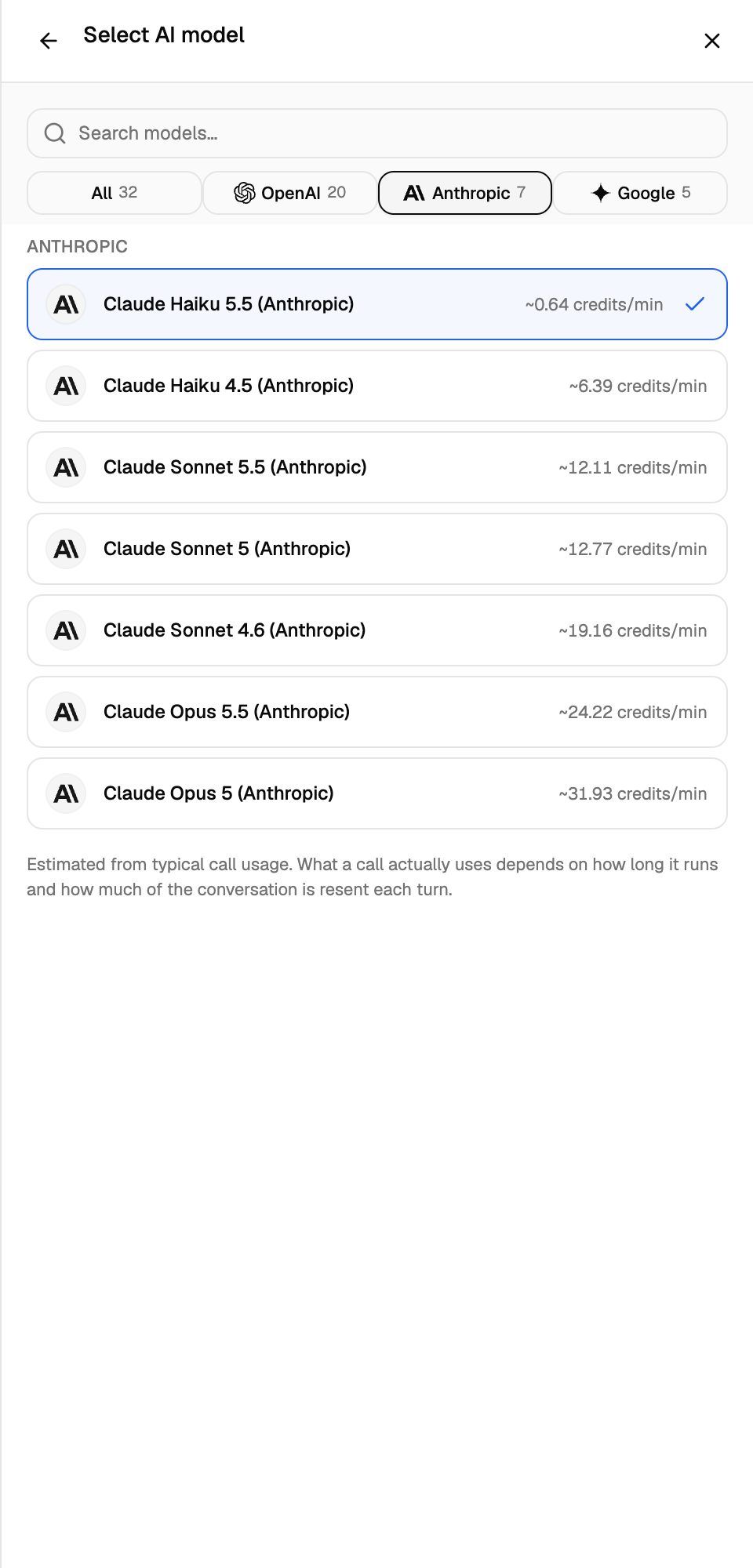
- Use the provider filter to show All, OpenAI, Anthropic or Google. The number next to each shows how many models match.
- Compare the credits/min shown next to each model.
- Click a model to select it. The sheet returns to its main view.
- Click Save changes in the sheet's footer or on the Unsaved changes bar.
What credits/min means
The figure next to each model is an estimate of what the model alone uses per minute of a typical call. It's worked out from real calls, but what a call actually uses depends on how long it runs and how much of the conversation is resent to the model each turn. Long calls with long prompts cost more per minute than short ones.
A call's total also includes the voice, speech recognition and the platform, plus a knowledge base charge for the length of the call when one is attached. After a call, open it in Call Logs and check the Cost section on the What ran tab for the full breakdown in credits. See Credit History and Per-Call Costs.
Step 2: Set the behaviour
Back on the AI model sheet, the Behavior section has up to two settings.
Creativity
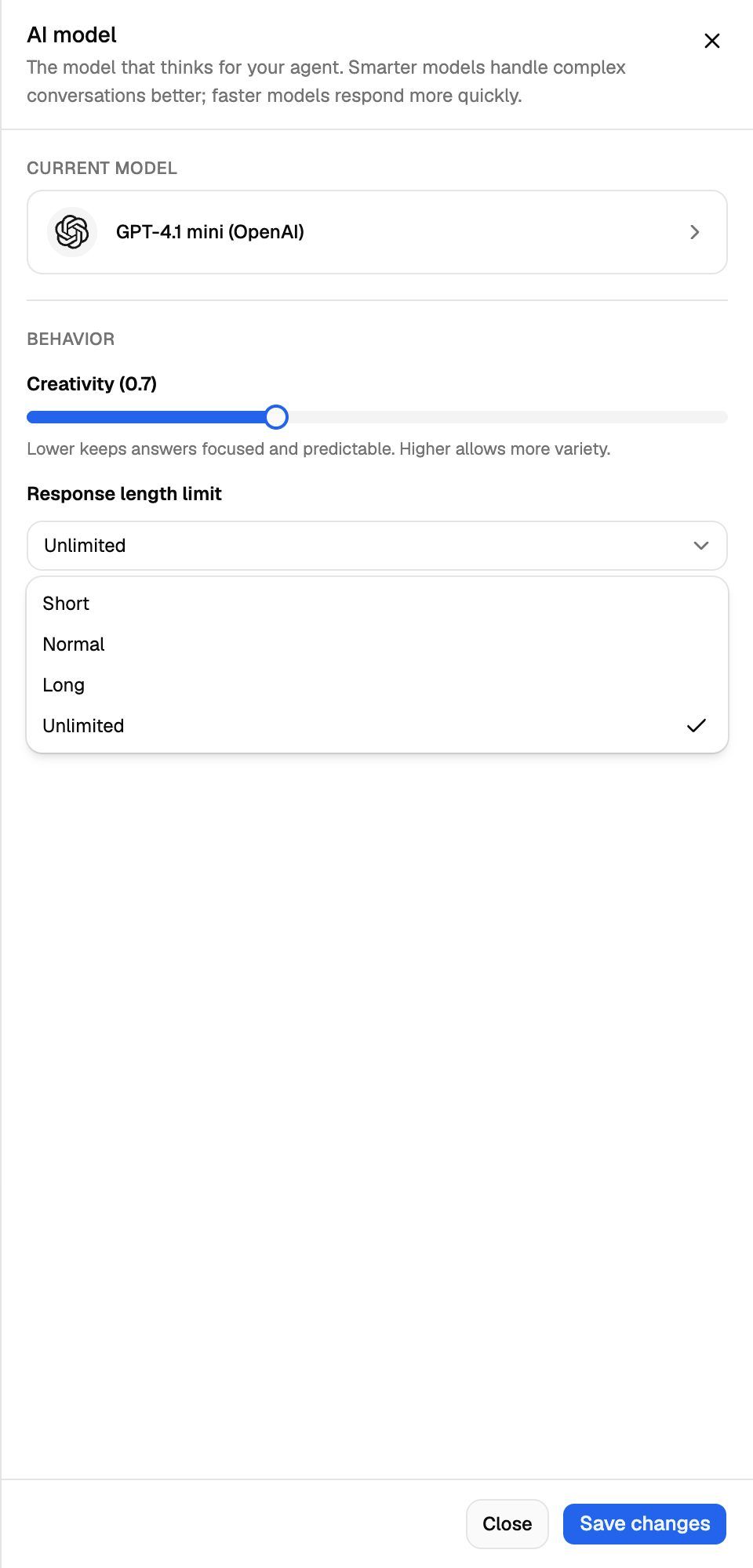
Some models show a Creativity slider from 0 to 2 (default 0.7). Lower keeps answers focused and predictable. Higher allows more variety.
For most business calls, stay at or below the default. A lower value helps the agent stick to your script, prices and policies.
Models without a Creativity slider
Most models on the list are reasoning models, which don't take a creativity setting. On calls we always run them at their fastest setting so callers aren't kept waiting. For these models you'll see "This model is set up for speed, so the caller is not kept waiting." instead of the slider. There's nothing to set.
At the time of writing, Creativity appears for GPT-4.1 nano, GPT-4.1 mini, GPT-4.1, GPT-4o mini, GPT-4o and Claude Haiku 4.5.
Response length limit
Response length limit caps how long each reply can be. How it works depends on the model.
On models without a Creativity slider, the agent is asked to keep its replies to the chosen length:
On models with a Creativity slider, the limit is only a hard cap on length. The agent isn't told about it, so a long answer is cut off mid-sentence when it reaches the cap. On these models, ask for short replies in your prompt instead, and choose a longer limit if replies stop mid-sentence.
Short replies sound more natural on the phone and use fewer credits.
How to balance quality, speed and cost
- Start with the default model and get the prompt right first. A better prompt usually helps more than a bigger model.
- Test the hard cases. Use web test calls to try the questions and tools your callers will actually use. Test calls use AI credits like real calls. See Test Your Agent: Web Calls, Phone Calls and Chat.
- Move up to a larger model if the agent misses instructions, calls the wrong tool or gets lost in long conversations.
- Move down to a smaller, cheaper model if calls are short and simple, such as reminders or basic FAQs, and the agent still handles them well.
- Compare real costs. Check the What ran tab on a few test calls with each model before you decide.
Changing the model changes how the agent behaves. After a switch, run your test calls again, especially any that use tools like booking or transfers.
Frequently asked questions
Why don't I see a credits/min figure for a model?
Why don't I see a credits/min figure for a model?
The figure only shows when we hold a current rate for that model. You can still use the model, and the call's actual cost appears in Call Logs afterwards.
Does the model affect post-call analysis?
Does the model affect post-call analysis?
No. Post-call analysis has its own model setting on the agent's Analysis tab. See Post-Call Analysis: Summary, Sentiment and Call Success.
Can my clients change the model?
Can my clients change the model?
Not unless you allow it. The model sets how many credits a call uses, so clients can't change it in their portal by default. See Set Client Permissions on VAW Native Workspaces.
Can I use my own OpenAI key or a model that isn't on the list?
Can I use my own OpenAI key or a model that isn't on the list?
Not on VAW Native. Agents use the models on the list, billed in AI credits. To use your own provider account and model choice, connect a Vapi, Retell AI or ElevenLabs Pod instead. See What Is a Voice AI Pod?.
Related articles
Was this helpful?
Still need help? Share an idea