SMS Capability and Caller ID
Check whether a VAW Native number can send text messages, re-check it with Twilio, and see when a number can be used as caller ID for outbound calls.
Written By voiceaiwrapper
Last updated 26 days ago
Two facts decide what a VAW Native number can do beyond answering calls: whether it can send text messages, and whether your agents can show it as caller ID when they call out. Both appear on the number's Overview tab. Neither is a setting you switch on. SMS is what Twilio reports for the number, and caller ID depends on the number being set up and working.
Applies to: phone numbers in VAW Native Pods. For Vapi, Retell AI and ElevenLabs, see Phone Numbers on Vapi, Retell, ElevenLabs and Bolna.
Check whether a number can send texts
Your agent can only text callers (with the Send SMS tool) from a number that Twilio says can send SMS. Not every number can.
You can check in two places:
- On the Phone Numbers page, the SMS column shows a green Y when the number can text, and a red N when it can't or hasn't been checked yet. Hover over the letter to see which: "Can send text messages", "Cannot send text messages" or "Not checked with the provider yet".
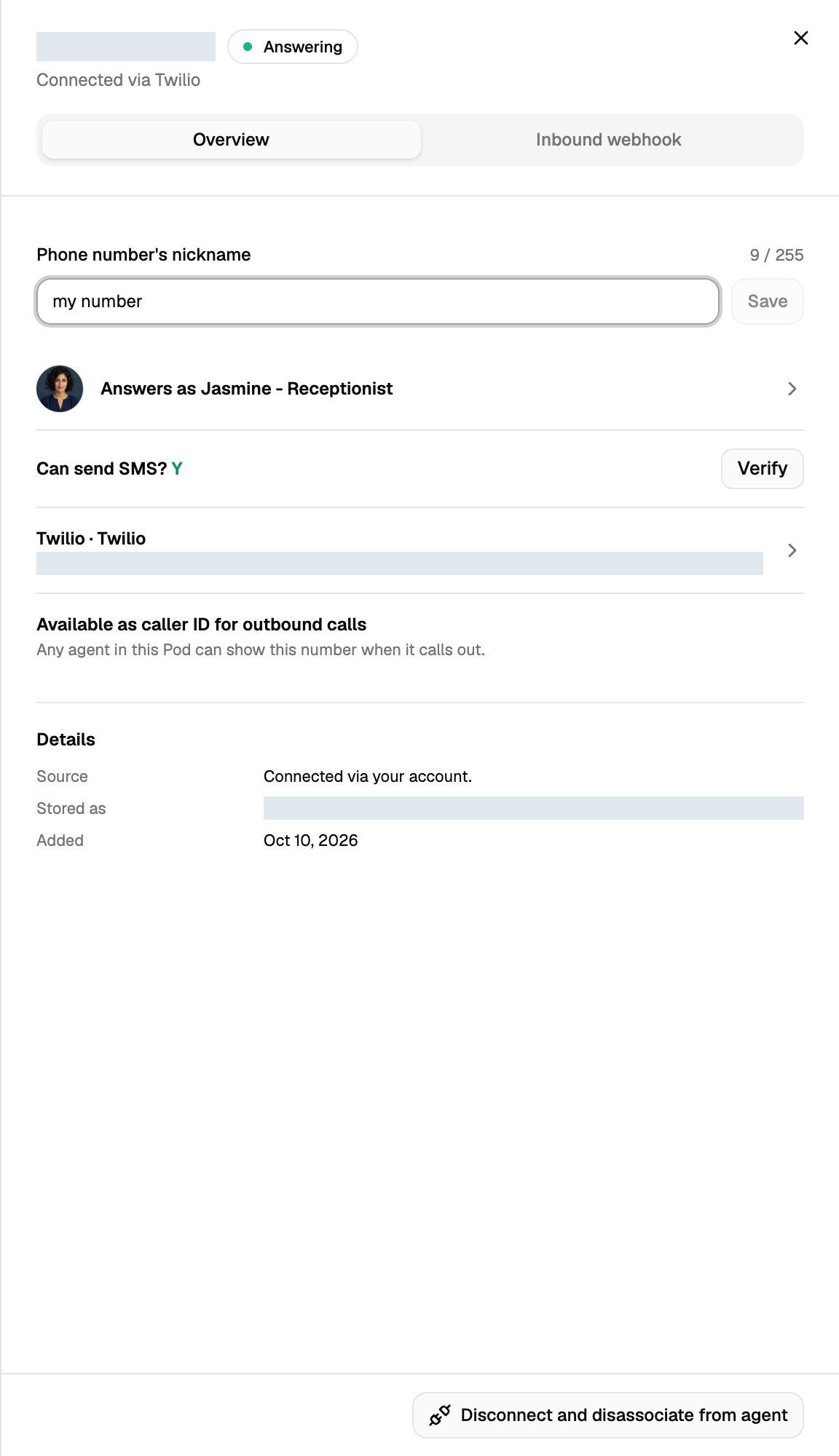
- In the number's settings, the Can send SMS? row shows Y or N.
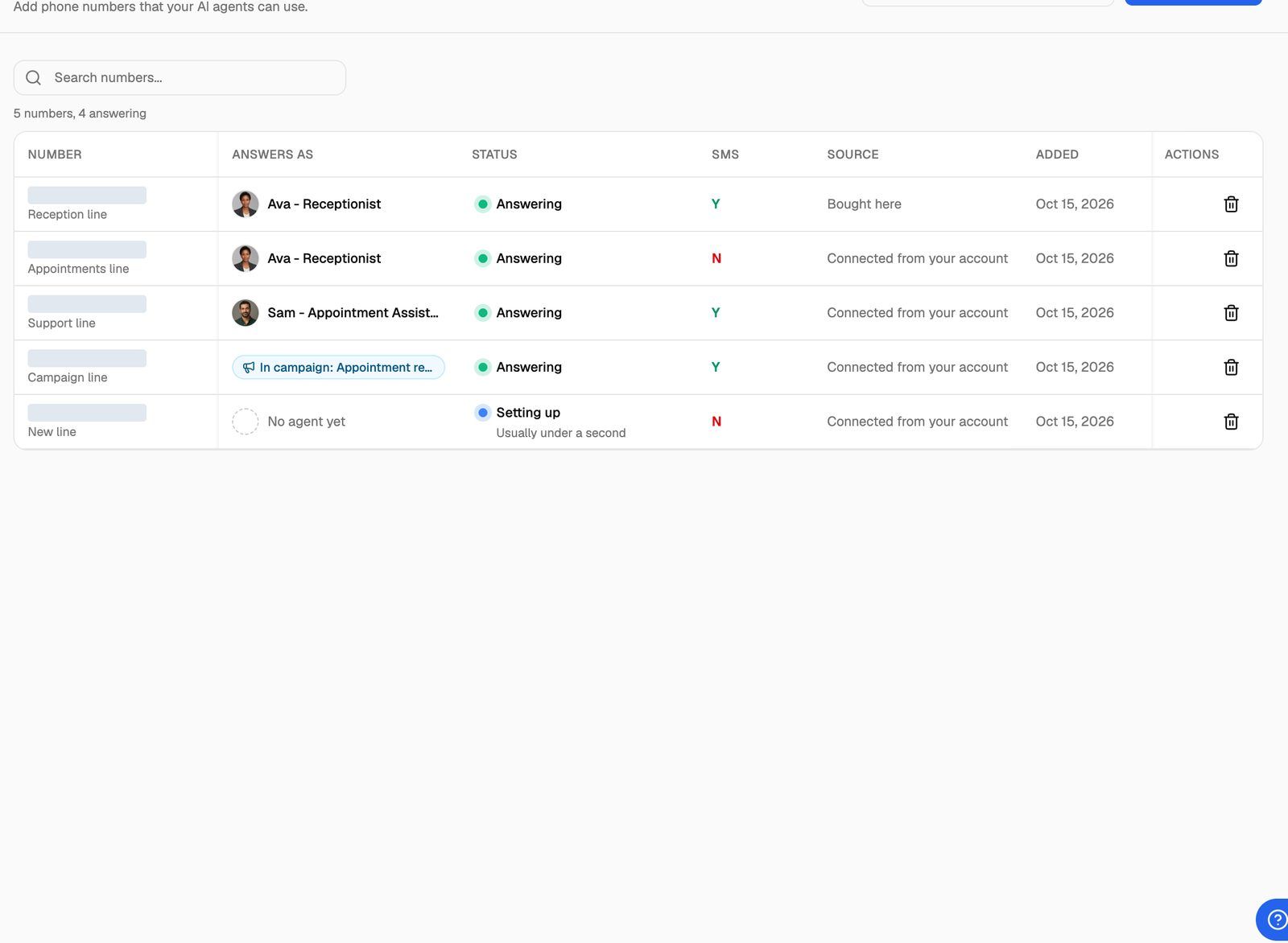
Numbers you buy or bring in are checked with Twilio when you add them. While you're choosing a number to add, the Texts and No texts badges tell you the same thing up front.
Check again with Verify
Twilio's answer can change. For example, SMS may be turned on for a number after you added it, or a number added long ago may never have been checked. To ask Twilio again:
- In your VAW Native Pod, open Phone Numbers and click the number.
- On the Overview tab, click Verify next to Can send SMS?.
You'll see "number can send text messages." or "number cannot send text messages.", and the Y or N updates. Verify only reads the number's details from your Twilio account. It doesn't send a text.
You can verify up to 10 times a minute. After that you'll see "You have rechecked 10 times in the last minute. Wait a moment and try again."
What to do when a number can't send SMS
If you want your agent to text callers and the number shows N:
- Click Verify first. A number that was never checked also shows N. Verifying may turn it into Y.
- Check the number in your Twilio Console. If Twilio doesn't list SMS among the number's capabilities, texts can't be sent from it.
- Send texts from a different number. Add a number marked Texts, by buying one or bringing one in. Then, in the agent's Send SMS tool, set Send from to Always this number and pick it. Calls can still come in on the original number. See Send Text Messages During a Call.
If no number can text yet, the Send SMS tool says "No number in this workspace can send SMS yet. Recheck your numbers, or import one that can."
Texting US numbers: in the US, a regular local number must be registered for A2P 10DLC in your Twilio account before it can text US numbers. VoiceAIWrapper doesn't check this, and Twilio refuses texts from an unregistered number even when it shows Y.
Texts are sent from your Twilio account, and Twilio charges you for each one.
When a number can be used as caller ID
A number can be shown as caller ID on outbound calls once it's set up and working. The number's Overview tab tells you which applies:
A number doesn't need an agent of its own to be used as caller ID. A number showing No agent yet can still be shown when any agent in the Pod calls out.
If a number isn't available, fix its setup first. See Choose Who Answers a Number.
Where you choose the caller ID
Only numbers that are available as caller ID are offered in these places:
- An agent's Deploy tab → Outbound, under Show as caller ID, for a one-off call. See Place a One-Off Outbound Call.
- Test agent → Phone call, under Show as caller ID. See Test Your Agent: Web Calls, Phone Calls and Chat.
- Outbound phone campaigns, as a single number or a phone number pool. See Run an Outbound Phone Campaign and Rotate Caller IDs with Phone Number Pools.
Outbound calls are real calls placed through your Twilio account, and Twilio bills them to you.
Troubleshooting
"That Twilio connection is not verified. Reconnect it and try again."
"That Twilio connection is not verified. Reconnect it and try again."
The Twilio account behind this number failed its last check, so VoiceAIWrapper can't ask Twilio about the number or call out with it. Fix the connection, then try again. See Connect Your Twilio Account to VAW Native.
"… is no longer in that Twilio account."
"… is no longer in that Twilio account."
The number was released, moved or deleted in Twilio, so it can no longer take calls or send texts through VoiceAIWrapper. Disconnect it here. See Disconnect or Release a Number.
The first outbound call fails with an error about setting up outbound calling.
The first outbound call fails with an error about setting up outbound calling.
The first time an agent calls out on a Twilio connection, VoiceAIWrapper sets up an Elastic SIP trunk named VAW Native in that Twilio account. If Twilio refuses, Elastic SIP Trunking may not be available on the account. Check it in your Twilio Console, then try the call again.
The number shows Y, but texts aren't delivered.
The number shows Y, but texts aren't delivered.
Y means Twilio says the number supports SMS. Delivery can still fail, for example when a US number isn't registered for A2P 10DLC. Open the call in Call Logs and find the Send SMS step: it shows Sent to Twilio, No delivery report received, Delivered or Not delivered with the reason. See Send Text Messages During a Call.
Related articles
Was this helpful?
Still need help? Share an idea