VAW Native Agent Webhooks: Events and Delivery
Send every call and chat event from a VAW Native agent to your own server, test the URL, and check or resend deliveries for each call.
Written By voiceaiwrapper
Last updated 26 days ago
Give a VAW Native agent a webhook URL and it sends every call and chat it handles to your own server: when it starts, when it ends with the full transcript, and when the analysis is done. Use it to update a CRM, start an automation in n8n, Make or Zapier, or store calls in your own database.
Setting it up takes a few minutes. Each call's details then show whether every event arrived, with a button to send it again.
Applies to: VAW Native Pods. For Vapi, Retell AI and ElevenLabs, use the campaign's Post-call event webhook. See Post-Call Event Webhook.
Before you start
- A VAW Native agent. See Create an Agent from Scratch.
- An endpoint that accepts POST requests. It must start with
https://, be reachable from the internet, and answer with a2xxstatus within 10 seconds. Local and private addresses (such aslocalhostor192.168.…) are refused. - Optional: your signing secret, to check each request came from VoiceAIWrapper. See Verify Webhook Signatures.
Step 1: Add the webhook URL
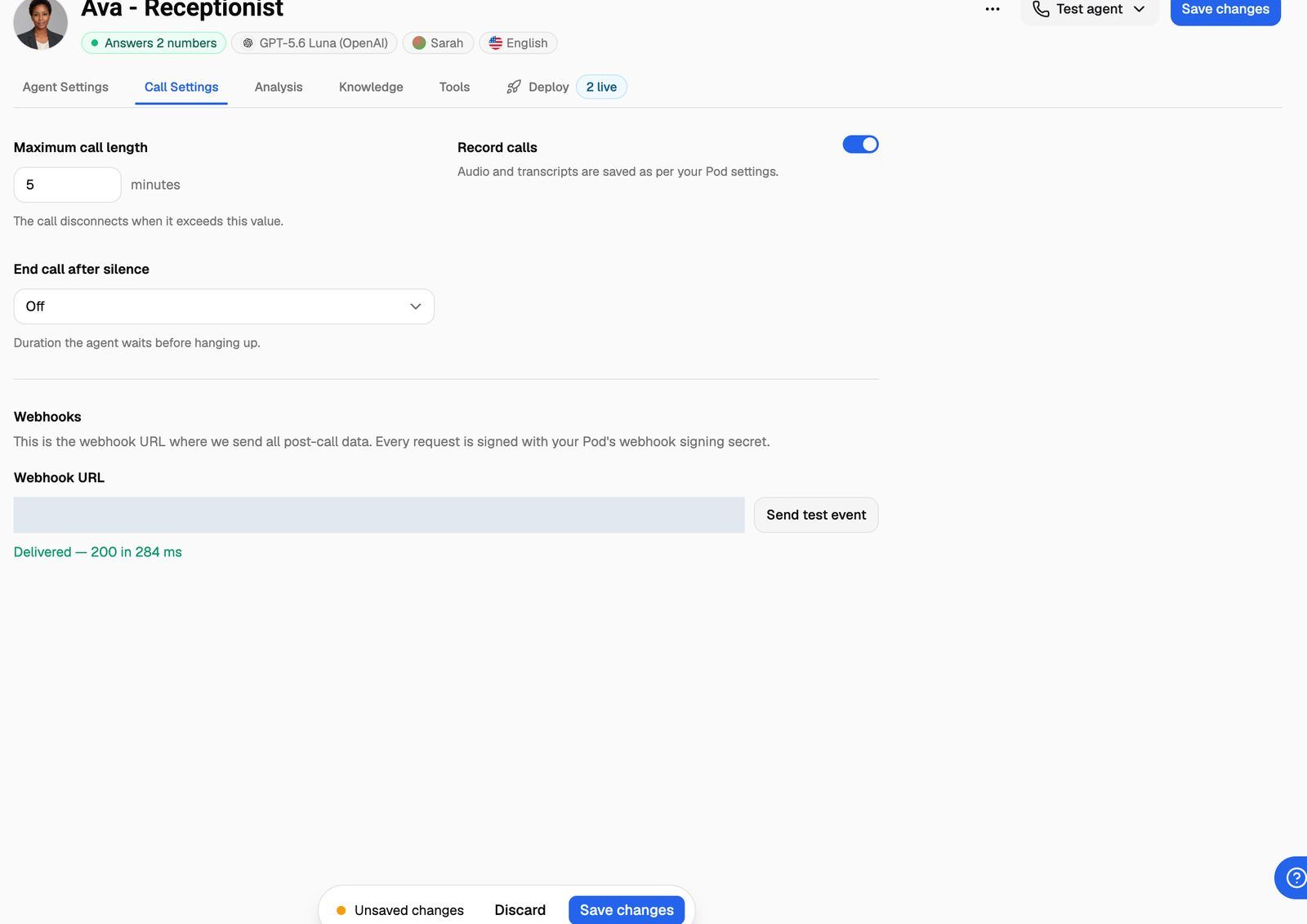
- Open the agent and go to the Call Settings tab.
- Scroll to Webhooks at the bottom.
- Paste your endpoint into Webhook URL (up to 2,048 characters).
Each agent has one URL, and that URL receives every event. You can't pick which events to receive. Your server can ignore the ones it doesn't need.
Step 2: Send a test event
Click Send test event. VoiceAIWrapper sends a sample call.ended event to the URL in the field (saved or not), signed like a real one, and shows your server's answer under the field:
- Delivered — 200 in 143 ms: your server accepted it.
- Failed — …: the reason, for example
Failed — Timed out after 10 sorFailed — Rejected with status 401.
If the URL itself isn't accepted, you see the reason in red instead, such as Webhook URL: The URL must start with https://.
The test body uses your agent's real IDs and contains "test": true, so your code can tell it apart from a real call. A test is sent once and never retried. No call is placed.
Step 3: Save the agent
Click Save changes, either at the top of the page or in the Unsaved changes bar at the bottom. Calls that start from now on send their events to this URL.
The URL is fixed for each call when the call starts. If you change or remove it, calls already in progress keep sending to the old URL. The next call uses the new one. Clearing the field and saving turns webhooks off for the agent.
The events
Test calls and chats from Test agent send events too. Chat events include a source field (test, widget or preview), so you can filter out test chats.
Campaign calls: every event of a campaign call includes the campaign and the lead. If the campaign has a Post-call event webhook, the same events also go to that URL, each delivered and retried on its own. If both URLs are the same, each event is sent once.
What's in an event
Every event is a JSON POST with the same outer shape:
{
  "id": "evt_5b0c1f…",
  "type": "call.ended",
  "created_at": "2026-10-01T10:03:15Z",
  "version": "2026-10-01",
  "call": { "…": "…" }
}
Chat events carry a chat object instead of call. version only changes when the format changes in a way that could break your code. New fields are added without a version change.
The call object grows as the call moves on:
Recording links in events work for 7 days and need no login. If the recording is still processing, the link answers with status 409. Try again a little later and it redirects to the audio file.
How delivery works
- Success is any
2xxanswer within 10 seconds. Redirects aren't followed, so a301or302counts as a failure. - Retries: a timeout, a connection failure, a response body over 1 MB, or a
408,429,500,502,503or504answer is retried. There are 4 attempts in total: right away, then 1 minute, 4 minutes and 10 minutes after the previous attempt, about 15 minutes in all. - Not retried: any other status (for example
400,401,404or a redirect), or a URL that isn't allowed. - Duplicates can happen. An event keeps the same
idon every attempt (also sent as thewebhook-idheader). Use it to ignore repeats. - Order isn't guaranteed. Each event carries the call's status and timestamps.
- Your server can't affect the call. A slow or failing endpoint never delays or drops a call.
Check and resend deliveries
- Open Call Logs in your VAW Native Pod and click the call.
- Open the Webhooks tab.
The tab shows "Sent to" and the URL, then one card per event:
Each card also shows Last sent, Attempts, Response (the status code or the error) and Event id. For a campaign call that also sends to the campaign's webhook, you see a card for each event at each URL.
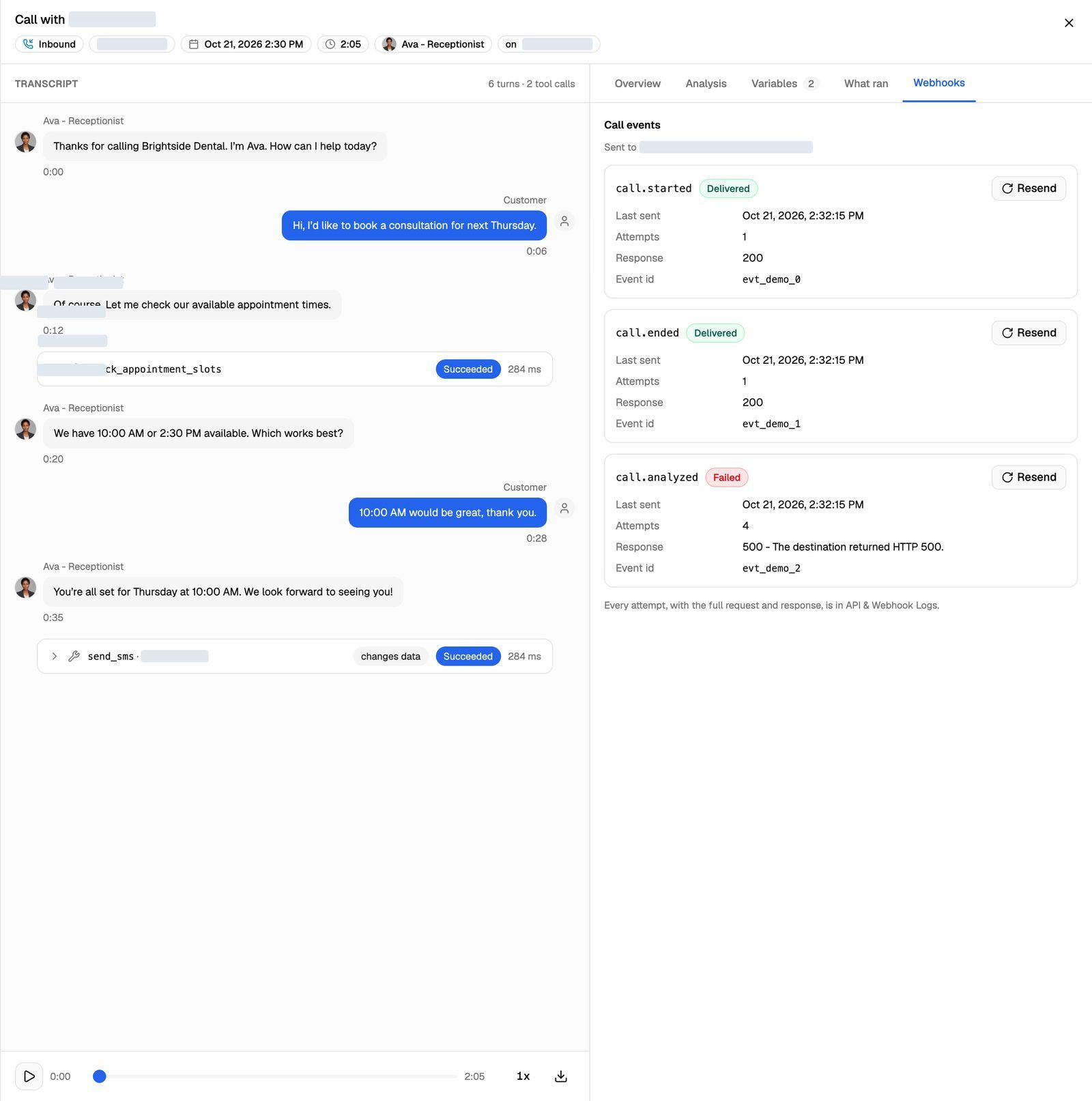
To send an event again, fix your server, then click Resend on its card. Resend sends the same body with the same event id, to the URL recorded for the call, with a fresh timestamp and signature. It's a single attempt, with no automatic retries. A message tells you "Delivered — …" or "Failed — …". Resend isn't shown on a Pending card, because that event hasn't been sent yet.
Resend sends the original body. A recording link in an event that's more than 7 days old will have expired by the time you resend it.
The Webhooks tab is only in your webapp, not in the client portal. Every attempt, with the full request and response, is also in API & Webhook Logs, where VAW Native deliveries are kept for 14 days on every plan. See API & Webhook Logs.
Troubleshooting
The Webhooks tab says "No webhook URL was set on the agent when this call ran, so no events were sent."
The Webhooks tab says "No webhook URL was set on the agent when this call ran, so no events were sent."
The URL is copied onto each call when it starts. The call ran before you saved the URL, or the agent's Webhook URL was empty. Save the URL and place a new call. Events for past calls aren't sent.
On a campaign call, you see this message whenever the agent has no URL, even if the events went to the campaign's Post-call event webhook. Check API & Webhook Logs for those deliveries.
The test says the URL isn't allowed.
The test says the URL isn't allowed.
You see a message such as Webhook URL: The URL must start with https:// or Failed — URL not allowed: …. The URL must start with https:// and point to a public address. localhost, private network addresses and bare IP addresses on private ranges are refused. Use a public HTTPS endpoint, or a tunnelling tool that gives your local server a public https:// address.
The test says "Redirected with status 301; webhooks do not follow redirects".
The test says "Redirected with status 301; webhooks do not follow redirects".
Your endpoint answered with a redirect. This often happens when the URL is missing a trailing slash or uses the wrong subdomain. Paste the final URL the redirect points to.
call.analyzed arrives a while after call.ended.
call.analyzed arrives a while after call.ended.
call.analyzed waits until the analysis, every call data extraction and the final cost are done. That usually takes longer than the transcript. Use call.ended if you need the transcript quickly, and call.analyzed for the summary and extracted data.
My server received the same event twice.
My server received the same event twice.
Retries and Resend reuse the same event id. Store the IDs you've processed and skip any you've seen before.
Related articles
Was this helpful?
Still need help? Share an idea