Price Your Services for Clients
Work out what a minute costs you, pick a client pricing model, set per-minute prices and included minutes, bill chats, and keep your margin private.
Written By voiceaiwrapper
Last updated 26 days ago
You set your own prices for your clients. VoiceAIWrapper doesn't prescribe them. This article shows how to turn what a minute costs you into a client price: work out your cost per minute, pick a pricing model, set per-minute prices and included minutes, decide how to bill chats, and keep your margin out of your clients' view.
The prices in the examples below are made up to show the arithmetic. They aren't recommendations.
Before you start
- Decide how you'll bill each client: through your own Stripe account, or outside VoiceAIWrapper. See Ways to Bill Your Clients: Stripe or External Billing.
- Know which engine the client's agents run on. VAW Native calls use AI credits. Calls on your own Vapi, Retell AI or ElevenLabs account (a BYOK Pod) are billed by that provider. See How VoiceAIWrapper Pricing Works.
Step 1: Work out your cost per minute
On VAW Native
A VAW Native call is priced on its answered time, to the second. 1,000 AI credits = $1. Each minute is made up of these lines:
To see what the model and voice add, open the agent:
- The AI model picker shows an estimate in {cost} credits/min for each model.
- Each voice shows from {cost} credits/min, and the voice model picker can sort by Lowest cost.
- On the Analysis tab, post-call analysis shows {cost} credits/run. It runs once per call, so it's a per-call cost, not a per-minute one.
These are estimates from typical call usage. A real call depends on how long it runs and how much the agent says.
Worked example. Say the AI model and voice estimates on your agent add up to 25 credits/min (an example figure; check your own agent). With a knowledge base attached:
60 (platform) + 5 (knowledge base) + 4.8 (transcription) + 25 (model and voice) = 94.8 credits per minute, or about $0.095 per minute.
A 3-minute call on that agent costs about 3 × 94.8 = 284.4 credits ($0.28), plus one analysis run.
Once calls are running, check your real figure instead of the estimate. Open a campaign's Analytics tab and look at Avg. Cost Per Minute ("Total Spend ÷ Total Talk Time"), shown in credits for VAW Native. For a single call, open it in Call Logs and use the Cost section of the What ran tab. See Credit History and Per-Call Costs.
For the full cost breakdown, see What a Call Costs on VAW Native.
On a Vapi, Retell AI or ElevenLabs Pod
Your provider bills you for these calls at the rates on your provider account. VoiceAIWrapper doesn't add anything to them, and they don't use AI credits. Check your rate in your provider account. In VoiceAIWrapper, a campaign's Analytics tab shows Avg. Cost Per Minute as your Pod reports it: in dollars for Vapi and Retell AI, and in tokens for ElevenLabs. See What a Call Costs When You Bring Your Own Provider.
Costs that aren't per minute
Your price also has to cover costs that don't show up in a per-minute figure:
- Phone numbers, phone-line charges and text messages on VAW Native. They run on your own Twilio account, so Twilio bills you for them at its rates. VoiceAIWrapper adds nothing.
- Your VoiceAIWrapper plan and add-ons, such as client accounts and BYOK provider connections. See Compare Plans.
- Test calls and chats. They're real and cost credits (or provider minutes) like any other.
To bring these together for a month, see Estimate Your Monthly Costs.
Step 2: Choose a pricing model
With Stripe billing, every client plan uses one of four pricing models. You pick it on the first step of the plan wizard, and it can't be changed later.
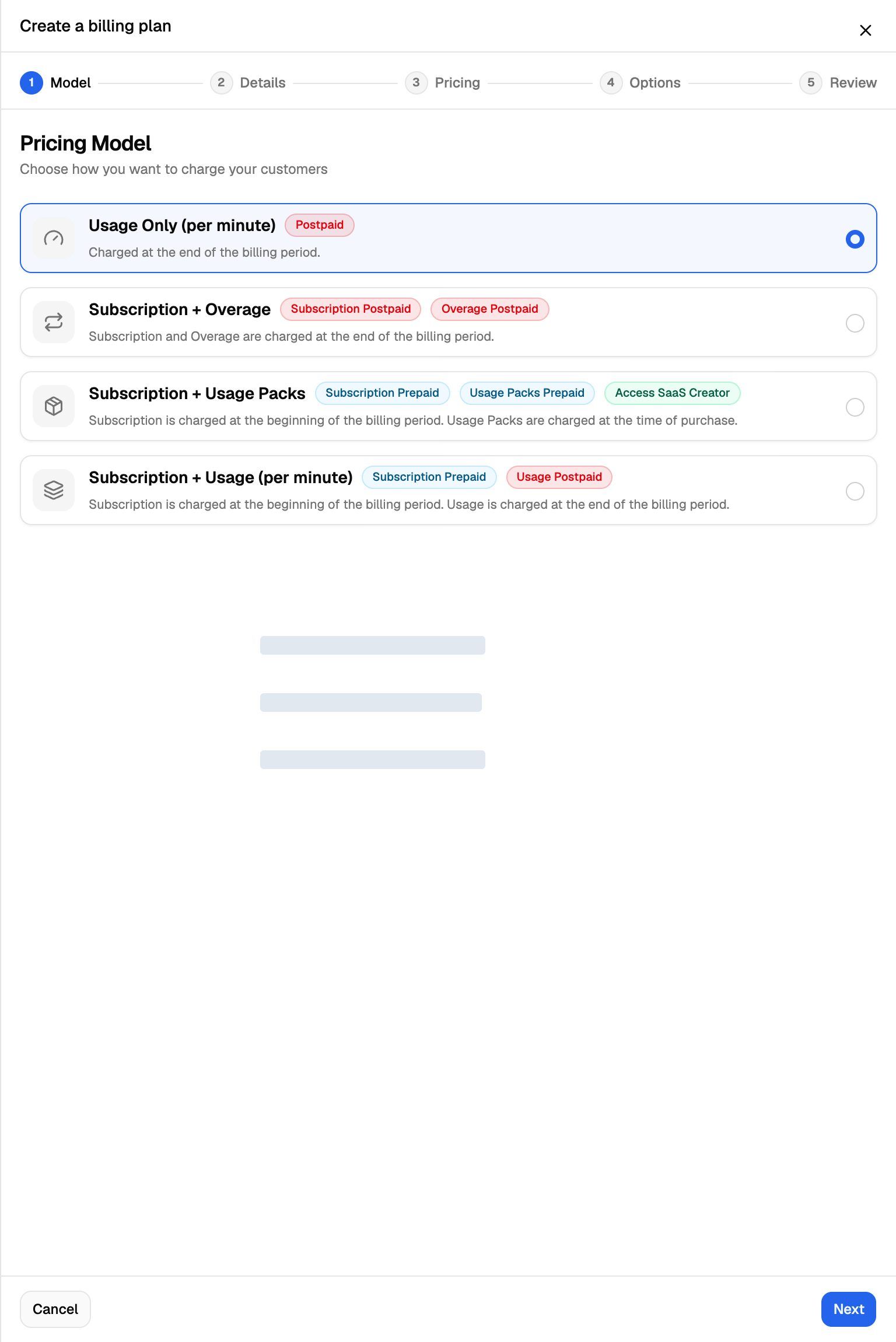
External billing has its own plan fields: Recurring amount, Included minutes per period and Per minute amount. For worked examples of each Stripe model, see Choose a Pricing Model.
Step 3: Set your price per minute and included minutes
Start from your cost per minute, then add your margin and a share of your fixed costs.
Worked example (Usage Only). Your cost is about $0.095 per minute (from Step 1). You charge $0.25 per minute. Your gross margin is $0.25 − $0.095 = $0.155 per minute before Twilio charges and your plan fees. A client who uses 400 minutes pays 400 × $0.25 = $100. Your credit cost is 400 × 94.8 = 37,920 credits, or about $37.92.
Worked example (Subscription + Overage). You charge $99 a month with 300 minutes included and $0.25 per extra minute.
- The plan wizard shows the effective rate on the price card: $99 ÷ 300 = ≈ $0.33 / min effective.
- If the client uses 400 minutes, they pay $99 + (100 × $0.25) = $124. Your credit cost is 400 × 94.8 = 37,920 credits, about $37.92.
- If they use only 100 minutes, they still pay $99, and your credit cost is about $9.48.
Things to keep in mind when you set the numbers:
- Included minutes don't roll over to the next billing period.
- Calls aren't rounded up to a whole minute. For per-minute Stripe charges, 1 minute counts as 100 units, so a 1 minute 20 second call is 133 units. A price of $0.25 per minute shows to clients as $0.0025 per unit at checkout.
- Your cost per minute moves with the agent. A premium voice or a larger AI model raises it. If you change a client's agent, recheck your margin.
- Plan prices can't be edited once they're live. To charge a new price, create a new plan with it (or add a billing interval the plan doesn't have yet). See Create a Billing Plan.
Step 4: Decide how to bill chats
Chats on VAW Native cost you per reply the agent sends, not per minute:
When you bill clients for chats, you set a conversion on the plan, such as "1 min = 10 chats". Each chat session counts as one chat, however many messages it has.
Worked example. A typical chat on your agent has 8 replies with a knowledge base attached: 8 × 5.5 = 44 credits ($0.044) plus the model. If you bill 1 min = 10 chats at $0.25 per minute, each chat earns you $0.025, which is less than its cost. Either lower the number of chats per minute (for example 1 min = 2 chats, so each chat earns $0.125) or raise the per-minute price.
Keep your margin private
Your costs stay on your side. In the client portal:
- The Cost section of a call's or chat's details is hidden.
- The per-call credits column isn't shown in call logs.
- Campaign analytics leave out the cost metrics. In your webapp they're marked Only visible to you.
- Voices and models are listed without their credits/min prices.
Clients see only what you charge them, in their portal's Billing page.
Usage you pay for but may not bill
Related articles
Was this helpful?
Still need help? Share an idea